
Most UK teams start looking for a Mailchimp alternative because of the bill, the dollar pricing or a feature that sits on the wrong plan, but the choice that decides your results is whether your emails reach the inbox after the move. A new platform does not fix a damaged sender reputation, broken authentication or a list full of unengaged addresses, because those travel with your domain and your data. Our team therefore suggests comparing alternatives on cost and fit first, then testing them against the things that decide inbox placement at Outlook, Hotmail, Gmail and Yahoo. If you want to know where you stand before you move, the Deliverability Snapshot is the place to start.
Table of Contents
- Why UK teams look beyond Mailchimp
- The main types of alternative, and who each suits
- What alternatives cost in pounds
- Contract and consent questions that affect your sending
- Transactional email and automation limits
- Moving without damaging your inbox placement
- Perspective
- Check your starting point before you switch
- FAQ
- Sources
Why UK teams look beyond Mailchimp
The reasons are consistent across the UK comparison sites. General Update names three: cost, because contact-based billing means every subscriber pushes the bill up even if they never open anything; the UK page pricing in US dollars, so the pound figure moves with the exchange rate; and fit, because a platform that tries to do everything can leave a newsletter-only business paying for unused features while advanced automation sits on pricier plans.
The cost point is easy to underestimate. Bernard Moves reported in October 2026 that Mailchimp’s UK Standard plan, the one it points users to for automations, cost £75.59 a month for 2,501 to 5,000 contacts, with automatic billing for usage beyond limits. Compare that plan rather than the entry price, because the entry price rarely includes the multi-step automation most lifecycle teams need.
There is a quieter driver too. Mailing Manager lists UK-based support and data location as reasons businesses reconsider, since procurement and compliance teams increasingly ask where customer data sits. And it adds a sensible warning: do not switch over one frustrating experience without first deciding whether the problem is temporary, caused by configuration or truly fundamental. If the frustration is that campaigns land in spam, it is very often configuration or reputation, and that follows you.
The main types of alternative, and who each suits
We do not sell an email platform, so we keep this neutral and describe the options by what they are built for. TheMarketingblog’s UK comparison sorts the field into a few groups, which we find a useful way to think about it.
| Type of platform | Typically suits | What to check for deliverability |
|---|---|---|
| Simple newsletter tools | Publishers, small lists, creators | Whether you can authenticate your own domain and whether sending is on shared infrastructure |
| Volume-priced all-rounders | Teams with uneven send volumes | Whether transactional email is included or a separate product |
| Ecommerce-focused platforms | Retailers on Shopify or WooCommerce | Suppression handling and how flows are rebuilt |
| CRM-led platforms | B2B teams wanting email plus CRM | Per-seat costs and sending reputation across sales and marketing mail |
| Event-driven messaging tools | SaaS onboarding and lifecycle | Separation of transactional and marketing streams |
On the ecommerce side, Omnisend describes itself as an email and SMS platform for ecommerce brands with campaigns, automations, segmentation and forms. MailerLite positions itself around a drag and drop editor, automations, landing pages and signup forms with 24/7 support. Teams already on Klaviyo, Braze, Iterable, SendGrid or HubSpot are in a different position: they are usually comparing within a more advanced tier, and the questions below matter even more.
What alternatives cost in pounds
Prices move, so treat every figure as a snapshot for its date and confirm it on the provider’s own page. Two sources checked in late 2026 give a feel for the spread.
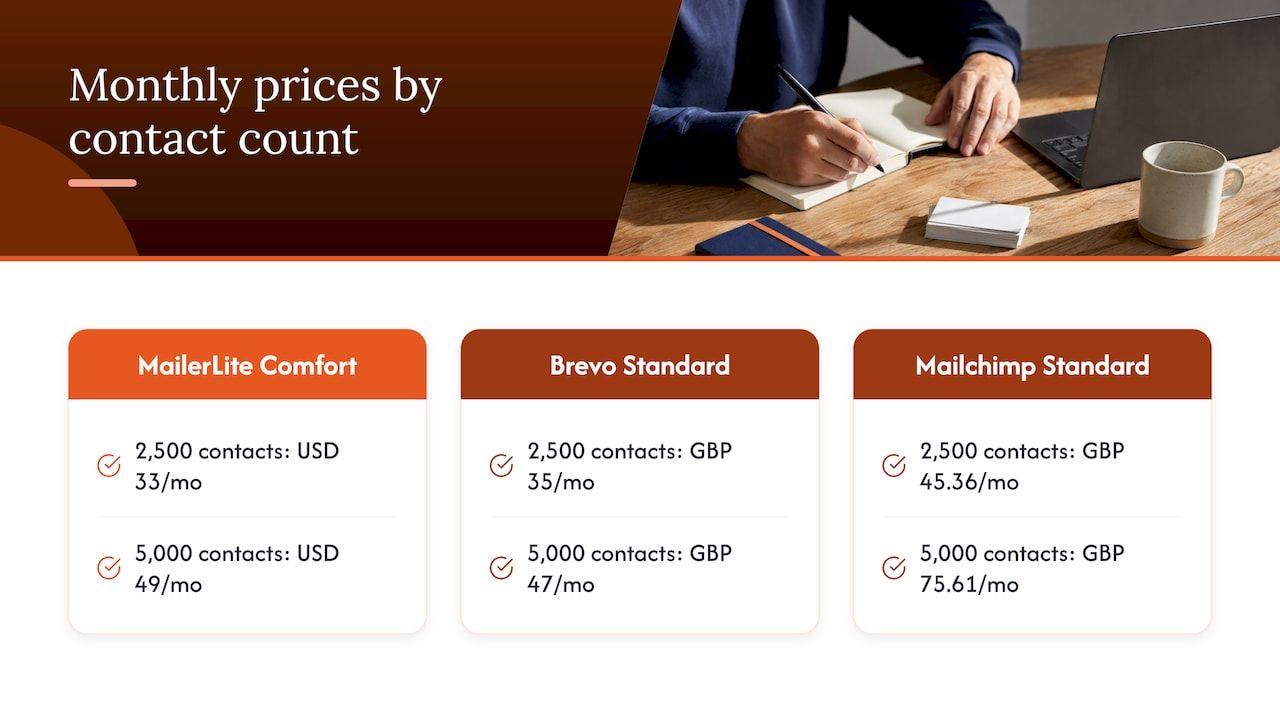
Whiteski Digital’s check of 31 October 2026 priced the cheapest multi-step-automation plans at 5,000 contacts: $49 a month for MailerLite Comfort, £47 for Brevo Standard and £75.61 for Mailchimp Standard. At 2,500 contacts the figures were $33, £35 and £45.36. MailerLite bills in dollars or euros only, while Brevo bills by emails sent rather than contacts.
For entry-level pricing in sterling, SMECompare’s 2026 UK comparison shows Transpond at £7.20 a month, MailerLite Comfort at £8, Omnisend Standard at £12, ActiveCampaign Starter at £13, Mailchimp Essentials at £10 and HubSpot Starter at £18 per seat, with Brevo and EmailOctopus free at entry. Klaviyo’s UK pricing page lists an Email plan at USD 20 a month for 500 active profiles and 5,000 emails a month.
The detail that changes real bills is how contacts are counted. SMECompare notes that Mailchimp bills all contacts including unsubscribed, while Klaviyo bills active profiles only and MailerLite active subscribers only. If your list carries years of historical records, that difference can matter before you send a single campaign, and it is worth checking how many of those records are actually addressable.
SMS is another line item. SMECompare records that Brevo, Transpond, Omnisend on its Pro plan, Mailchimp as a paid add-on, Klaviyo and Dotdigital support UK SMS, while EmailOctopus, Kit, MailerLite, AWeber and HubSpot do not.
Contract and consent questions that affect your sending
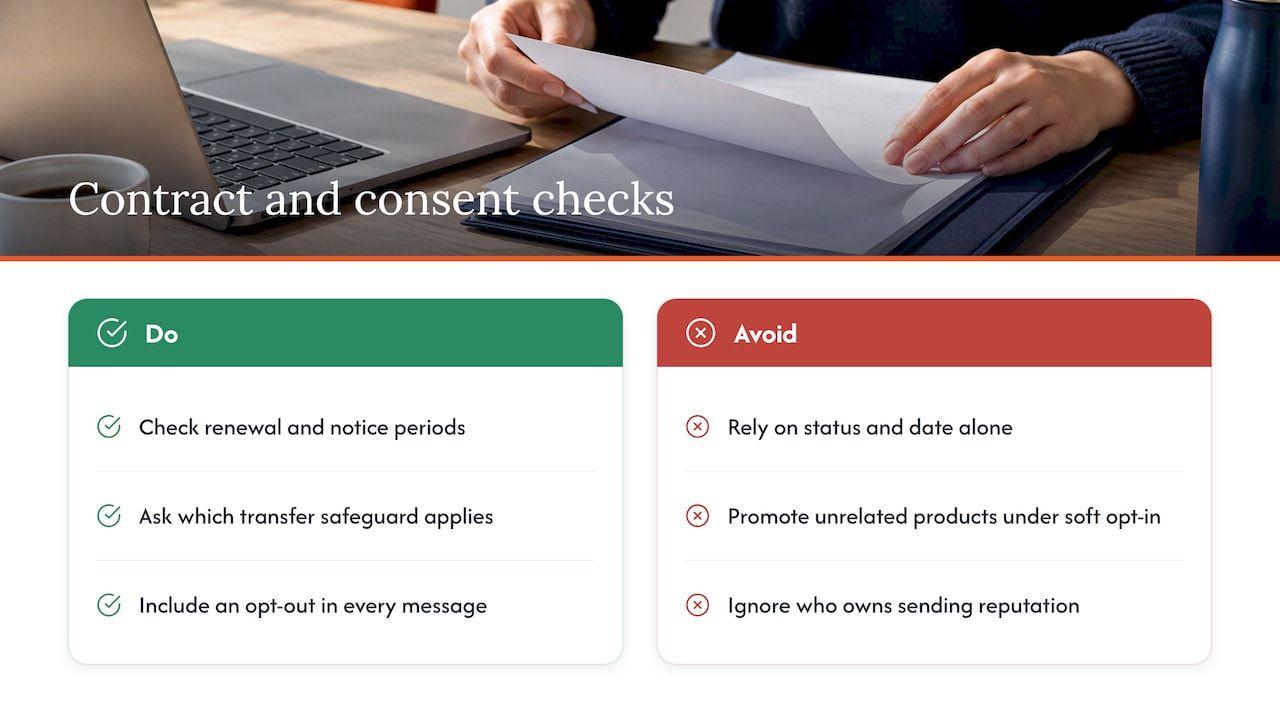
Before you compare features, read the contract. Ridley Digital suggests checking renewal and notice periods, how and when the provider can change prices, support hours (a US-based team may answer overnight), what triggers account suspension when bounces or complaints rise, and who owns the sending reputation. On a shared platform domain other senders affect it, while on your own authenticated domain only you do. That last point is a deliverability point disguised as a procurement one.
Consent records matter as well. In the UK, marketing email to individuals falls under PECR (the Privacy and Electronic Communications Regulations) and UK GDPR, both enforced by the ICO. Irvale Studio’s UK small business guide sets out the soft opt-in: you can email existing customers about similar products or services without explicit consent if the address was collected at sale, an opt-out was offered then, and every message includes one. A gym may promote classes but not an affiliated supplements brand. If your platform stores only a subscribed status and a date, that is thin evidence for a business collecting addresses at checkout, events and the shop counter. Our guide to the PECR soft opt-in covers how this affects spam complaints, and the UK GDPR and EU GDPR differences matter if you also mail the EEA.
Data location is the other check. Ridley Digital explains that sending personal data outside the UK is a restricted transfer under ICO rules, which needs UK adequacy regulations, a safeguard such as the International Data Transfer Agreement or Addendum, or an exception. Ask any shortlisted provider which of those applies.
Transactional email and automation limits
If your sign-up, password reset or order confirmation emails matter, check how each platform handles them. Whiteski found that MailerLite, Brevo and Mailchimp all connect to Shopify and have WooCommerce plugins, but only Brevo includes transactional email on every plan, while the other two use separate products. For SaaS teams in particular, a separate transactional product is not a flaw, but it does mean a second sending setup to authenticate and monitor. Our page on email deliverability for SaaS companies explains why those streams are worth keeping apart.
Also count steps. Christoph Olivier’s comparison advises comparing each live automation’s step count with the new plan’s cap before signing, which saves an unpleasant upgrade a month after launch. If you are choosing among CRM-connected tools, this guide to CRM task automation shows how workflow automation fits around the platform you pick.
Moving without damaging your inbox placement
Migration is where deliverability is most often lost. Marketing Email Tools argues that a platform change does not guarantee better deliverability and that migration is the riskiest moment, because domains, DNS records, suppression lists and templates all change at once. Our experience of platform moves, built on five years at SendGrid and Twilio, and a decade in email marketing and strategy, is that the same few steps decide the outcome.
- Audit what you have. List active and inactive contacts, tags, segments, fields, forms, journeys, sender domains and integrations. Mailing Manager’s migration chapter is a good checklist. We would add one thing: note which contacts have not opened or clicked in a long time, because you may not want to carry them over at all.
- Import suppression first. Mailchimp exports one CSV per segment, so as Martin Hinshelwood notes, the unsubscribed and cleaned segments should go in as the suppression store before any subscribers. Otherwise an opted-out address can be emailed by accident, which is both a legal problem and a complaint generator.
- Authenticate your own domain. SPF, DKIM and DMARC are the three DNS records that tell mailbox providers your mail is genuinely yours. Our explainer on SPF, DKIM and DMARC covers them in plain English, and our piece on sending architecture and authentication shows how they fit together.
- Rebuild flows and test. Flows do not transfer between platforms, so document and rebuild them, then test unsubscribe links and preferences.
- Warm up and move in cohorts. Start with your most engaged, clearly consented contacts and ramp volume gradually. Belt Creative recommends running both platforms in parallel for at least four to six weeks and a structured warm-up that is longer for bigger lists. Our domain warm-up ramp plan sets out a UK-focused schedule.
- Keep the old account read-only until the export is verified, and retain historical records before closing it.
Our team handles this through our ESP migration and warm-up service, working inside your platforms with your team, so the steps above are not left to a weekend.
Perspective
The most common mistake we see in a Mailchimp review is treating it as a software problem. A team notices that opens have dropped, or that Outlook is sending mail to junk, and the instinct is to change platform. But reputation belongs to your domain and your sending behaviour, and it is carried across in your list, your DNS records and your habits.
Our view is that you should look at the evidence your platform does not show you before you decide: authentication, sender reputation, bounces, complaints and who is actually being mailed. If those are healthy, a move is a straightforward cost and fit decision. If they are not, a move without a fix simply relocates the problem, and a new IP or sending domain with no history is the least forgiving place to find that out.
That is why we pair any platform decision with a baseline first, and why we prefer a short pilot that proves you can authenticate, send, observe, suppress and recover before budget is committed. Whether you land on a newsletter tool, an ecommerce platform or a CRM-led system, the same checks apply, and our team can run them with you.
James
Check your starting point before you switch
The Deliverability Snapshot costs £895 and gives you a clear read on authentication, reputation and list health before you commit to a new platform. If the Snapshot finds problems, Deliverability Review and Fix at £3,950 adds 45 days of hands-on implementation with your team, and Managed Deliverability keeps things healthy every month. You can also book a free 15-minute call to talk through a planned move.
If you would rather start with a quick look, our free email deliverability test is the lightest first step.
FAQ
Is there a free Mailchimp?
Mailchimp has a free plan, which covered up to 250 contacts and 500 sends a month according to plan details checked in late October 2026. Several alternatives also have free tiers with different limits, so check each provider’s pricing page for the current allowance. Free plans are fine for a small list, but they rarely include the authentication and domain options a growing sender needs.
Are there better alternatives to Mailchimp?
That depends on what you send and to whom. Newsletter tools, ecommerce platforms, CRM-led systems and event-driven messaging tools each fit a different team, and none is better for everyone. From a deliverability view, the better choice is the one that lets you authenticate your own domain, handle suppression cleanly and separate transactional from marketing mail.
Will switching platform improve my inbox placement?
Not by itself. Mailbox providers judge your domain, your authentication, your complaint and bounce rates and how people engage, so those follow you to the new platform. A clean migration with warm-up can protect placement, and a review beforehand shows what needs fixing first.
What should I move first when I migrate?
Your suppression data: unsubscribes, hard bounces and complaints. Importing these before any active contacts means an opted-out address can never be mailed by mistake. Then move your most engaged, clearly consented contacts in cohorts.
Sources
- 7 Mailchimp Alternatives for UK Small Businesses (2026)
- Mailchimp and HubSpot alternatives for UK small businesses
- Mailchimp Alternative UK, Mailing Manager
- Best Mailchimp Alternatives UK 2026
- Omnisend email marketing software for ecommerce
- MailerLite
- MailerLite vs Brevo vs Mailchimp: UK Prices 2026
- Compare Email Marketing Platforms UK 2026
- Klaviyo Pricing UK
- Email Marketing Software UK: What to Look For
- Email Marketing for UK Small Businesses: The 2026 Revenue Playbook
- Email Marketing Platform Comparison 2026
- Email Deliverability Guide, Marketing Email Tools
- You Probably Shouldn’t Build Your Own Mailchimp
- Klaviyo Alternatives 2026, Belt Creative