
Email throttling is a receiving server deliberately slowing down, or temporarily refusing, mail from you because it is arriving faster, in larger volumes or from a less trusted sender than that server is willing to accept, and the usual cure is to send more slowly while you work out which signal triggered it. The message is normally not lost: it is deferred and retried. What matters is why the provider became cautious, because a throttle is often the first visible symptom of a reputation, list or infrastructure problem that will cost you inbox placement later if it is left alone. If you want a senior consultant to look at the evidence behind your deferrals, our free health check and advisory options are the quickest place to start.
Table of Contents
- What email throttling actually is
- Why mailbox providers throttle you
- Throttling, soft bounces and blocks compared
- Reading the codes in your logs
- Is there a limit to sending emails?
- What happens to a throttled email
- How to throttle sending and recover safely
- Planning for peak periods
- When a consultant saves you time
- FAQ
- Sources
What email throttling actually is
When a mailbox provider throttles you, it accepts mail at a controlled rate or defers some of it with a “try again later” response. Your sending platform holds the message, waits and tries again. Nothing has been rejected for good, which is the point of the distinction, but nothing has been welcomed either. The receiving server is telling you that it is willing to talk to you, just not at this pace.
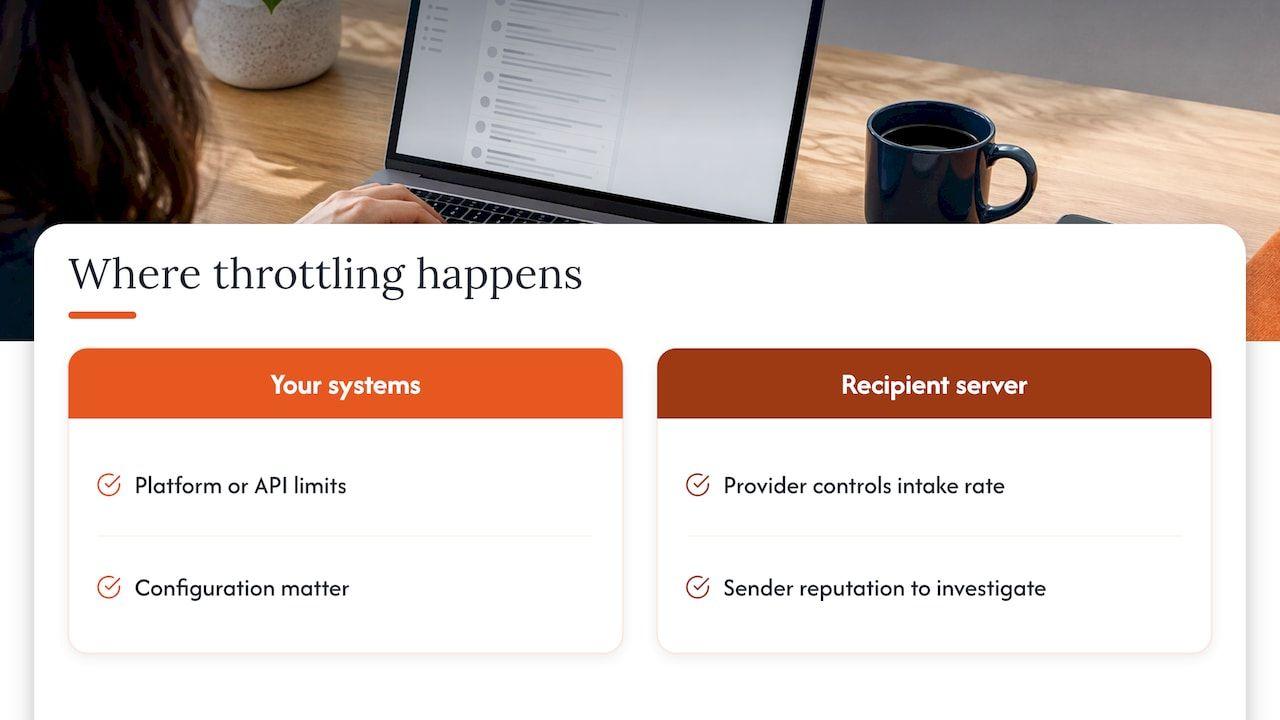
There are really two places where throttling can happen, and teams often confuse them. The first is between your own systems and your email platform, where the platform or an API applies its own limits. The second is between the platform and the recipient’s mail server, where Gmail, Outlook, Yahoo or a corporate gateway decides how much it will take from your IP or domain. A slowdown that begins in the first place is a configuration matter. A slowdown in the second place is a verdict about you as a sender, and that is the one worth investigating.
It helps to think of it like a doorman who has not seen you before: he lets a few people through, watches how they behave, and then lets more in. If the first few cause trouble, the queue outside gets longer.
Why mailbox providers throttle you
The documented reasons are fairly consistent. Providers may throttle to protect server capacity, when a domain or IP has little or no sending history, after recent complaints or bounces, or when a sender exceeds explicit rate limits. In practice these overlap, and it is rare for only one to be true.
Volume that arrives too quickly
Mailbox providers protect their infrastructure and their users when traffic lands in a rush. The same documentation gives the example of a sender attempting 100,000 emails in one minute, which a server may well throttle. For a UK ecommerce team this is the Black Friday or January sales pattern: a list that usually receives a few thousand messages a day is suddenly sent a promotional blast to everyone at once. Spreading that send over a longer window is the obvious fix, and the sooner you plan it, the less likely it is that the first sign of trouble comes in the middle of a campaign.
Little or no history
A new IP address or a freshly set up sending domain has no track record, so receiving servers are cautious. Amazon SES, for example, notes that new users generally start with a small daily allowance that increases as providers keep accepting their mail. That is the principle behind warm-up, and our guides to IP warming over 45 days and a 1.5x ramp plan for warming a domain show how to build volume in a way receiving servers can digest. Migrating between platforms resets your IP history in exactly the same way, which is why throttling so often appears in the first week after a move.
Complaints, bounces and unfamiliar traffic
Recent spam complaints and bounces make providers more reluctant to accept volume. Twilio’s guidance lists several reasons receiving servers commonly defer mail: a full recipient mailbox, a receiving server with no open ports, or a server that does not recognise the sending IP or suspects spam. Reputation improves more quickly when complaints and bounces are limited, an unsubscribe function is present, and recipients read, reply, forward or add the sender to their contacts. If your deferrals cluster at one provider, look at engagement and complaint rates for that provider’s recipients before you touch anything else. Our piece on what your spam complaint rate is telling you covers how to read those figures.
Throttling, soft bounces and blocks compared
The terms are used loosely, so it pays to be precise about what your logs are showing. Throttling produces a temporary 4xx error, whereas a blocked sender is rejected entirely. Twilio SendGrid’s SMTP documentation classifies 4xx responses as temporary failures normally retried for up to 72 hours, and 5xx responses as permanent failures that are generally not retried.
| Outcome | Typical SMTP class | Is it retried? | What it usually means | First response |
|---|---|---|---|---|
| Throttle or deferral | 4xx | Yes, with backoff | Too much, too fast, or too little trust | Slow down, then investigate |
| Soft bounce | 4xx | Yes, several times | Full mailbox, timeout, too many connections | Watch for repeats |
| Hard bounce | 5xx | No | Address does not exist | Suppress the address |
| Block | 5xx | No | Sender rejected outright | Find the cause before resending |
Amazon SES draws the same line: it defines a hard bounce as a persistent failure such as a nonexistent mailbox and does not retry it, while a soft bounce is a temporary failure such as a full mailbox, too many connections or throttling, or a timeout, and is retried several times. The practical consequence is an asymmetry. Four hundred-series responses deserve controlled persistence, and 500-series responses need correction or suppression, not repeated attempts.
Reading the codes in your logs
The three codes you will meet most often in a deferral are 421, 450 and 452, and they tell different stories.
A 421 means the recipient server temporarily deferred the mail, often because too many messages or connections arrived in too short a time. A 450 is documented as excessive sending volume, and a 452 as too many recipients received in an hour or insufficient receiving storage. All are temporary and all are retried for up to 72 hours by that platform.
The text that follows the code is often more useful than the code itself. Many providers include a short explanation or a link to a postmaster page, and it will usually say whether the problem is connection count, rate, reputation or content policy. Copy those strings into a spreadsheet grouped by receiving domain, because a pattern across a single provider points to a different cause than the same message spread across all of them.
Is there a limit to sending emails?
Yes, but not a single one, and this is where most generic advice falls short. The right throttling speed depends on your delivery deadline, current send rate, sending reputation and sending history, so there is no universal figure that suits every sender. Limits are layered, and it is worth knowing which layer you are hitting.
- Account or platform limits. Amazon SES documents two account-level quotas: emails allowed in a 24-hour period and emails allowed per second.
- Per-IP limits. One platform’s documentation says its limits differ by provider, can apply per hour and per day, and are generally on a per-IP basis. It also notes that sending too much, using too many IPs, or sending too little across an IP range can create problems.
- Mailbox-level limits. The API limit is not necessarily the mailbox provider’s limit: hard ceilings for connected mailboxes are set by the mail provider, not the API, so throughput should be budgeted per mailbox.
- Connection and session limits. Providers can apply limits to messages per minute or hour, SMTP connections and messages per connection, separately or together, and they can shift with sender reputation and volume.
The upshot is that your own platform’s quota is a ceiling you may never reach, while the receiving provider’s tolerance is a moving target set by your reputation. A sender with excellent engagement at one provider can be moving quickly there and crawling at another, and that is normal.
What happens to a throttled email
A throttled message is not necessarily lost. A 4xx response places it in a retry queue, with exponential backoff and smart scheduling, and eventual delivery is marked delivered while exhausted retries are marked failed. Twilio’s deferral documentation says it retries deferred messages for up to 72 hours using exponential backoff, and that if the message is still deferred throughout that period the event status changes to blocked.
This has a commercial edge that is easy to miss. A 72-hour retry window is generous for a newsletter and disastrous for a password reset, an order confirmation or a time-limited offer. If transactional and marketing mail share an IP or a queue, a marketing throttle can quietly delay messages that customers are actively waiting for. Separating those streams is one of the more valuable infrastructure decisions a growing SaaS or ecommerce team can make.
How to throttle sending and recover safely
The guidance across the major platforms is remarkably consistent: slow down immediately, find what failed, and ramp back up in stages. Here is a routine that follows it.
1. Reduce the rate straight away
On 4xx deferrals, senders should reduce sending rate immediately and retry later with backoff, keeping concurrency low and stable, reducing recipients per message and avoiding long-running high-volume sessions. Do not respond to a deferral by adding retries. SendGrid explicitly warns that sending more messages to a domain returning 421 or 450 can further delay messages already in progress, and its advice is to temporarily send fewer messages to that domain.
2. Work out which dimension failed
Cutting total volume is a blunt instrument. The same postmaster guidance identifies separate controls for recipient-count rate, invalid-recipient rate, overall send rate, concurrent connections, per-session mail count and recipients per message, each with its own remedy: reduce the relevant rate or concurrency, clean invalid addresses, pause when spam thresholds are exceeded, and ramp back up gradually. If your problem is invalid recipients, slowing down will only postpone it.
A useful triage looks like this:
- Group deferrals by receiving domain and by code.
- Check whether they began at a particular send, a platform change or a list import.
- Compare bounce and complaint rates for the affected domain with the previous fortnight.
- Confirm that SPF, DKIM and DMARC are passing for every sending source. If you are unsure, our guide to SPF, DKIM and DMARC explains what correct looks like.
- Check whether several lifecycle triggers are firing at once and creating a spike you did not plan.
That last point matters more than people expect. Welcome series, abandoned basket flows, win-back sequences and promotions can each be sensible on their own and still overlap on the same day for the same recipients, producing bursts that look like a reputation problem. Our first 48-hour signals checklist is a good companion for this stage.
3. Send as slowly as the deadline allows
The sensible rule is to send as slowly as possible while still meeting the deadline. A sudden campaign sent much faster than your normal pattern can risk spam placement or blocklisting, so for large promotions it is better to start the send earlier than to push harder later. Some platforms now offer a built-in throttle for exactly this purpose, spreading a send over days instead of minutes, and these are worth setting up before peak season rather than during it.
4. Build sensible retry logic
If you send through an API or your own infrastructure, retries need discipline. Retry only transient failures, respect any Retry-After header, use exponential backoff with random jitter, and cap attempts at five to seven before routing the job to a dead-letter queue. The same guidance recommends stable idempotency keys, retained for at least 24 hours, because a provider may accept and queue a message even if your client loses the response, and a retry without a key can deliver duplicates. Another API provider suggests asynchronous sending with up to three automatic retries at increasing intervals such as 30 seconds, two minutes and five minutes.
5. Clean the audience before you speed up
Throttling after a dormant segment is mailed is common, because old lists carry invalid addresses, spam traps and uninterested recipients that all drag reputation down. If you plan to wake up a cold segment, the principle of re-engaging old leads gradually, building trust before increasing volume, applies just as much to the sending side as to the message. Mail your most engaged recipients first, suppress the long-dormant, and widen the audience only as your results at each provider stay healthy.
6. Ramp back up in stages
Monitor your reports and spam placement and increase speed gradually only after inbox placement is stable. A reasonable pattern is to raise volume in modest steps, hold each step for a day or two, and only move up if deferrals, bounces and complaints stay flat. If deferrals return, step back one level and hold there. It is slower than you would like, and considerably faster than recovering from a damaged reputation.
Planning for peak periods
The UK has two predictable pressure points: the run-up to Black Friday and the January sales. Both involve a larger audience, a shorter window and a higher temptation to send everything at once. Throttling is far less of a problem when it is planned for, which usually means checking authentication and infrastructure weeks ahead, staggering segments by engagement, keeping transactional mail on a separate stream, and agreeing in advance who can pause a send if deferrals spike. A reputation that looked fine in October can be tested hard by a threefold volume jump in November, and the first signal you will get is usually a stream of 421 and 450 responses.
If open rates fall at the same time as deferrals rise, the two are often connected, because mail that is delayed or filtered to spam is not being read. Our article on why open rates drop suddenly explains how to separate a reach problem from an audience or message problem.
When a consultant saves you time
Throttling is one of those issues where the symptoms live in your platform and the causes live somewhere else: in authentication, in sender reputation at individual providers, in list quality and in how your lifecycle triggers overlap. We start with the evidence your platform does not show you, and one senior consultant, with SendGrid and Twilio experience, works inside your platforms with your team.
The free health check shows where to start. For a single focused conversation, our advisory session is £250 one-off. Where the problem needs a full investigation, Deliverability Review and Fix combines a detailed review with 45 days of implementation support, and Managed Deliverability gives the ongoing work a clear owner with daily monitoring, incident response, monthly inbox placement testing and one agreed improvement each month.
If you are planning an ESP migration or a new IP, our IP warm-up and migration support is designed to keep throttling from becoming the first thing your new setup is known for.
FAQ
Is there a limit to sending emails?
Yes, and it comes in layers: your platform’s own daily or per-second quotas, per-IP hourly or daily limits, and the tolerance of each receiving provider, which depends on your reputation and history. There is no single figure that suits every sender, so the safest approach is to send as slowly as your deadline allows and raise volume gradually while inbox placement stays stable.
Why would an email hard bounce?
A hard bounce is a permanent failure, most often because the mailbox does not exist or the domain cannot receive mail. It is returned as a 5xx response and is generally not retried, so the address should be suppressed. This is different from throttling, which produces a temporary 4xx deferral that is retried automatically.
How long will throttled emails keep being retried?
Major sending platforms document retries of up to 72 hours with exponential backoff for 4xx responses. If the message is still deferred at the end of that window, it is marked as blocked or failed. For time-sensitive messages such as password resets, that window is far too long, which is why transactional mail benefits from its own sending stream.
Should I send more to clear a throttled queue?
No. Sending more mail to a domain that is returning 421 or 450 can delay the messages already waiting in the retry queue. Reduce the rate, find the dimension that failed, and increase speed only once deferrals have stopped and inbox placement looks healthy.
Sources
- Email Throttling, SendKit documentation
- What Is Email Throttling & How to Fix It, Twilio
- FAQ: Deliverability / Reputation, Mailgun documentation
- Understanding email deliverability in Amazon SES
- SMTP errors and troubleshooting, Twilio SendGrid documentation
- Deferrals, Twilio documentation
- Why throttling rates aren’t one size fits all, Force24
- Send email reliably at scale, Nylas documentation
- Postmaster guidance, Atmail
- Email Throttling: A Guide To Optimize Your Sending Speed, Mailjet
- Send Emails via API, Hyvor Relay