
The best email marketing platform for your business is the one that lets you see, and fix, what happens between pressing send and the message reaching an inbox, because most ranked lists compare editors, templates and price tiers while the thing that decides your revenue is whether mail is accepted, trusted and read. Every mainstream platform can send a campaign. Far fewer give you the authentication controls, the reputation data and the complaint and bounce reporting you need to find out why results dropped, and even the strongest platform still needs someone on your side who owns the sending health of your domain.
This guide is written for UK marketing teams, CRM and lifecycle leads, and the engineering or IT people who get pulled in when email goes quiet. It covers how the market splits, what to check before you commit, and why the platform decision and the deliverability decision should be made together.
Table of Contents
- Why most best-platform lists miss what you need
- How the UK market actually splits
- The checks that matter more than the feature list
- A platform will not fix what is wrong upstream
- Overlapping lifecycle emails: the quiet drain on engagement
- Questions to ask before you sign
- Where Digistrat fits in the decision
- A sensible order of work
- FAQ
- Sources
Why most best-platform lists miss what you need
Search for this keyword and you will find rankings built around ease of use, template libraries, automation builders and entry pricing. Those things matter for a team sending its first newsletter. They matter much less once email drives revenue, retention or product activation, because at that point a feature gap costs you a few hours and a deliverability gap costs you a percentage of your inbox reach every single day.
The reader we have in mind is usually in one of three situations. Perhaps you are choosing a platform for the first time and want to avoid a bad decision. Perhaps you are unhappy with your current one and suspect it is to blame for falling opens, clicks or conversions. Or you are planning a migration ahead of a peak season. In all three, the useful question is not which tool has the longest feature list but which tool lets you prove what is happening to your mail.
How the UK market actually splits
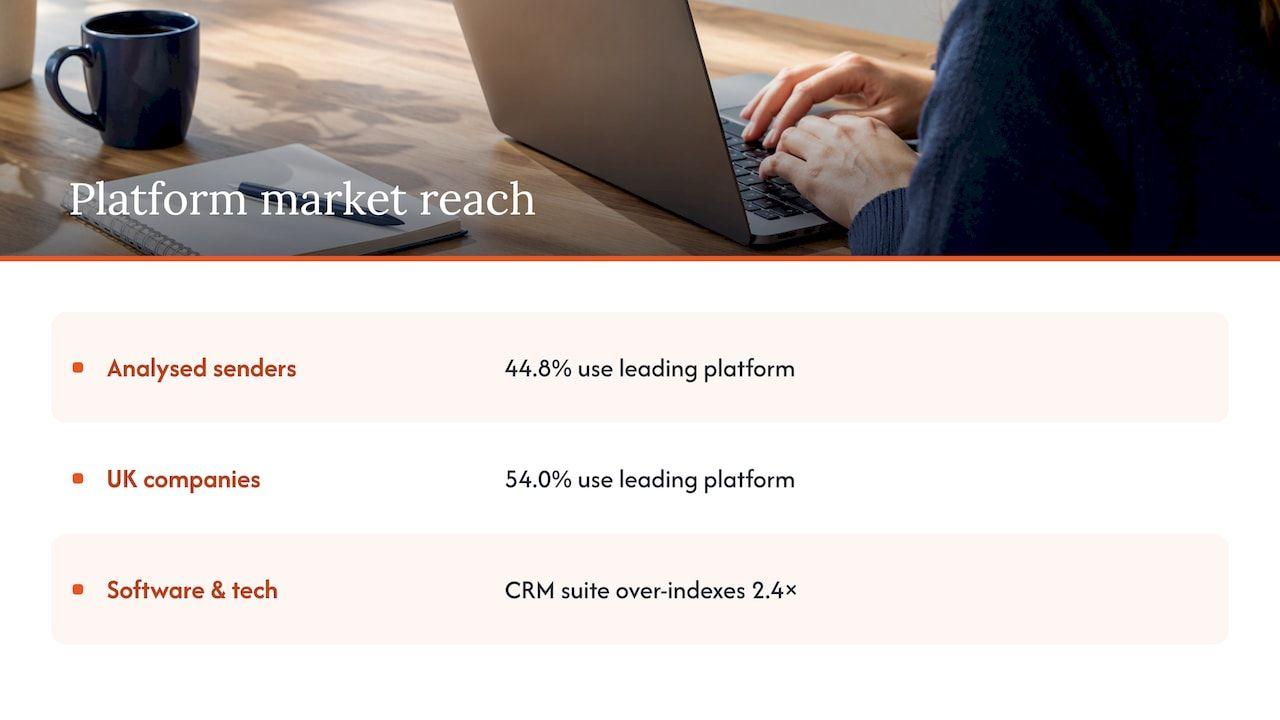
It helps to know what other businesses use, mainly so you can see that the field is crowded and that popularity says little about fit. A June 2026 analysis of email-sending companies found the single most widely used platform on 44.8% of them and on 54.0% of UK companies, largely because its customer profile is flat, meaning it suits the undifferentiated middle of the economy. The same study shows that specialists win niches: a CRM-led suite over-indexes 2.4 times among software and technology companies, and another tool skews towards financial services and regulated B2B.
For buying purposes, that translates into five types of platform, and it is easier to shortlist by type than by brand.
CRM-led marketing suites
These bundle email with sales, service and reporting on one contact database. They suit B2B and SaaS teams that want lifecycle email tied to pipeline stages. The thing to model carefully is cost, because pricing usually moves with marketing contacts, seats and add-ons, and a headline entry price can look very different once onboarding and growth are included.
Ecommerce specialists
Built around storefront data, these come with prebuilt flows for abandoned baskets, browse behaviour and replenishment, and they integrate closely with the major shop platforms. They are the natural choice for retailers, but the same ease that lets you switch on a dozen automated flows is what produces overlapping triggers, which we come back to below.
Automation-led tools for mid-sized teams
These are strong on visual workflow builders, conditional logic and lead scoring. They suit lifecycle managers who run onboarding, nurture and win-back journeys, and who need the logic to be inspectable rather than hidden.
Lightweight newsletter and small-business tools
Affordable, quick to start and often priced in sterling or dollars at low contact counts. They are fine for simple broadcast sending, but check what they offer for authentication, dedicated sending and reporting before email becomes a revenue channel.
Transactional and API-first platforms
Engineering teams often send password resets, receipts and product notifications from a separate API-led service. This is a sound pattern, and it makes your sending architecture (which streams use which domains and IPs) part of the decision. Our piece on how sending architecture and authentication affect deliverability explains why.
The checks that matter more than the feature list
Before you score templates and integrations, run each shortlisted platform through the following. These are the points where a bad choice is expensive to reverse.
1. Authentication you control on your own domain
You should be able to authenticate sending with SPF and DKIM on your own domain, publish a DMARC policy, and keep the From domain aligned with them. Spamhaus’s sender guidelines are plain that without SPF, DKIM and DMARC properly configured, a domain is exposed to spoofing and its mail is more likely to be rejected or flagged. If you want the mechanics in more depth, our own explainer on SPF, DKIM and DMARC and why getting them wrong is costly covers the failure modes, and a separate rollout guide for SPF, DKIM and DMARC is useful for the security side of a staged implementation.
It also pays to know what authentication does not do. Passing all three proves only that the sender is allowed to use the domain. It says nothing about whether Gmail, Outlook or Yahoo will place the message in the inbox, which depends on reputation, complaints, engagement and sending patterns.
2. Compliance with bulk-sender rules
The rules changed in 2024 and the buying brief should reflect that. Google and Yahoo have enforced requirements since February 2024 for senders of more than 5,000 messages a day to their users, counted across subdomains and sending IPs for the organisational domain, with marketing and transactional mail both included. Bulk senders must publish SPF, DKIM and DMARC (at least a policy of none), align SPF or DKIM with the From domain, and honour one-click unsubscribe within two business days for Gmail and ten for Yahoo. The spam complaint threshold is 0.3%, with under 0.1% as the target, and Microsoft introduced similar rules from 2025.
So ask whether the platform supports one-click unsubscribe headers by default, whether it surfaces complaint data from the major mailbox providers, and whether it lets you suppress complainers automatically.
3. Reputation controls and sending options
Shared sending IPs mean you inherit some of your neighbours’ reputation, and Spamhaus lists the service provider, IP neighbourhood, infrastructure and history among the factors that shape how a sender is judged. Find out whether the platform offers dedicated IPs, how it handles IP warm-up for new ones, whether you can throttle sending rates, and how bounces are processed. A dedicated IP is not automatically better, since a low-volume sender can struggle to build a stable reputation on one, but the option and the guidance should exist.
4. Diagnostics, not guarantees
Treat any promise of guaranteed inbox placement with scepticism, because no sender can control a mailbox provider’s filtering. What you want is evidence: bounce categories, complaint reporting, suppression logic, and a clear distinction between delivered (accepted by the receiving server) and inboxed (actually placed in the inbox). Many dashboards report the first and let you assume the second, which is one of the commonest reasons teams cannot explain a drop in results.
5. UK compliance and practical fit
Under PECR (the Privacy and Electronic Communications Regulations), marketing email to individuals generally needs prior consent, with a limited soft opt-in for existing customers buying similar products, and the ICO enforces it. Look for stored consent source and date, easy unsubscribe, suppression that survives list imports, a data processing agreement, clarity on where data is hosted, GBP pricing with VAT shown, and support during UK hours. A list import that silently reactivates previously opted-out addresses is a classic way to create complaints and legal exposure in one go.
6. The real cost at next year’s volume
Pricing models vary: by contacts, by sends, by feature tier, or by seats and add-ons such as dedicated IPs and premium support. A plan that is cheap at 5,000 contacts can become expensive at 25,000, and a missing feature can force a mid-contract upgrade. Model the bill for the list you expect to have in twelve months, not the one you have today.
A platform will not fix what is wrong upstream
This is the point most selection guides skip, and it is the one that saves the most money. When email results drop, the instinct is to blame the tool and move to another. But if the underlying cause is a decayed list, a spike in complaints, a recently changed sending domain or a pile-up of lifecycle messages, the new platform will inherit all of it.
The link between list health and delivery is measurable. Twilio’s August 2026 analysis found that for the lowest-engagement senders, 99% of mail took nearly three hours to be delivered, while the same volume from the highest-scoring senders landed in under two minutes. It recommends address validation at sign-up, double opt-in and automated sunset policies for inactive subscribers. In other words, who you mail, and how they react, shapes how mailbox providers treat you long before any template or subject line is judged.
A useful way to separate the possible causes is to ask three questions in order:
- Reach: is the mail being accepted and placed in the inbox? This is authentication, infrastructure and reputation.
- Audience: are you mailing the right people? This is list quality, consent, bounces and inactive addresses.
- Message: are people who receive it responding? Only once the first two are clear does creative become the suspect.
Open rates alone will not answer these. Apple Mail Privacy Protection preloads tracking pixels, and Apple Mail accounts for roughly half of all opens, so clicks and conversions are a better guide to real behaviour while complaint rates in the mailbox providers’ own tools are the number to watch. Our guide to the signals to check in the first 48 hours walks through what to look at when something suddenly changes.
Overlapping lifecycle emails: the quiet drain on engagement
CRM and lifecycle managers will recognise this one. An onboarding sequence, a promotional campaign, a basket reminder and a product announcement can all fire at the same contact in the same week, each one individually reasonable and collectively a reason to hit the spam button. Platforms with generous automation builders make this easy to do accidentally, and almost none of them warn you when it is happening.
Whatever platform you choose, check that it can apply frequency caps across journeys, suppress promotional sends while a customer is in a transactional or onboarding flow, and report on complaints and unsubscribes by journey rather than only by campaign. If you cannot see overlap, you cannot manage it, and the damage shows up as gradually worsening engagement that looks like a content problem.
Questions to ask before you sign
When you speak to vendors, ask for answers you can verify rather than adjectives:
- Can we authenticate on our own domain and keep the From domain aligned, and how is DMARC alignment shown in the dashboard?
- How is one-click unsubscribe implemented, and does it apply to every message type we send?
- What complaint, bounce and blocklist data do we see, and how fast?
- How does the platform separate delivered from inboxed in its reporting?
- What is the route for an incident, such as a sudden blocklisting, and who responds?
- Can we export our data and suppression lists in full if we leave?
The last one matters more than it looks. A contract that makes leaving difficult leaves you stuck with a platform whose reputation you cannot repair.
Where Digistrat fits in the decision
A platform gives you the means to send. It does not give you someone whose job is to read the evidence your dashboard does not show: authentication results, sender reputation, bounces, complaints and who is actually being mailed. That is the gap we work in. You work directly with one senior deliverability consultant, with senior SendGrid and Twilio experience, who works inside your platforms with your team, whichever platform you choose.
The quickest way to find out where you stand is our free health check and 15-minute inbox check-up call. If you would rather have a focused conversation on a platform decision or a specific problem, the advisory session is a 250 GBP one-off.
If the picture is bigger, Deliverability Review and Fix combines a detailed investigation with 45 days of implementation support, and we also run ESP migrations, IP warm-up and authentication setup. Once things are healthy, Managed Deliverability gives the work a clear owner every month, with daily monitoring, incident response, monthly inbox placement testing and one agreed improvement each month. You can see all of it on our deliverability services page.
A sensible order of work
If you are choosing or changing platform, this sequence avoids the most common and most costly mistakes.
- Establish your baseline first. Record complaint rates, bounce rates, authentication status and click behaviour on your current platform, so you can tell later whether a change helped. Our overview of what monitoring actually looks like shows what to capture.
- Clean the audience before it moves. Remove hard bounces, suppress complainers and decide on a sunset rule for subscribers who never engage, so you do not carry a damaged list into a fresh sending setup.
- Shortlist by type and by the checks above. Pick two or three platforms in the category that fits your sending pattern, and weigh deliverability controls above template polish.
- Plan authentication and infrastructure before the first send. Decide your sending domains and subdomains, which streams are marketing and which are transactional, and how a new IP will be warmed.
- Warm up and ramp gradually. Start with your most engaged contacts and increase volume in steps rather than switching everything over at once, especially ahead of a peak period such as Black Friday or the January sales.
- Give reputation an owner. Someone should review it every month, and that is easier when sender reputation is treated as an asset rather than a surprise.
If you want a view on whether a migration is even the right move, our email deliverability audit investigates the cause before you spend on a new platform.
FAQ
Which email marketing platform is most widely used in the UK?
A June 2026 study found one general-purpose platform on 54.0% of UK email-sending companies, well ahead of specialists that dominate particular sectors. Popularity reflects a broad, undifferentiated customer base rather than suitability for your sending pattern, so choose by your own needs.
Does the platform I choose decide whether my emails reach the inbox?
It contributes, through its IP infrastructure, authentication options and reporting, but your own domain reputation, list quality and sending behaviour usually weigh more. That is why moving platform without diagnosing the cause often carries the same problem to a new home.
Do I need SPF, DKIM and DMARC to use a platform?
If you send more than 5,000 messages a day to Gmail or Yahoo users, their rules require all three, with alignment to your From domain and one-click unsubscribe. Below that volume they are still the baseline that mailbox providers expect, and a free health check will show whether yours are in order.
What complaint rate is safe?
Google’s published threshold is 0.3%, and the target is to stay under 0.1%. Treat anything creeping between the two as a prompt to investigate your audience and frequency, not a number to live with.
Sources
- The state of marketing automation tools in 2026 (Bloomberry)
- Sender Guidelines (Spamhaus)
- Boost Email Deliverability at Global Scale (Twilio)
- Google and Yahoo 2024 Sender Requirements
- How to send bulk email the right way
- SPF, DKIM and DMARC: How They Work and How to Roll Them Out