The honest answer is both, sent together. Our recommended default is multipart MIME, the technical format that bundles HTML and plain text into a single message, choosing HTML when branding and visuals genuinely lift conversion, and plain text when the message is personal or carries critical transactional information. This works only when the HTML is properly coded, a plain text fallback exists, and authentication through SPF, DKIM and DMARC is correctly configured.
TL;DR:
- Sending multipart MIME with both HTML and plain text maximizes compatibility, tracking, and trust; proper coding and authentication are essential.
- HTML emails excel for visual promotions and product launches but risk deliverability issues if poorly coded or image-heavy.
- Plain text outperforms in universal rendering, speed, and creating a personal tone, especially for transactional or one-on-one messages.
- Technical setup must include SPF, DKIM, DMARC, proper headers, and thorough testing to ensure inbox placement and effective measurement.
- Testing both formats on high-volume segments and prioritizing click and conversion metrics can optimize campaign performance.
Digistrat
Improve Your Email Deliverability
Digistrat assesses sender reputation, infrastructure, and list quality to address spam placement and declining email engagement.
Table of Contents
- Quick side-by-side: what each format gives you and what it costs
- What HTML emails are, what they enable, and the common pitfalls
- What plain text emails are and why they still win in many metrics
- Deliverability and technical checklist you must follow
- When to use each format and how to choose by campaign type
- How Digistrat’s experience supports this approach
- Design versus deliverability: a personal note
- How we can help if format or deliverability issues are holding you back
- FAQ
- Sources
Quick side-by-side: what each format gives you and what it costs
Before choosing a format for a campaign, it helps to see what you are trading away. HTML buys you visual control and tracking; plain text buys you trust and compatibility, often at the cost of measurement.
| Factor | HTML email | Plain text email |
|---|---|---|
| Branding and visual control | Full control over layout, colour and imagery | None; text only |
| Tracking and analytics | Open pixels, click tracking, detailed engagement data | Click tracking possible via links; opens cannot be measured |
| Deliverability risk | Higher if poorly coded or image-heavy | Generally lower, fewer elements to trigger filters |
| Accessibility and device compatibility | Variable; depends on client and coding quality | Universally readable across all clients and screen readers |
| Best-for use cases | Promotions, product launches, visual newsletters | Transactional, personal outreach, sales follow-ups |
These are general tendencies rather than fixed rules. A beautifully coded HTML template can outperform a lazy plain text blast, and a clumsy HTML email can tank deliverability faster than either format alone. Implementation quality and how your specific recipients behave will often matter more than the format label itself.
What HTML emails are, what they enable, and the common pitfalls
An HTML email is built with markup that lets you control layout, embed images, insert buttons and track opens and clicks in far more detail than plain text allows. The catch is that email clients render HTML inconsistently, so anything beyond the basics needs to lean on inline CSS and table-based layouts rather than modern web techniques, and JavaScript is stripped out entirely by every major provider. Practical guidance on building for this constrained environment, including inline styling and image fallback text, is well covered in existing HTML email guidance.
Badly coded HTML causes several recurring problems:
- Broken layouts in Outlook or older clients that do not support modern CSS properties.
- Images that fail to load, leaving blank boxes where the message content should be.
- Excessive code bloat or hidden text, both of which Gmail’s own sender guidelines flag as red marks against deliverability.
- Missing alt text, which leaves image-blocked readers with no idea what they are looking at.
HTML earns its place for catalogue-style promotions, product launches and visual newsletters where seeing the product is part of persuading someone to buy it. A clothing retailer showing a new collection, or a SaaS company unveiling a redesigned dashboard, genuinely benefits from imagery that plain text cannot provide.
Pro Tip: Keep your HTML template under 102 KB and always include descriptive alt text, since many clients clip larger emails and hide images by default.
What plain text emails are and why they still win in many metrics
Plain text email is exactly what it sounds like: unformatted words with no embedded styling, images or layout, distinct from rich text formats that add bold or italics without full HTML markup. What it lacks in polish it makes up for in reliability, since it renders identically everywhere, loads instantly and reads, to most recipients, like a message from a real person rather than a marketing blast.
That perception matters more than it might seem. Plain text’s strengths include:
- Universal rendering across every email client without exception.
- Faster load times, particularly on slower connections or older devices.
- A more personal, less promotional feel that can increase trust for sensitive or one-to-one messages.
- Better baseline accessibility for screen readers, since there is no layout to misinterpret.
Independent testing by HubSpot found that simpler, plain-text-style emails can outperform heavily designed HTML templates on opens and clicks. That does not mean plain text always wins, but it does mean the assumption that more design equals more engagement is not safe to make without testing.
The trade-off is measurement and presentation. Plain text cannot carry open tracking pixels, and it offers nothing in the way of branded visuals. Some teams get around the first limitation by sending what is sometimes called lookalike plain text, HTML formatted to look identical to plain text while still carrying trackable links, which preserves some measurement without sacrificing the personal tone.
Deliverability and technical checklist you must follow
Format choice only pays off when the underlying technical setup is sound. Follow this sequence for every campaign:
- Send multipart MIME, the message type defined in RFC 2046, which bundles an HTML part and a plain text part together so the recipient’s client renders whichever it supports best, and validate both parts before sending.
- Authenticate every sending domain with SPF, DKIM and DMARC, and monitor alignment continuously rather than setting it up once and forgetting it; our guide to SPF, DKIM and DMARC covers the common configuration mistakes that undo otherwise good campaigns.
- Add a List-Unsubscribe header compliant with RFC 8058, which Gmail’s own unsubscribe guidance recommends for one-click opt-out support and improved sender reputation.
- Keep headers clean, with a recognisable From name, no hidden content, and visible, honest link destinations rather than disguised redirects.
- Test before every send, checking inbox previews across major clients, running a spam-score check, viewing the message with images blocked, checking dark mode rendering, and accounting for Apple Mail Privacy Protection by measuring clicks and conversions rather than opens.
| Check | What to verify | Why it matters |
|---|---|---|
| MIME structure | Both HTML and plain text parts present | Ensures every client can render something usable |
| SPF/DKIM/DMARC | All three configured and aligned | Reduces spam folder placement |
| List-Unsubscribe header | Present and RFC 8058 compliant | Supports one-click unsubscribe, protects reputation |
| Image-blocked view | Message still makes sense with alt text only | Covers clients that block images by default |
Sending architecture and authentication affect far more than this checklist alone; our broader look at sending architecture and authentication is worth reading if inbox placement has been inconsistent across campaigns.
When to use each format and how to choose by campaign type
A simple rule of thumb works for most sending programmes: use HTML where visuals genuinely help the reader decide, and plain text where trust and clarity matter more than design.
- Promotional campaigns with product imagery favour HTML, since the visual is often the argument itself.
- Transactional messages, such as receipts or password resets, favour plain text or lightly styled HTML with a strong plain text fallback.
- Personal outreach and sales follow-ups almost always perform better in plain text, since recipients respond to messages that feel individually written.
- Retention sequences often benefit from testing both, since loyal subscribers may respond differently from new ones.
When testing, set clicks and conversions as your primary metric rather than opens, since privacy features on major platforms distort open data. Segment results by device and by known Apple Mail users, and keep the call to action identical between test variants so the format itself is the only thing being measured. According to Zoho’s comparison of HTML and plain text email, a hybrid strategy combining HTML for promotional content with a robust plain text fallback is usually the better approach for business senders rather than treating the choice as binary.
Pro Tip: Run format tests on your highest-volume segment first, since small differences in click rate become statistically meaningful much faster there than on a small list.
How Digistrat’s experience supports this approach
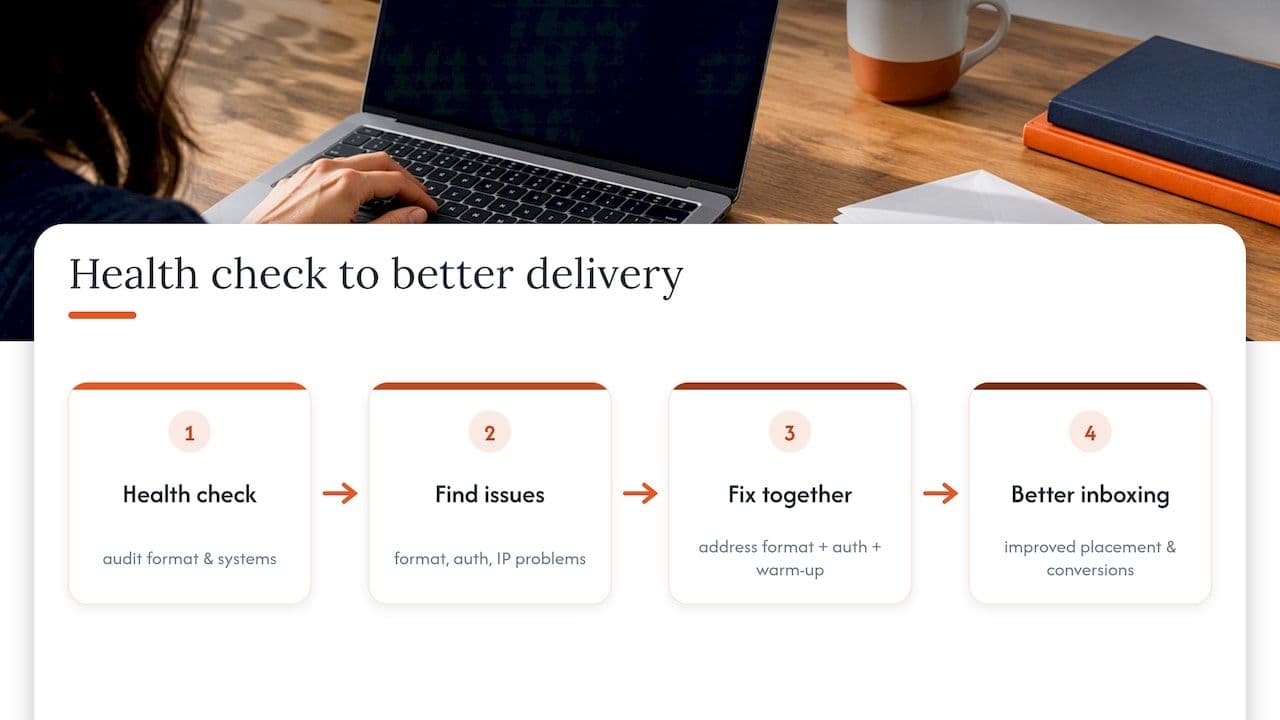
Format-related problems often surface during health checks for email senders, such as missing plain text parts, unauthenticated sending domains, or HTML heavy enough to trigger spam filters outright. Audits often examine authentication, sending architecture and IP warm-up together, because a format problem rarely travels alone. Addressing these issues alongside format choice can lead to improvements in inbox placement and conversion metrics within a few sending cycles. If any of this sounds familiar, starting with a health check may be helpful.
Design versus deliverability: a personal note
The most common mistake we see is treating design polish as a substitute for measurement discipline. Clients fall in love with a beautiful template and skip the test that would have told them it was hurting conversions. Open rates flatter you; clicks and replies tell you the truth.
How we can help if format or deliverability issues are holding you back
Getting the format right solves half the problem; the other half is making sure your authentication, sending reputation and infrastructure are not quietly working against you regardless of what the email looks like. Our deliverability work covers the practical side of this: a free health check to spot what is going wrong, a full Deliverability Review and Fix where issues run deeper, Authentication setup for SPF, DKIM and DMARC done properly from the start, and an IP warm-up programme for anyone moving to new infrastructure.
- Free health check to identify format and authentication issues affecting inbox placement.
- Deliverability Review and Fix for a full technical remediation.
- Authentication setup covering SPF, DKIM and DMARC configuration and alignment.
- IP warm-up programme for new sending infrastructure.
If you would rather talk it through first, our advisory session gives you direct access to a senior specialist for £250 one-off. Otherwise, the full list of services sits on our deliverability services page, or you can go straight to booking a free email deliverability check-up.
FAQ
Should emails be HTML or plain text?
Neither format wins outright; the recommended default is sending both together as multipart MIME, letting the recipient’s client choose, while leaning towards HTML for visual promotions and plain text for personal or transactional messages.
Should I use HTML or plain text for email merges?
Mail merges for personal or sales outreach generally perform better in plain text, since the format reads as individually written rather than mass produced, though you should still send it as part of a multipart message for compatibility.
How do I know if my email is HTML or plain text?
Check the message source or your email service provider’s send settings; an HTML email will contain markup tags and styling, while plain text contains only unformatted words with no embedded code.
What is the difference between HTML text and plain text?
HTML email supports layout, images, colour and tracking through embedded markup, while plain text email contains only unformatted words with no styling, making it universally compatible but limited in tracking and visual presentation.
Sources
- RFC 2046
- Email sender guidelines - Gmail Help
- Plain text vs HTML emails data (HubSpot blog)
- HTML vs. plain text email: Which works better? (Zoho article)
- HTML email: The only guide you need (Pagenflow)
