
If you are searching for the best software for email marketing as a marketing, IT or engineering lead at a medium or large business, the honest answer is that no dashboard fixes inbox placement on its own. What actually moves the needle is a technical deliverability audit, followed by remediation and ongoing monitoring, delivered by people who understand the mechanics behind SPF, DKIM, DMARC and sender reputation. If your campaigns are landing in spam or your open rates have quietly slipped, the right next step is a health check or an advisory call, not another platform subscription.
TL;DR:
- Persistent spam placement or reputation issues after platform changes require forensic, cross-layer analysis rather than simple dashboard checks.
- Choosing a deliverability consultant is justified when problems persist despite basic fixes or follow major incidents like migrations or blocklists.
- Per-mailbox provider reporting on inbox placement is crucial to identify specific filtering issues and avoid chasing misleading aggregate delivery metrics.
- Technical checks such as verifying SPF, DKIM, DMARC alignment, and handling unsubscribe requests should be performed immediately to reduce deliverability risks.
- Cost-effective improvements often depend on ongoing monitoring and proper authentication setup rather than platform price alone, especially when revenue effects are considered.
Digistrat
Improve Your Email Deliverability
Digistrat assesses sender reputation, infrastructure, and list quality to help businesses address spam placement and declining open rates.
Table of Contents
- 1. What a deliverability consultancy actually does and why it matters
- 2. When to hire a consultant versus using self-serve tools
- 3. How to evaluate and choose a deliverability provider
- 4. What a typical engagement looks like: stages and timelines
- 5. Immediate technical checklist you can run before hiring anyone
- 6. Compliance basics that shape complaints and reputation
- 7. Why delivery rate and inbox placement are not the same thing
- 8. Key features worth evaluating in your sending platform
- 9. Integration capabilities with other business platforms
- 10. Pricing models and cost considerations
- 11. User experience across different skill levels
- 12. Customer support and training resources vendors provide
- 13. Security and data privacy measures beyond compliance
- 14. Digistrat and James: measurement and commercial outcomes
- 15. Start with a free health check from Digistrat
- Sources
- FAQ
1. What a deliverability consultancy actually does and why it matters
A proper deliverability engagement looks across five layers at once: authentication (SPF, DKIM and DMARC alignment), sender reputation, list hygiene, content patterns, and the underlying sending infrastructure. Most email marketing platforms only report on one or two of these at a time, which is exactly why a healthy-looking dashboard can sit alongside a spam folder full of missed campaigns.
The layers interact in ways that a single tool rarely surfaces. A DKIM misconfiguration might only become visible as a reputation problem weeks later, once a mailbox provider has quietly started filtering your mail. This is why consultants run forensic, cross-layer analysis rather than checking each box independently: they trace how an authentication gap, a spike in complaints and an ageing list combine to produce the placement problem you are actually seeing.
The commercial stakes are straightforward. Every email that lands in spam instead of the inbox is a message that never gets the chance to convert, and for businesses that depend on email for a meaningful share of revenue, a drop in inbox placement translates directly into lost campaign return on investment, whatever your open-rate tracking claims to show.
2. When to hire a consultant versus using self-serve tools
Not every deliverability wobble needs outside help. The decision usually comes down to how persistent the problem is and how much revenue sits behind the affected email streams.
Bring in a consultant when you see:
- Persistent spam-folder placement that survives basic fixes and does not improve after a few sending cycles.
- Failures that appeared straight after an email service provider migration, since these often point to authentication or IP reputation issues that are hard to diagnose from inside the new platform.
- Blocklisting events or a sudden spike in spam complaints, both of which can cascade into wider reputation damage if left unaddressed.
Self-serve tools remain adequate for routine list hygiene, low-volume IP or domain warm-up, and straightforward authentication fixes where the cause and the solution are both well understood. The judgement call is really a risk calculation: weigh the value of the email revenue at stake against the cost of letting a problem run on. For a mid-sized e-commerce or SaaS sender, a week of poor inbox placement during a peak campaign period can easily outweigh the cost of a proper audit, which is the point at which consultancy stops being a luxury and starts being the obvious economic choice.
3. How to evaluate and choose a deliverability provider
Choosing a provider is easier when you judge them against a short list of concrete criteria rather than a sales pitch. Look for audit depth that goes down to log-level forensics rather than a surface scan, genuine authentication expertise across SPF, DKIM and DMARC alignment, proper access to reputation tooling such as Postmaster Tools and Microsoft’s SNDS, real list-hygiene capability, and support that extends to implementation and ongoing monitoring rather than a report you are left to action alone.
Before signing anything, ask for the evidence that separates a serious provider from a reseller of generic checklists:
- A sample remediation roadmap that ranks fixes by likely impact, not just by technical severity.
- Before-and-after inbox-placement reports broken down by mailbox provider, not a single blended delivery figure.
- A clear statement of the access they need (DNS, ESP account, Postmaster Tools) and the monitoring service level you can expect once the fixes are live.
- A plain explanation of how they handle your data, given the compliance obligations covered later in this article.
Pro Tip: Ask any shortlisted provider to walk you through a real (anonymised) remediation roadmap before you sign anything: the way they prioritise fixes tells you more about their expertise than any sales deck.
Treat certain promises as red flags rather than reassurance. No credible provider guarantees inbox placement, since mailbox providers change their filtering constantly and no external party controls that decision. Be equally wary of a single-scan PDF audit with no implementation support attached, and of any vendor who cannot explain clearly how your sending data and DNS access will be stored and protected. Our own audit checks are built around exactly this kind of transparency, and it is worth holding any provider to the same standard.
4. What a typical engagement looks like: stages and timelines
A well-run engagement moves through a predictable sequence: an initial discovery or health check, a log-level audit across DNS records, mail transfer agent logs and ESP configuration, a written remediation roadmap, hands-on implementation support, and then a period of post-fix monitoring to confirm the improvements hold.
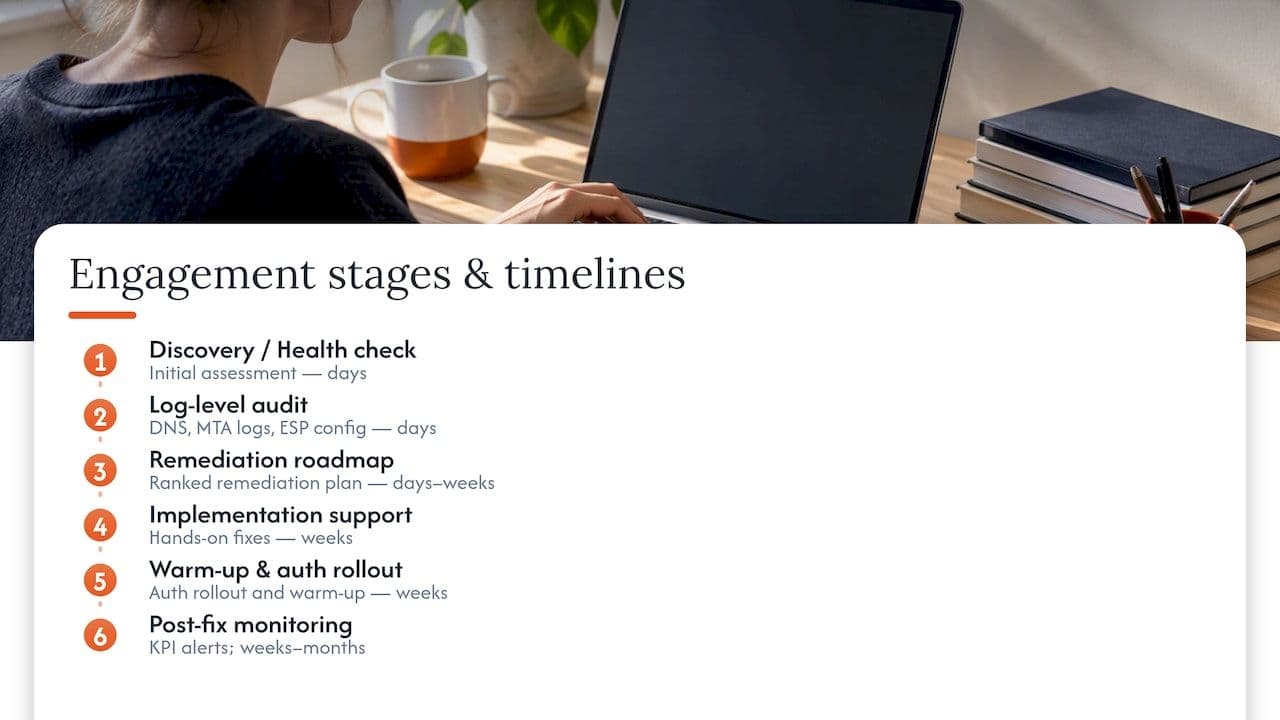
The deliverables worth expecting include a ranked remediation plan rather than an undifferentiated list of issues, inbox-placement reports broken down by provider, and ongoing monitoring alerts tied to specific key performance indicators such as spam-complaint rate and authentication pass rate.
Timelines vary by the type of fix. Quick wins, such as correcting a misaligned SPF record, can be resolved within days. Authentication rollouts and IP or domain warm-up programmes typically run over several weeks, since mailbox providers need time to build trust in the new sending pattern. Reputation recovery at scale, particularly after a blocklisting event or a sustained period of poor sending practice, can take weeks to months, and any provider who promises otherwise is not being straight with you. Our monitoring guidance covers what this looks like once the initial fixes are in place.
5. Immediate technical checklist you can run before hiring anyone
There is a set of checks worth running immediately, whether or not you end up bringing in outside help. Doing these now reduces risk and often improves your metrics before any formal audit begins.
- Verify your SPF, DKIM and DMARC records are correctly published and aligned; if DMARC is not yet enforced, publish it at p=none first and plan a staged move towards stricter enforcement, as Microsoft recommends for high-volume senders.
- Add a List-Unsubscribe header to every commercial send and make sure unsubscribe requests are honoured within 48 hours, not left to accumulate.
- Check Postmaster Tools and Microsoft’s SNDS regularly for spam-rate signals and reputation warnings, aiming to keep spam rates well under Gmail’s threshold of 0.3%, ideally below 0.1%.
- Run a list verification pass to remove invalid addresses, tidy up bounce handling and suppression lists, and put a recurring hygiene schedule in place rather than treating this as a one-off task.
Our piece on sending architecture and authentication goes into more depth on how these pieces fit together technically.
6. Compliance basics that shape complaints and reputation
Compliance is not a separate concern from deliverability, it is one of its main drivers. Under the Privacy and Electronic Communications Regulations and UK GDPR, the rules differ depending on who you are emailing. Marketing sent to individuals and sole traders generally needs specific consent, whereas business-to-business marketing to corporate subscribers has more flexibility, though it still needs a clear opt-out and honest sender identification, as the ICO’s guidance on direct marketing sets out.
The link to deliverability is direct rather than theoretical. When recipients feel they were emailed without proper consent, or cannot unsubscribe easily, they are far more likely to hit the spam button instead of the unsubscribe link, and every one of those complaints feeds straight into the reputation signals that mailbox providers use to decide where your next campaign lands. A technically flawless authentication setup will not protect you from a reputation slide caused by weak consent practices upstream.
This is one of the quieter risks in email marketing: a business can have pristine SPF, DKIM and DMARC records and still see placement deteriorate because its list-building practices generate a steady trickle of complaints. Getting the compliance basics right, proper consent records, honest sender identification and fast unsubscribe handling, is as much a deliverability control as anything sitting in your DNS records.
7. Why delivery rate and inbox placement are not the same thing
A message can be “delivered” in the sense that a mailbox provider accepted it, and still never reach the inbox. Delivery rate measures whether the receiving server accepted your message; inbox placement measures where that message actually ended up, inbox, promotions tab or spam folder, and the gap between the two numbers is where most deliverability problems hide.

This matters because most email marketing platforms report delivery rate prominently and inbox placement barely at all, which means a business can watch its delivered figure sit healthily near 100% while its actual inbox placement quietly deteriorates. Worse, placement varies by mailbox provider: a sender might be landing cleanly at one large provider while being systematically filtered at another, and a single blended figure hides that entirely.
This is why per-provider placement reporting matters rather than a single aggregate number. Breaking results out by major mailbox provider shows you exactly where a reputation or authentication issue is concentrated, which is often the difference between fixing the right problem quickly and spending weeks chasing the wrong one. Any serious audit or monitoring service should report this way as standard, not as an optional extra.
8. Key features worth evaluating in your sending platform
Whatever platform you use to build and send campaigns, a handful of features determine how much control you have over the outcomes that actually matter for deliverability. Automation capability affects how well you can pace sends and avoid the volume spikes that trigger reputation warnings. Segmentation lets you tailor frequency and content to engagement level, which keeps complaint rates down among your least active subscribers rather than blasting everyone at the same cadence.
A/B testing helps you refine subject lines and content patterns that influence spam filtering, since certain formatting and language choices are more likely to trip filters regardless of how technically clean your authentication is. Analytics depth matters more than analytics volume: a platform that reports bounce categorisation, complaint rates and engagement trends gives you the early warning signals that let you act before a reputation problem becomes a full-blown placement crisis.
None of these features replace the underlying deliverability work covered elsewhere in this article, but a platform that makes them easy to use gives your team more room to catch problems early rather than discovering them after a campaign has already underperformed.
9. Integration capabilities with other business platforms
Email marketing rarely operates in isolation, and how well your sending platform connects to the rest of your stack affects both campaign performance and, indirectly, deliverability. Integration with a customer relationship management system allows behavioural and purchase data to inform segmentation, which keeps content relevant and reduces the disengagement that drives up complaint rates over time.
E-commerce integrations matter for similar reasons: platforms that can trigger transactional and lifecycle emails based on real purchase or browsing behaviour tend to produce more relevant, better-received messages than static batch sends. Social media integration is generally a lighter-weight consideration, useful for consistency of messaging and audience growth, but it has less direct bearing on inbox placement than CRM or e-commerce connections.
The practical takeaway for a technical or marketing lead is to treat integration quality as a data-quality issue as much as a convenience feature. A platform with clean, real-time integrations reduces the stale or inaccurate list data that so often shows up later as bounce and complaint problems, which brings the discussion back to the list-hygiene practices covered in the compliance and checklist sections above.
10. Pricing models and cost considerations
Email marketing platforms are typically priced by subscriber count, by monthly send volume, or through tiered plans that bundle in automation and reporting features at higher price points. For medium and large senders, the practical cost consideration is rarely the platform subscription itself, since most enterprise-grade options sit in a broadly similar range once volume discounts are applied.
The costs that catch teams out are the ones that sit outside the subscription: dedicated IP fees, additional charges for advanced segmentation or reporting, and the hidden cost of poor deliverability itself, which shows up as wasted spend on campaigns that never reach the inbox in the first place. A business paying for a mid-tier plan but losing a meaningful share of its sends to spam folders is, in effect, paying twice: once for the platform and once in lost campaign revenue.
This is why cost comparisons between platforms should never be the only lens applied. A cheaper plan that leaves authentication and reputation unmanaged can end up far more expensive than a pricier one paired with a proper deliverability review, once you account for the revenue sitting behind each campaign.
11. User experience across different skill levels
Sending platforms vary considerably in how much technical fluency they assume from the person building a campaign. Some are built for marketers with no coding background and lean heavily on drag-and-drop editors and pre-built templates, while others expose granular controls over sending domains, authentication records and API-based automation that assume a more technical user.
For a medium or large organisation, this split often maps onto team structure rather than personal preference. Marketing teams typically want a fast, visual campaign-building experience, while IT and engineering leads need direct access to the technical settings that govern authentication and sending infrastructure. A platform that hides these settings behind layers of abstraction can be just as much of a problem as one that is too technical for a marketing team to use confidently, since either extreme tends to push important configuration decisions to whoever happens to have access, rather than to whoever understands the consequences.
The practical standard worth applying is whether the platform lets both audiences do their job without stepping on each other’s settings, since a misconfigured DNS record changed by someone without the context to understand it is a common and entirely avoidable cause of deliverability problems.
12. Customer support and training resources vendors provide
Support quality becomes far more important the moment something goes wrong with deliverability, since a platform’s own support team is rarely equipped to diagnose cross-layer authentication or reputation issues, even when they are excellent at helping with campaign-building questions. Most vendors offer tiered support, with faster response times and dedicated account management reserved for higher-priced plans.
Training resources vary widely too, from basic help-centre articles through to structured onboarding programmes for enterprise accounts. For a technical lead evaluating a platform, it is worth asking specifically what support looks like when an authentication or sending issue arises, since this is the scenario where the gap between marketing-focused support and genuine technical expertise becomes obvious.
This is also precisely the gap that a deliverability consultancy is built to fill. A platform’s support desk can usually tell you that your bounce rate has risen, but rarely why, or what to do about the DNS misconfiguration or reputation issue sitting behind it, which is a different kind of expertise entirely.
13. Security and data privacy measures beyond compliance
Meeting PECR and UK GDPR obligations is the regulatory floor, not the ceiling, and the platforms and providers you work with should be judged on data handling practices that go beyond what the law strictly requires. Encryption of subscriber data both in transit and at rest is a baseline expectation, as is clarity about where data is physically stored and which sub-processors have access to it.
For a business handling substantial customer lists, it is worth asking any vendor or consultancy directly how they handle credentials and access during an audit or migration, since a deliverability review often requires temporary access to DNS settings, ESP accounts and sending logs. A provider who cannot explain their access controls, data retention periods and deletion practices clearly is not one you should be handing sensitive customer data to, regardless of how strong their technical deliverability credentials appear.
Good practice here overlaps with the CRM-integration considerations covered earlier: platforms and providers that integrate cleanly with your existing data governance tend to reduce the number of places sensitive subscriber data is copied and stored, which is itself a security benefit as much as an operational convenience, a point covered in more depth in external guidance on CRM data flows and consent for e-commerce senders.
14. Digistrat: measurement and commercial outcomes
Everything in this article points to the same conclusion: deliverability problems are rarely solved by a single fix, and they are almost never solved by dashboards alone. What actually moves inbox placement is a forensic, log-level review across authentication, reputation, list hygiene, content and infrastructure, followed by implementation support and monitoring that confirms the fix has held.
Case studies in this field consistently show that measurable improvement depends on establishing a proper baseline before any remediation begins and then tracking inbox placement per provider afterwards, rather than relying on a single blended delivery figure. Anything less makes it impossible to know whether a change actually worked or whether the numbers simply moved on their own.
15. Start with a free health check from Digistrat
If any of this sounds familiar, whether it is a slow decline in open rates, a migration that has not gone smoothly, or simply not knowing where your emails are actually landing, the sensible next step is a free health check rather than another platform trial. Digistrat’s deliverability services cover the full range from initial diagnosis through to authentication setup, reputation recovery and ongoing monitoring, structured as Advised, Managed or Owned engagements depending on how much hands-on support you need.
The health check itself is the natural starting point: a straightforward look at where your current setup stands before deciding whether a full audit and remediation programme is worth the investment. From there, you can move into a Deliverability Review and Fix, or book a focused advisory session at £250 one-off if you want a faster, more targeted conversation about a specific problem. Either way, the booking page is the place to start.
Sources
The claims above draw on Gmail’s sender guidelines and Google’s wider authentication guidance on spam-rate thresholds and one-click unsubscribe, Microsoft’s requirements for high-volume senders on staged DMARC enforcement, and the ICO’s guidance on direct marketing under PECR.
- Email sender guidelines FAQ - Gmail Help
- Strengthening email ecosystem: Outlook’s new requirements for high-volume senders | Microsoft Community Hub
- Guidance on direct marketing using electronic mail - ICO
FAQ
What counts as the best software for email marketing?
For medium and large senders, the limiting factor is rarely the sending platform itself but inbox placement, so the practical answer is a deliverability audit paired with authentication setup and ongoing monitoring rather than a specific tool. A platform matters less than whether your SPF, DKIM and DMARC are correctly aligned and your sender reputation is being actively watched.
How do I know if I need a deliverability consultant?
Persistent spam-folder placement that does not improve with basic fixes, failures that started right after an ESP migration, or a sudden spike in complaints or blocklisting are all strong signals that the problem sits deeper than a platform setting. If the email revenue at stake is significant, the cost of a proper audit is usually small compared with the cost of continued poor placement.
What is the difference between delivery rate and inbox placement?
Delivery rate shows whether a mailbox provider accepted your message, while inbox placement shows whether it actually reached the inbox rather than spam or a secondary tab. The two can diverge significantly, which is why per-provider placement reporting matters more than a single blended delivery figure.
Do I need to worry about PECR and UK GDPR for email marketing?
Yes: consent requirements differ for marketing to individuals versus corporate business contacts, and the ICO’s guidance sets out what is required for each. Poor compliance tends to generate more spam complaints, which directly damages sender reputation regardless of how clean your technical authentication setup is.
How long does a deliverability fix typically take?
Quick technical corrections such as an SPF record fix can be resolved within days, while authentication rollouts and warm-up programmes usually run over several weeks. Reputation recovery after a serious event such as blocklisting can take weeks to months, since mailbox providers rebuild trust gradually rather than all at once.
