
The best Black Friday email tip is also the least glamorous: make sure the message actually arrives in the inbox before you spend another hour on subject lines. Most advice ranking for this topic is about creative, countdown timers and discount framing, but a brilliant offer sent from a cold domain, to a stale list, in a volume spike that mailbox providers have never seen from you, will be quietly discarded or filed under spam. This guide covers the sending side of the problem, which is where we work: infrastructure, list quality, volume ramps, overlapping automations and what to watch during the week itself.
Table of Contents
- Why Black Friday is a deliverability event before it is a creative one
- Start with what your platform is not telling you
- Clean and tier your list before you send a single sale email
- Ramp volume gradually, and send in waves
- Put every email on one calendar
- What to watch during the week itself
- Where a specialist saves you time
- A simple timeline you can reuse every year
- FAQ
- Sources
Why Black Friday is a deliverability event before it is a creative one
For most of the year your sending pattern is boringly consistent, and consistency is exactly what mailbox providers reward. Black Friday breaks that pattern in three ways at once: volumes jump, frequency rises, and you mail segments that have been quiet for months. Providers read all of that as a change in behaviour, and a change in behaviour from a sender without a long enough track record is treated cautiously. SAP’s Emarsys guidance notes that Gmail is especially sensitive to sudden volume increases, and Ometria warns that sudden large increases in broadcast and transactional sends may lead some providers to mark emails as spam.
The stakes are not small. The DMA’s Marketer Email Tracker 2026, summarised by Peak Digital, puts UK email return at £41 for every £1 spent, which is why a few hours of poor placement during the sale window costs far more than it would in a quiet week. The same summary reports that brands reaching 99% or better delivery tend to run SPF, DKIM and DMARC at a reject policy, keep active sunset policies and steer messages away from cold subscribers. Those are habits, and habits take weeks to build, which is why the order of the tips below matters.
Start with what your platform is not telling you
Your email platform will happily report that a campaign was sent to 400,000 people. It will not tell you how many of those messages Gmail deferred, how many were routed to junk, or whether your domain reputation slipped three days earlier. So before anyone reviews creative, check the plumbing, which is the advice Zeta Global gives too: check sending infrastructure before reviewing creative, and test the full set of planned campaigns through to the website journey, including the path to checkout.
The infrastructure checks that matter most are these:
- Authentication. SPF, DKIM and DMARC should all pass and be aligned with the domain in your visible From address. If you are unsure what each one does, our plain-English guide to SPF, DKIM and DMARC explains why getting them wrong is costly. A DMARC record that has sat at monitoring-only for two years is a common finding, and a peak week is a poor time to tighten it for the first time.
- Sending architecture. Marketing and transactional mail ideally sit on separate sending streams so that a spam-folder problem with promotions cannot take order confirmations and password resets down with it. Mailjet’s Black Friday research recommends separate domains for transactional and marketing emails for exactly this reason, and we go into the trade-offs in our piece on sending architecture and authentication.
- Reputation signals. Look at complaint rate, hard bounce rate and deferral patterns by mailbox provider for the last 90 days, and check that your sending domain and IP are not on a public blocklist. Our note on the 48-hour signals to check first is a quick way to see whether something is already drifting.
- Unsubscribe mechanics. One-click unsubscribe should work, and a visible link should sit in the body. A slow or broken unsubscribe flow turns tired subscribers into spam complainants.
If you are new enough to a platform that you do not know what a normal week looks like, an IP warm-up or an infrastructure review before the sale is far cheaper than recovering a reputation after it.
Clean and tier your list before you send a single sale email
The list is where most Black Friday deliverability damage starts, because the temptation is to mail everyone who has ever signed up. The reasoning against it is simple: contacts who have not engaged in a long time are the most likely to bounce, to hit spam traps or to complain, and a larger send to them makes the whole campaign look worse to providers.
Ometria’s UK guidance suggests tiering contacts by subscription date, clicks, orders and site visits, then splitting them into engaged contacts (0 to 6 months) and unengaged tiers at 6 to 12, 12 to 24 and 24 to 36 months. The same piece recommends not emailing anyone with no engagement in three years, because those addresses are likely to include invalid ones and spam traps that damage reputation. Whatever windows you choose, the principle holds: define engagement from behaviour that happens on your site and in your shop, not from opens alone.
A practical sequence, starting about four to six weeks before the sale, looks like this:
- Remove the obvious risks. Hard bounces, disposable addresses and unsubscribes come out of every list and every automation, not just the one you are about to send.
- Treat role addresses with suspicion. Addresses such as info@ or admin@ are rarely a person with buying intent, and Klaviyo points out that sending to less-qualified recipients can hurt domain reputation more than any revenue gain justifies.
- Run a re-engagement send early. Contacts who have gone quiet get a low-pressure message (an early-access sign-up works well) well ahead of the sale, and the ones who stay silent are suppressed rather than hoping the discount will wake them.
- Export the exact segment on the day. Sending to a segment built three weeks ago is how last month’s unsubscribes and fresh bounces slip back in.
- Check consent. Marketing to past customers and sign-ups depends on valid consent or the UK soft opt-in rules, so confirm your basis for each audience with whoever owns data protection in your business before it goes in a sale send.
It is also worth checking that last year’s sale copy has not been left in an automated welcome sequence, which is the kind of small oversight that produces complaints from your newest and most valuable subscribers.
Ramp volume gradually, and send in waves
The central principle of a peak-season send plan is that providers should have watched you sustain a pattern before it becomes your peak. Compare your normal weekly volume with the busiest week you have planned, then work backwards from the gap. As an illustration of the arithmetic, a series of four successive 20% increases takes a sender from business-as-usual volume to roughly double that volume, which is why a plan that starts three or four weeks out is realistic and one that starts the Monday before is not.
The published guidance converges on a few ceilings, though none of them is a law:
| Control | Published guidance | Why it matters |
|---|---|---|
| Step size | Ometria advises no more than double your average volume in one step; Omnisend suggests a conservative ramp of roughly 25 to 35% per campaign | Gradual growth looks like a business growing, not a list being dumped |
| Frequency | Ometria suggests adding one extra campaign per week when raising frequency | Cadence is a signal too, not just volume |
| Waves | Send less engaged tiers in batches of about 20%, around 30 minutes apart, so engaged subscribers go first | Early engagement protects the later, riskier mail |
| Send time | Avoid the top of the hour, for example 10:12am rather than 10:00am | Large volumes hit providers at the hour and can cause delays |
The timing point is worth a sentence of its own. Zeta Global notes that mailbox providers process large volumes at the top of the hour, which can contribute to delivery delays, and Emarsys makes the same recommendation about scheduling a few minutes past. On the engaged-first logic, SAP Emarsys describes a halo effect: when your most engaged contacts open and click first, the reputation signal that results helps the rest of the list.
On timing within the day, Ometria’s 2025 data showed bulk Black Friday sends starting from around 4am, with 29% of clicks arriving between 6am and 9am and a second peak of 23% between 3pm and 5pm, so it recommends a primary send between 6am and 10am and a secondary one between midday and 4pm. Treat that as a starting point for your own testing rather than a rule, because a B2B SaaS audience and a fashion retailer’s audience will not behave identically.
Put every email on one calendar
Most Black Friday deliverability trouble is not caused by one big send. It comes from five well-intentioned teams each adding something: a sale announcement from marketing, a basket reminder from lifecycle, a win-back flow that quietly kicks in for the same people, and a flurry of shipping updates from operations. Each looks reasonable alone, and together they put six messages in a subscriber’s inbox in a day.
Omnisend recommends building a combined campaign calendar covering every campaign and automation workflow from pre-sale through Cyber Monday, with send dates, segments, planned frequency, total recipient exposure, suppression rules and pause criteria. That last item is the one most teams skip, and it is the most useful: agree in advance what result makes you stop, so the decision is not made under pressure at 7am. The same calendar logic applies beyond email, since offers, stock and other channels need to agree with each other, a point made well in this plan for seasonal peaks in UK shops from the trade side of retail.
A workable priority order for collisions is:
- Transactional and service messages (receipts, delivery updates, security alerts) always send and are never capped.
- Triggered lifecycle messages (abandoned basket, renewal, win-back) send if the frequency budget allows.
- Broadcast promotions are lowest priority and the first to yield.
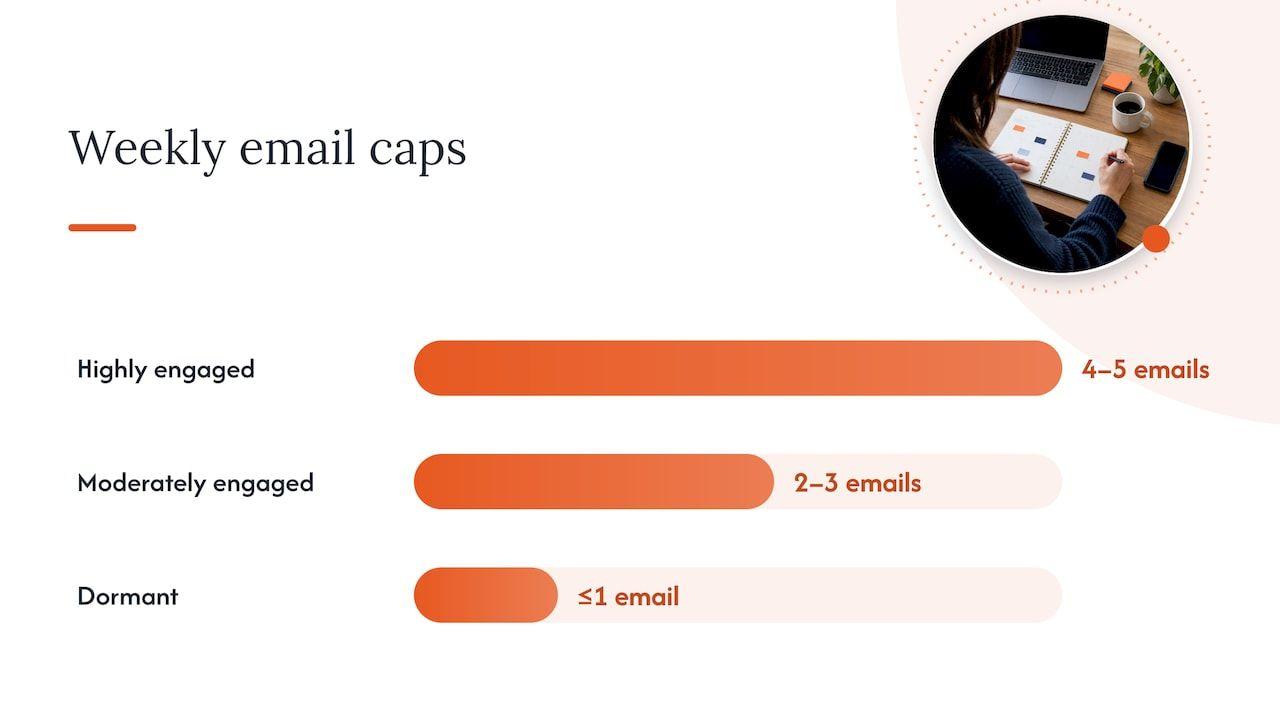
That order is set out in the CRM Marketing Knowledge Base’s guidance on orchestration and frequency, which also offers starting caps of roughly four to five emails a week for highly engaged contacts, two to three for moderately engaged ones and one or fewer for dormant ones. Treat those as a starting position to adjust against your own complaint and unsubscribe data. The cap is a safety rail, not a budget to be spent in full.
One platform feature deserves care. Smart-sending style suppression skips a message for a recipient who has recently been mailed, but it does not reschedule it, so a subscriber can silently miss your best offer. Some teams switch it off for peak because buyer intent is high, as Klaviyo’s UK plan discusses, but if you do, replace it with a deliberate cross-journey frequency cap rather than removing protection altogether. Our guide to lifecycle email campaigns covers how triggers stack up in more detail.
What to watch during the week itself
Once the sale starts, the temptation is to watch revenue and open rate. Open rate is the weaker of the two, because Apple Mail Privacy Protection makes opens less reliable, which is why Omnisend advises against using it as a standalone threshold and suggests weighing clicks, purchases, conversions, complaints, unsubscribes, bounces, delivery delays and mailbox-provider performance instead.
A short dashboard that someone actually looks at every few hours beats a long one nobody opens:
- Hard bounce rate by send, with a sudden rise treated as a list-quality problem.
- Complaint rate by mailbox provider, where Gmail and Microsoft often diverge.
- Deferrals and delivery delays, which are the earliest sign that a provider is throttling you.
- Clicks and orders per thousand delivered, compared with the last comparable sale.
- Unsubscribe rate per send, which tells you when frequency has crossed a line.
The response when something turns is to slow the ramp and not push through because another campaign is scheduled. Pause the least engaged tier, hold the next wave, find out which provider is affected and whether the cause is reach, audience or message, and only then resume. A rise in hard bounces, complaints or unsubscribes needs investigating before you scale further, a view Omnisend states directly. Name one person who has the authority to pause a send and make sure they are reachable over the weekend, because the worst deliverability decisions are made by a group waiting for permission.
Where a specialist saves you time
Everything above can be done in house by a team with time to spare, but the weeks before Black Friday are the weeks nobody has any. We built our work around that gap. Our free health check and 15-minute inbox check-up call show where your sending stands and where to start, and if the picture needs more than a quick look, the Deliverability Review and Fix combines a detailed investigation with 45 days of implementation support, with a senior consultant working alongside your team inside your platforms. If you need an IP warm-up programme, authentication setup or reputation recovery, those sit on the same page.
For a single question, such as whether your ramp plan is sensible, the advisory session is £250 one-off. For teams who want the peak season to be the start of something steadier, Managed Deliverability provides daily monitoring, incident response, monthly inbox placement testing and one agreed improvement each month, so the signals above have a clear owner all year.
A simple timeline you can reuse every year
Because the work is front-loaded, it helps to hang it on a countdown. Adjust the dates to your own sale window.
| When | What to do |
|---|---|
| Six weeks out | Review 90 days of complaints, bounces and send frequency, check authentication, review the audit approach, and settle the calendar |
| Four weeks out | Clean the list, remove invalid and role addresses, begin the engaged-first volume ramp |
| Three weeks out | Re-engagement send to lapsed contacts, then suppress those who stay silent |
| Two weeks out | Check blocklists, confirm unsubscribe flows, agree pause criteria and the named decision-maker |
| One week out | Small test to the most engaged segment, re-verify recently added addresses, test seed inboxes across providers |
| Sale week | Send in waves, away from the top of the hour, watch the dashboard, and slow down if signals turn |
| Afterwards | Review what each provider did, suppress new non-responders, and keep the cadence down gently rather than stopping dead |
If you are reading this with only a fortnight to go, do not try to compress all of it. Prioritise authentication, suppression of risky addresses, an engaged-first send order and a calendar with pause criteria, and leave the larger list expansion for the next campaign.
FAQ
How early should we start preparing our email for Black Friday?
Six weeks is a comfortable lead time, because it leaves room to fix authentication, clean the list and ramp volume in steps. Klaviyo UK reports that brands that began campaigns in October and kept a weekly cadence were about three times more likely to be top performing. If you are later than that, focus on the engaged segment first.
How much can we increase send volume for Black Friday?
Published guidance suggests never more than double your normal volume in one step, and Omnisend recommends roughly 25 to 35% growth per campaign. The right figure for you depends on your history and mailbox provider mix, so ramp earlier and slower rather than later and faster.
What time of day is best to send Black Friday emails?
Ometria’s 2025 data supports a primary send between 6am and 10am and a secondary between midday and 4pm. Whatever you choose, schedule a few minutes past the hour rather than exactly on it, and stagger larger audiences in waves.
Should we email subscribers who have not opened anything for a year?
Not in your main sale send. Put them through a re-engagement message beforehand and bring them in last, in small batches, if at all. Contacts with no engagement for around three years are best suppressed, since they are the most likely to be invalid or spam traps.
Sources
- SAP Emarsys: Black Friday email marketing, prepare your campaign
- Ometria: Black Friday 2026 deliverability guide
- Ometria: Re-engaging lapsed contacts ahead of Black Friday
- Omnisend: BFCM deliverability best practices
- Zeta Global: Maximise email deliverability during peak season
- Klaviyo UK: Black Friday marketing plan
- Klaviyo: Black Friday email deliverability
- Mailjet: Email is the new Black Friday
- CRM Marketing Knowledge Base: Orchestration and frequency
- Peak Digital: UK email marketing ROI 2026
- Watch Repair Station: Seasonal peaks plan for UK shops