
If your sending IP is on the SpamCop Blocking List, you generally cannot pay, apply or email your way off it: SpamCop expires listings automatically, normally once 24 hours pass without new spam reports against that IP. That means the useful work is not chasing a removal form, it is finding out why the reports arrived and stopping them, so the listing drops away and stays away. This guide explains how to confirm a listing, what the timings look like, who has to act when the IP belongs to someone else, and how to investigate the causes properly.
Table of Contents
- What a SpamCop listing actually is
- Check whether your IP is listed
- How SpamCop delisting works in practice
- Investigate the cause, not the listing
- When the listed IP is not yours to fix
- Confirm you have been removed
- Preventing the next listing
- How we can help
- FAQ
- Sources
What a SpamCop listing actually is
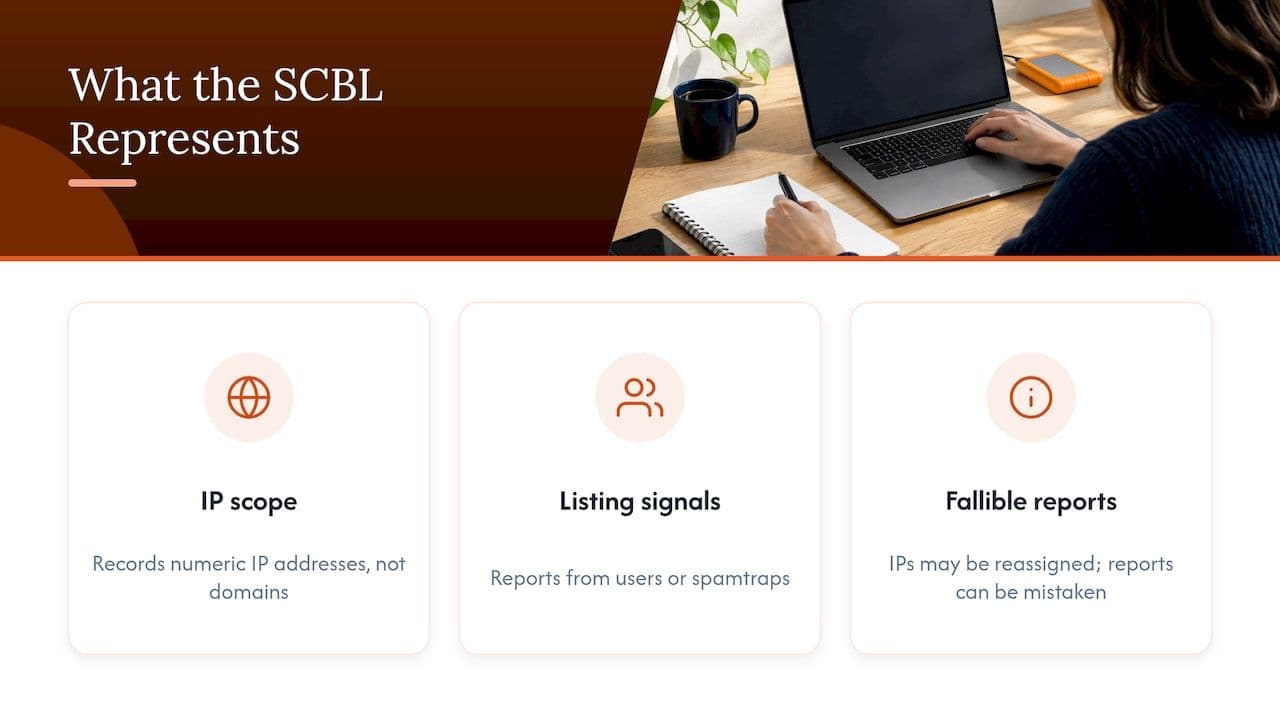
SpamCop runs a DNS-based blocklist, the SpamCop Blocking List (SCBL), which at bl.spamcop.net records IP addresses that have transmitted email reported to SpamCop users. It does not list email addresses or domains, which matters because many teams assume a listing is a verdict on their brand or their sending domain. It is a verdict on one numeric address at a particular moment.
According to SpamCop’s administrator FAQ, an IP is listed when SpamCop users or spamtraps receive spam from it and the volume meets the listing criteria. Two inputs, then: people pressing the report button, and traps that should never receive legitimate mail. Both are signals about behaviour at the IP, and neither is a human judging your business.
That is also why a listing does not automatically mean you are a spammer. SpamCop’s own explanation says that reports come from fallible humans, IPs get reassigned and an earlier listing may concern another user. A recipient who forgot they signed up, or who reports a genuine receipt because it was easier than unsubscribing, can contribute to a listing just as a real abuse case can. For a growth-stage SaaS or ecommerce sender, the honest reading is usually somewhere in the middle: the mail may be wanted by many people, but something in the sending pattern is producing complaints or trap hits.
Check whether your IP is listed
Start by identifying the exact IP that delivered the rejected message. The bounce text or the message headers will show it, and if you send through an ESP it may be a shared address you do not control. You need the numeric IP, because SpamCop will not look up a domain for you.
There are two reliable ways to check.
- Use the lookup on the SpamCop Blocking List page, which has an option for checking whether an address is listed, and enter the IP.
- Run a DNS query yourself. SpamCop’s FAQ explains the method: reverse the four octets of the IP and add bl.spamcop.net, so 1.2.3.4 becomes 4.3.2.1.bl.spamcop.net. Querying that name with nslookup returns an address, typically 127.0.0.2, if the IP is listed, and a nonexistent-domain response if it is not.
The DNS method is worth knowing because it is exactly what receiving mail servers do. If your own test returns 127.0.0.2, a server using SpamCop as a filter will see the same thing. If it returns nothing but a rejection still quotes SpamCop, the listing may have just expired and the receiver may be working from a cached answer.
SpamCop also records history. Each listing page shows the prior 30 days of listing and delisting dates and times, though it does not tell you whether an event was valid, mistaken, timed out or manually removed. That history is useful for spotting a pattern, such as a listing every few days, which points to a continuing cause rather than a one-off.
If you want to see whether other blocklists are involved as well, our guide to checking whether your domain or IP is on a blocklist covers the wider picture, since a SpamCop listing is rarely the only symptom.
How SpamCop delisting works in practice
SpamCop is a time-based list. Per its administrator FAQ, the normal route is that an IP is removed automatically after 24 hours with no new spam reports, with no routine manual request needed. When the listing page shows a count of 0, delisting has begun, but it can take up to four more hours to propagate to mirrors and to the systems that use the list.
Put those together and a realistic expectation is this: if the reports genuinely stop, you should be clear within roughly a day, plus a few hours of lag. If a fresh report arrives in that window, the clock effectively restarts, which is why people sometimes feel a listing is stuck when in fact it is being renewed.
Hosting providers describe the same behaviour. OVH’s support guidance notes that SpamCop status can be checked on its official page and that the IP is removed automatically once reports stop, usually without a manual removal request.
Why you should not email SpamCop
The administrator FAQ explicitly asks people not to write merely to say that the problem is fixed or to request early delisting, because automatic expiry is the normal process. Sending such a message adds nothing and takes your attention away from the part that matters. Spend that time on the investigation below.
A timeline to expect
| Stage | What is happening | What you should do |
|---|---|---|
| Rejection appears | Receivers using SCBL are refusing mail from the IP | Identify the IP from the bounce and confirm it with the lookup |
| Investigation | Reports are still possible while the cause is active | Find and stop the source of the mail being reported |
| Reports stop | The 24-hour expiry clock runs | Keep sending volumes and lists under control, avoid new triggers |
| Count reaches 0 | Delisting has begun | Allow up to four hours for propagation |
| Verification | The IP should no longer return a listing | Repeat the lookup and test real delivery |
Investigate the cause, not the listing
Because removal is automatic, the real question is what produced the reports. SpamCop’s administrator FAQ lists the usual culprits: worm, virus or trojan-infected PCs, exploited proxies or caches, insecure CGI or PHP scripts, SMTP AUTH attacks, incorrect server settings, and misdirected bounces or autoresponders. Each of these deserves a short, methodical check.
Compromised machines and stolen credentials
A single infected workstation, or a mailbox whose SMTP credentials have been stolen, can send thousands of messages that nobody at your company wrote. Look at your outbound mail logs for volume spikes, unusual sending hours, or recipients that bear no relation to your customers. Reset the credentials involved, and scan the machines that used them.
Web forms, scripts and plugins
Insecure contact forms and old PHP scripts are a classic source: an attacker uses the form to send arbitrary messages through your server. If your website, WordPress plugins or a legacy application sends mail directly, check that the recipient and body fields cannot be controlled by a visitor, and that form submissions are rate-limited.
Misconfigured servers and open relays
Mail servers and proxies that accept connections from anyone can be used to relay abuse. Review your server configuration, authentication requirements and firewall rules, particularly after any migration or infrastructure change. Also check that your SPF, DKIM and DMARC records match the systems that actually send for you, because an unexplained sender using your domain is often the first sign of a problem. Our explainer on SPF, DKIM and DMARC sets out what each record does and how the three fit together.
Misdirected bounces and autoresponders
This one catches many otherwise careful teams. When spam is sent with a forged return address, the bounce or auto-reply from the receiving system lands on an innocent party, and if your system generates those messages blindly, it can be reported as the sender. Review how your platform handles out-of-office replies, delivery failure notices and auto-acknowledgements, and make sure they go only to authenticated, genuine senders.
Lists, triggers and sending behaviour
The FAQ’s technical list is where SpamCop’s own guidance stops, but for commercial senders it is rarely the whole story. Reports and spam trap hits also follow from behaviour: mailing contacts who never opted in, sending to old addresses that have been recycled into traps, stacking several lifecycle emails on the same person in a short window, or sending a sudden burst after weeks of silence. Someone who receives four automated messages in a day is far more likely to press report than unsubscribe. This is the area we spend most of our time on with clients, because it sits outside what authentication checks and blocklist lookups will show you. Our piece on how to fix email deliverability issues walks through the order we tackle those layers in.
When reports are coming from real recipients, SpamCop’s report links are a useful source of detail. The Blocking List page explains that the report links provide details about the reported email and the procedures used to analyse it, which can help you tie a listing to a specific message or campaign.
When the listed IP is not yours to fix
Many senders are on shared infrastructure: an ESP’s pool, a hosting company’s address range, or a mailbox provider’s outbound servers. In that case you cannot edit the server settings, and nothing you change on your side will make the IP’s reputation your own.
SpamCop’s end-user guidance is clear that if the IP belongs to an ISP or hosting company, that provider must solve the problem, and the sender should forward the bounce message and ask them to investigate. Do exactly that, and make the request easy to act on.
- Forward the complete bounce, including the rejecting server’s name, the SpamCop reference and the timestamp.
- State the IP address, the date and the type of mail you were sending (for example, password resets or order confirmations).
- Ask what they have found and whether the sending IP has been changed, isolated or cleaned.
- Ask whether you can be moved to a different pool or a dedicated address if the problem is recurring.
The quality of your provider matters here. A properly managed hosted business email service with authentication in place will normally have its own abuse handling, so a forwarded bounce gets a real response rather than a ticket that sits. If your provider cannot or will not investigate, that is itself useful information when you decide whether the platform still suits your volumes.
A related situation: a message to a recipient behind a large mailbox provider is rejected citing SpamCop, but the listing is not on your own IP at all because the outbound relay belongs to a third party. The remedy is the same, which is to raise it with whoever operates the relay, not to spend days probing your own domain.
Confirm you have been removed
Once reports have stopped and a day has passed, check the status again. Per the SpamCop lookup guidance, you confirm removal by repeating the IP lookup and seeing whether the address is still listed. Then confirm from the receiving side:
- Run the DNS query again and look for the nonexistent-domain response.
- Send a test message to a mailbox at the provider that bounced you, and check the headers for the delivery result.
- Retry any deferred messages from your queue, rather than resending everything at once, to avoid creating a new burst.
- Watch bounce codes over the following week for a return of the same rejection.
If the listing history shows repeated entries over the last 30 days, treat the investigation as unfinished. A clean lookup today with a relisting next Tuesday means the cause is still live.
Preventing the next listing
The teams that rarely see SpamCop appear in their bounces tend to have a few habits in common, none of them exotic.
- Authenticate everything that sends for you. SPF, DKIM and DMARC aligned across every platform, with DMARC reports actually read.
- Separate mail streams. Transactional, marketing and lifecycle mail on distinct sending identities, so a complaint spike in one does not drag the others down.
- Keep lists honest. Confirmed opt-in where practical, suppression of hard bounces and long-inactive contacts, and no purchased or scraped data.
- Control cadence. Map every automated trigger and check where several can fire for one person within a short window.
- Monitor daily. A listing noticed within hours costs far less than one discovered when customers say they never received their password reset.
- Review scripts and credentials. Rotate SMTP credentials, restrict who can send, and audit forms and plugins that generate mail.
If you are growing quickly, or have just changed platform, the sending architecture is worth examining as a whole. Our write-up on sending architecture and authentication explains how the structure of your sending affects the reputation each IP and domain builds.
How we can help
If a listing keeps returning, or you cannot tell whether the cause lies in your platform, your lists or your lifecycle triggers, a second pair of senior eyes usually saves weeks. Digistrat is a UK-based email deliverability consultancy for SaaS, ecommerce and fintech teams. Our free health check is the easiest place to start, and Deliverability Review and Fix combines a detailed investigation with 45 days of implementation support, carried out in your platforms with your team. For ongoing protection, Managed Deliverability provides daily monitoring, incident response, monthly inbox placement testing and one agreed strategic improvement each month.
If you have one specific question, such as a recurring listing on a dedicated IP, a 250 GBP one-off advisory session is a focused way to get it answered. You can see everything we offer on our deliverability services page.
FAQ
How long does SpamCop listing removal take?
SpamCop normally delists an IP automatically after 24 hours with no new spam reports. Once the listing page shows 0, delisting has begun, and it can then take up to four more hours to reach mirrors and the systems that use the list. If new reports arrive during that period, expect the listing to continue.
Can I pay or apply to be removed from SpamCop?
The documented process is automatic expiry, and SpamCop asks administrators not to email just to report a fix or ask for early delisting. Your effort is better spent finding and stopping the source of the reports. If the IP belongs to your provider, ask them to investigate instead.
Does a SpamCop listing mean my business is a spammer?
Not necessarily. SpamCop says reports come from fallible people, IPs can be reassigned, and a listing may reflect another user or a mistaken report. Treat it as an IP-level signal that something in the sending needs investigating, whether that is a compromised machine, an insecure script or a list and cadence problem.
Does SpamCop list domains or email addresses?
No. The SpamCop Blocking List contains IP addresses only. If a rejection mentions SpamCop, work out which sending IP was involved and check that address with the lookup or a DNS query.
What if the IP belongs to my ESP or hosting company?
Forward the full bounce to them and ask them to investigate, as SpamCop’s guidance says the provider must resolve it. Include the IP, the time and the type of mail affected, and ask whether you can be moved to a cleaner or dedicated address if the issue repeats.
Sources
- SpamCop Blocking List (bl.spamcop.net)
- SpamCop FAQ: How can I check if an IP is listed
- SpamCop FAQ: Dispute Resolution for ISPs and administrators
- SpamCop FAQ: If my IP is listed, does it mean I am a spammer
- SpamCop FAQ: Dispute Resolution, bounce messages
- OVH Support Guides: Delisting blocklisted IP addresses