
The only authorised route for Spamhaus delisting is the official IP & Domain Reputation Checker, never a third party who promises a quicker fix for a fee. Check your status there first, prepare proof of ownership alongside a short remediation summary, and submit through that same tool. If your listing sits on the SBL, your internet service provider or hosting company must make the request on your behalf.
Table of Contents
- What is Spamhaus delisting and why does it take proof, not just a request?
- Quick action checklist: what to do in the first hour
- How to use the Spamhaus IP & Domain Reputation Checker (step by step)
- What to include in a removal request (evidence and phrasing)
- SBL-specific path: why and how to involve your ISP or hosting provider
- What to expect after submission: timelines, propagation and verification
- Prevent recurrence: technical fixes and long-term best practice
- Digistrat’s take: when to handle delisting in-house and when to hire expert help
- How Digistrat can help with delisting and reputation recovery
- Official Spamhaus pages and resources to bookmark
- Sources
- FAQ
What is Spamhaus delisting and why does it take proof, not just a request?
Spamhaus delisting is the process of proving to Spamhaus that whatever caused your IP address or domain to appear on one of its blocklists has genuinely been fixed, not simply asking them to remove the entry. That distinction catches out a surprising number of administrators who treat the removal request as an administrative formality rather than an evidence submission.
Spamhaus runs as a non-profit authority on internet reputation, and its removal procedures are deliberately strict because its mission is protecting the health of the wider network, not smoothing things over for individual senders. A request without evidence of what went wrong and what has changed is treated as incomplete, and incomplete requests get rejected. That is the standard industry practice worth understanding before you touch the ticketing form: you are not asking permission, you are submitting a case.
Quick action checklist: what to do in the first hour
Speed matters here, but rushing an incomplete request wastes more time than it saves. Work through these steps in order before you touch the removal form itself.
- Confirm the listing using the Spamhaus Reputation Checker rather than relying on a bounce message or a third-party monitoring dashboard, since it tells you exactly which list you are on.
- Stop the outbound mail stream from the affected IP or domain immediately, particularly if the cause is a compromised server still sending spam.
- Pull logs, timestamps and a plain record of whatever remediation you have already carried out, because this is the evidence Spamhaus asks for later.
- Submit any request from a network genuinely tied to the listed resource, never through a VPN, and never using a disposable email address.
- If the listing is on the SBL, contact your provider’s abuse or security desk straight away rather than attempting to file the request yourself.
A quick blocklist check at this stage tells you exactly what you are dealing with before you commit time to a request that might be the wrong one.
How to use the Spamhaus IP & Domain Reputation Checker (step by step)
The checker at check.spamhaus.org is where every legitimate Spamhaus delisting request begins, and it does two jobs at once: it tells you your current status, and it either processes an immediate removal or opens a ticket for manual review.
- Enter the listed IP address, domain, or an SBL ticket number if you already have one, into the lookup field.
- Read the result carefully. It names the specific list (SBL, XBL or PBL) holding the entry and links through to listing details that explain the reason.
- Follow that link before submitting anything, because each list has different criteria and a different removal path, and misidentifying which list you’re actually on wastes a submission cycle.
- Understand that the checker correlates where your request originates from with the listed resource itself. Requests filed from unrelated networks are commonly denied, which is why VPNs cause problems.
Some entries clear automatically once the checker verifies the issue no longer exists; others generate a ticket that a human reviews, and that difference alone explains most of the variation in delisting timelines readers report.
Pro Tip: Bookmark the exact listing detail page for your entry before you start drafting your removal request. Referencing the specific criteria Spamhaus cites for your listing type makes a rejection far less likely than a generic apology and promise to do better.
What to include in a removal request (evidence and phrasing)
Spamhaus requires the request to come from the registered owner of the resource, and it needs enough documentation to stand on its own without follow up questions. Requests missing any of the following are routinely denied.
- Owner contact details and a verifiable email address genuinely tied to the listed IP or domain, not a generic support inbox.
- A clear root cause statement: was it a compromised account, an open relay, a misconfigured server, or abuse originating from a hosted tenant.
- Corrective actions with precise dates and times, plus the verification steps you ran to confirm the fix held.
- Preventative measures now in place, whether that is patching, authentication changes, or new monitoring, so Spamhaus can see recurrence is unlikely.
Keep the language factual rather than persuasive. Sample logs with timestamps carry far more weight than a paragraph explaining how sorry you are.
SBL-specific path: why and how to involve your ISP or hosting provider
The SBL typically flags malicious hosting or hijacked IP ranges, and Spamhaus places responsibility for removal squarely with the network owner, not the individual customer sitting on that infrastructure. If you’re an end user rather than the network owner, you cannot submit this one yourself, no matter how good your evidence is.
- Send your provider the SBL listing link, your logs, the remediation steps taken, and a clear request for them to submit removal on your behalf.
- If the abuse desk is slow, follow up in writing and reference any SLA commitments in your hosting contract.
- If a provider consistently drags its feet on abuse handling, that is worth weighing against the cost of moving your workload elsewhere.
Pro Tip: Ask your provider for written confirmation once they’ve submitted the SBL removal request. Providers sometimes tell customers a ticket is “in progress” when nothing has actually been filed with Spamhaus yet.
What to expect after submission: timelines, propagation and verification
Outcomes vary because not every removal request is processed the same way. Some clear automatically once the checker verifies the listed condition no longer applies; others move into manual review, which naturally takes longer.
- DNS propagation after an approved removal typically takes one to two hours, though some networks sync more slowly than others, so allow a wider margin before assuming something has gone wrong.
- If deliverability problems persist after an approved delisting, check whether you’re seeing DNS caching delays rather than a genuine reputation issue still in place.
- Recheck the Reputation Checker directly, and separately look at bounce or rejection codes from receiving mail servers, since a different blocklist or a content filter could be the real culprit.
Patience here saves you from firing off a second, unnecessary request while the first one is still propagating through the network.
Prevent recurrence: technical fixes and long-term best practice
Getting delisted once is a fair result; getting delisted twice for the same reason suggests the underlying fix was cosmetic rather than structural.
- Configure SPF, DKIM and DMARC properly, with DMARC set to an enforcement policy rather than left at monitor only, and review the aggregate reports regularly since they often reveal compromised senders before anyone else notices.
- Patch mail servers and any software with known vulnerabilities, close open relays, rotate any credentials that might have been exposed, and apply sensible rate limits on outbound sending.
- Maintain list hygiene: monitor complaint rates, handle bounces properly, and suppress addresses that consistently fail rather than retrying them indefinitely.
- Set up ongoing reputation monitoring so a sending spike or sudden complaint surge gets flagged before it turns into a listing, not after.
A full deliverability remediation review covers most of this ground in one pass rather than fixing issues piecemeal as they surface.
Pro Tip: A single compromised sending account inside a large organisation can trigger a listing that affects every other team using the same IP range. Isolate high-risk senders onto dedicated infrastructure where your volume justifies it.

Digistrat’s take: when to handle delisting in-house and when to hire expert help
Most premature removal requests fail for the same reason: someone treats the listing as the problem, rather than as a symptom of a security or configuration failure that Spamhaus is deliberately designed to catch. Fixing the symptom without addressing the cause gets you rejected, and sometimes relisted within days.
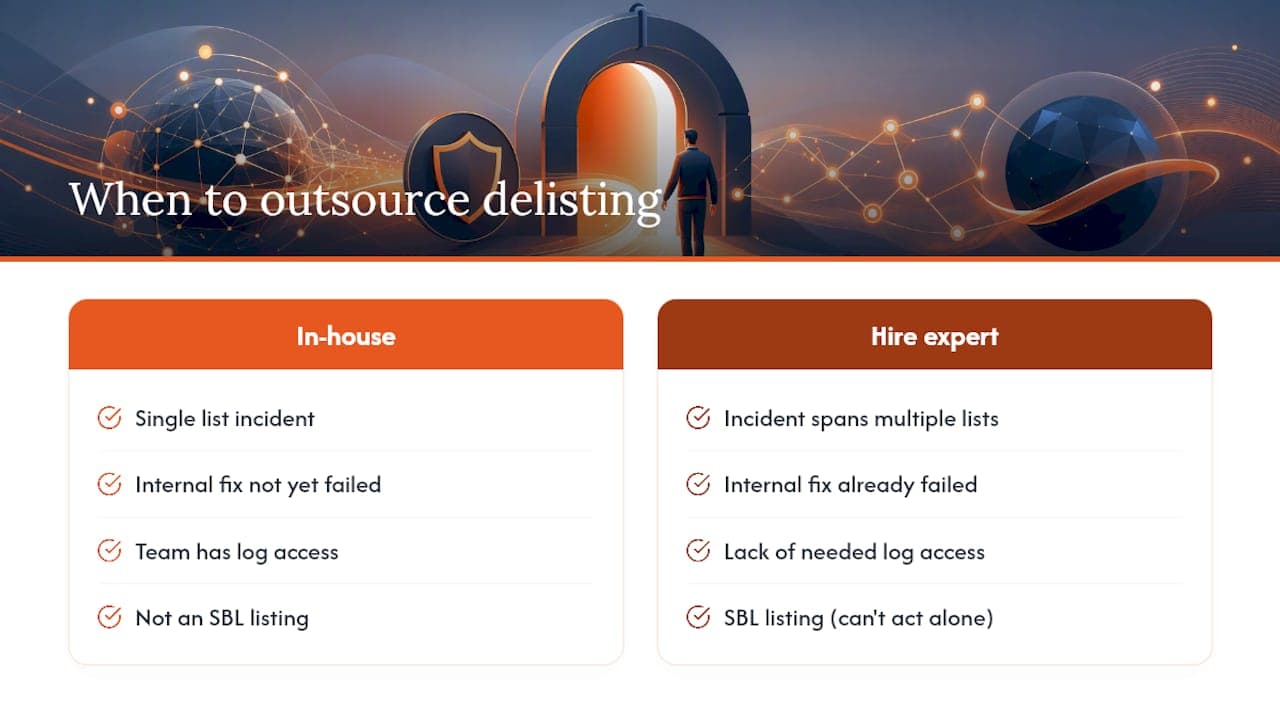
A consultancy engagement earns its cost when the incident spans multiple lists, when your provider’s abuse desk is unresponsive, or when the remediation documentation itself is the sticking point. That is precisely the triage, provider liaison and evidence preparation an email deliverability consultant handles day to day.
Ask yourself three questions before escalating: is this listing SBL, meaning you cannot act alone anyway; has an internal fix already failed once; and does your team have the log access needed to build a request that will actually pass review. Two “yes” answers is usually the point to bring in outside help.
How Digistrat can help with delisting and reputation recovery
Digistrat is the practical alternative to guessing your way through a Spamhaus rejection or paying for a “guaranteed removal” service that has no genuine authority to remove anything. A listing rarely arrives alone; it usually exposes a wider authentication gap, an infrastructure misconfiguration, or a sender hygiene problem that will trigger another listing within weeks if it goes unaddressed.
An Email Deliverability Audit identifies what caused the listing, builds remediation evidence relevant to Spamhaus, and checks your SPF, DKIM and DMARC setup to help ensure the request you submit is complete on the first attempt rather than bounced back for missing detail. For businesses that have been through a listing once and want to avoid a repeat, Reputation Monitoring tracks sender reputation continuously and aims to flag early warning signs before they escalate into a block. Book an initial assessment and gain a clearer picture of what caused your listing and what steps can be taken to reduce the risk of recurrence.
Official Spamhaus pages and resources to bookmark
- Reputation Checker for status lookups and removal submissions.
- SBL blocklist page for SBL-specific listing criteria.
- General FAQs for removal requirements.
- Contact portal for direct enquiries.
Removals are never charged; any paid “delisting service” is a scam.
Sources
FAQ
Why is my IP being blocked by Spamhaus?
Spamhaus lists an IP when it detects spam, malware activity, an open relay, or hosting known to be compromised or hijacked, and the specific list (SBL, XBL or PBL) tells you which category applies.
How do I delist an IP from Spamhaus?
Check the listing on the Reputation Checker, fix the underlying cause, then submit a request through that same tool with ownership proof and a remediation summary; for SBL entries, your ISP or host must submit it instead.
Why am I listed on Spamhaus?
The most common causes are a compromised mail server or account sending spam, a misconfigured relay, or abuse traced to a hosted tenant sharing your IP range, and the listing details page for your entry names the exact reason.
How do I delist an IP from a blacklist generally?
The process is the same principle across most blocklists: verify the listing through the operator’s own tool, remediate the cause, then submit evidence of the fix through their official channel rather than a third party, since Spamhaus and most reputable blocklists never charge a fee for removal.
