Spam trigger words are phrases such as “act now”, “100% free” or “guaranteed” that were once used to catch junk mail, and they still matter a little, but far less than most email marketing checklists suggest. Modern filters treat your wording as one signal among many, and the larger ones are whether your domain is authenticated, how recipients have treated your previous messages, and whether your list was built on proper consent. If a campaign is landing in spam, rewriting the subject line is rarely the fix, and this guide explains why, which words are still worth thinking twice about, and what to check first.
Table of Contents
- Why the word lists exist, and why they mislead
- What filters look at instead
- The words and habits still worth avoiding
- The UK angle: consent and unsubscribes matter more than vocabulary
- A better order of work when mail lands in spam
- How Digistrat can help
- Frequently asked questions
- Sources
Why the word lists exist, and why they mislead
The lists of 200, 400 or 600 “forbidden” words you find online descend from the early days of spam filtering, when filters such as SpamAssassin scored messages by adding points for suspicious phrases and blocked anything that crossed a threshold. HubSpot describes these terms as historically used to identify junk email, back when filters relied mostly on language, and notes that filters today look at far more than the text.
That history explains why the lists persist: they are easy to publish, easy to scan, and give a marketing team something concrete to do. They also explain why the advice is so often wrong in practice. A legitimate retailer can say “free delivery” or “offer ends Sunday” every week, and if its domain is authenticated, its complaint rate is low and its subscribers open and click, those words cost it nothing. A sender with broken authentication and a stale list can write the most careful, plain-spoken subject line imaginable and still end up in the junk folder.
Some of the tools that rank for this search will tell you that hundreds of listed words consistently flag emails, particularly in cold outreach. It is fair to say that cold, unsolicited sending is where copy matters most, because there is no engagement history to fall back on. But our readers send opted-in email to people who asked for it, and for that kind of sender the weight sits elsewhere.
What filters look at instead
Think of the inbox decision as a conversation between several layers, with your wording sitting near the bottom.
Authentication and alignment
Google’s published rules say that SPF prevents spammers from sending unauthorised messages that appear to be from your domain, and that your record should include every service sending on your behalf. Its sender guidelines also set out that bulk senders (those sending more than 5,000 messages a day to Gmail addresses) need SPF, DKIM and DMARC in place. Gmail’s FAQ lists the consequences: when the From header and authentication do not align, or when messages are not authenticated with both SPF and DKIM, you can see temporary or permanent failure codes, or messages go straight to spam.
Yahoo is similar. Its sender best practices ask for SPF or DKIM at a minimum, a spam complaint rate below 0.3%, valid forward and reverse DNS for sending IPs, and compliance with RFCs 5321 and 5322.
In our experience this is the most common reason a team “has a spam words problem” that is really an infrastructure problem: a marketing platform was added years ago, a CRM or transactional system started sending from the same domain later, and nobody updated the SPF record or checked DKIM alignment. If that sounds familiar, our guide to SPF, DKIM and DMARC explained walks through what each record does and what goes wrong when they are misconfigured, and the piece on sending architecture and authentication covers how the pieces fit together.
Complaint rates
Both providers watch how often recipients press “report spam”. Google’s guidance is to keep the rate below 0.1% and never to reach 0.3%, and it adds that a sender who reaches that level can lose eligibility for mitigation (both figures appear in Gmail’s sender guidelines). Those numbers are small. At 0.3%, three recipients in every thousand clicking the button is enough to cause trouble, which is why a single badly targeted send to an old segment can do more harm than a year of mildly salesy subject lines.
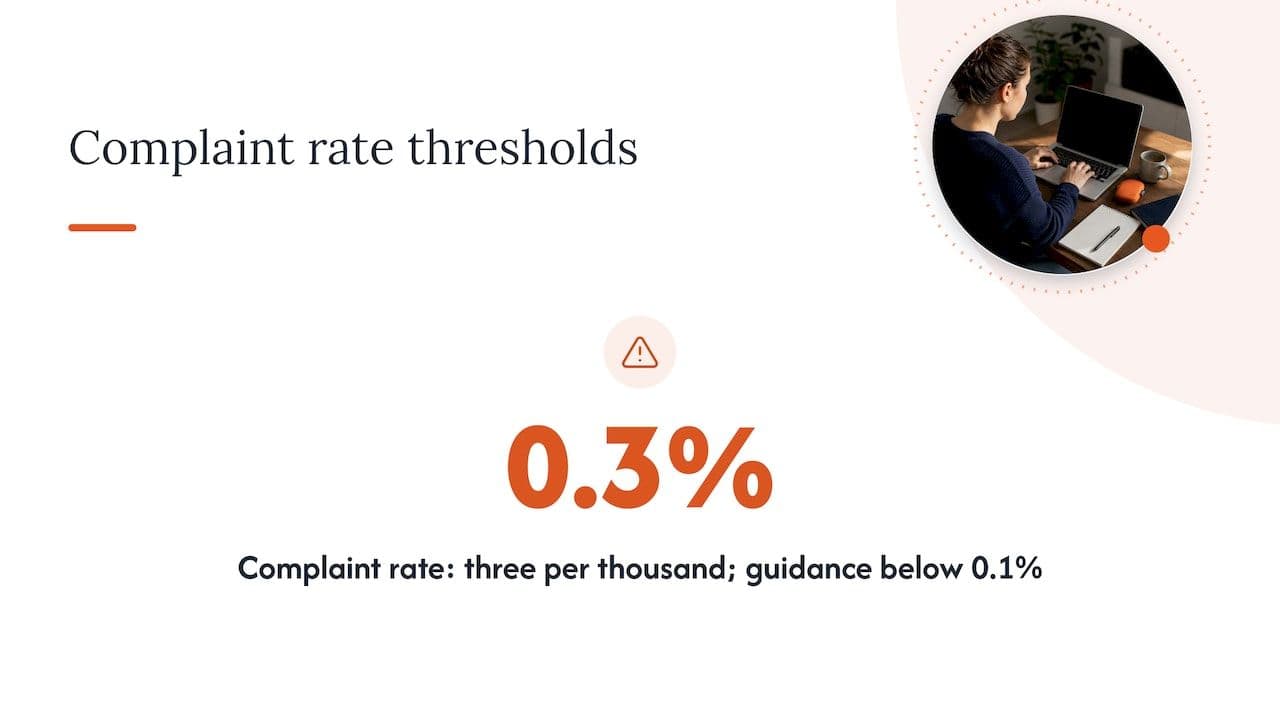
The rate is visible in Google Postmaster Tools, which updates daily. A drop in engagement usually reflects a reputation problem that began days or even weeks earlier, so watching the figure daily is the only dependable way to catch a problem before it reaches revenue.
Engagement history
This is the layer that surprises people most. Gmail’s own guidance describes filtering that learns from how recipients treat your mail over time, so recipients who consistently ignore, delete or report your messages teach the system where to put the next one. Even a perfectly authenticated message can end up in spam if your audience has historically shown little interest in your sending.
That is also where words and reputation meet. A subject line such as “Last chance: act now” sent to people who have stopped reading you is more likely to be deleted unopened or reported, and it is that reaction, not the phrase itself, that does the damage.
The words and habits still worth avoiding
So, should you ignore wording altogether? No. The sensible position is that certain patterns make a message look like the junk that filters and people have learnt to distrust, and avoiding them costs you nothing. Here is how we would group them.
| Pattern | Examples | Why it can hurt | Better approach |
|---|---|---|---|
| Pressure and false urgency | “Act now”, “Last chance”, “Urgent”, “Don’t miss out” | Reads as manipulation and invites deletion or complaints, particularly when repeated every week | Give a real deadline: “Free delivery ends Sunday 23:59” |
| Money and guarantee claims | “Guaranteed”, “No risk”, “Earn extra cash”, “100% satisfied” | Associated with scams and unrealistic promises | State the actual terms, such as a returns window |
| Shouting | ALL CAPS, “FREE!!!”, strings of exclamation marks or £ signs | Stacked formatting is a classic junk signal and looks careless to humans | One clear sentence, normal capitalisation |
| Vague or misleading framing | “Re:” or “Fwd:” on a first message, “Your account” on a promotion | Misleading subject lines also breach the spirit of the rules on identifying the sender | Say what the email is and who it is from |
| Generic button text | “Click here” | Gives no context and sits oddly in a message full of links | Describe the outcome: “See the new range” |
The common thread is that none of these is a problem in isolation. “Free” is not dangerous. A subject line made of three pressure phrases, capitals and an exclamation mark, sent from a domain with weak authentication to a list that has not heard from you in a year, is.
A quick way to test your copy
Before a send, read the subject line and first two lines aloud and ask whether you would believe them from an unfamiliar company. Then check four things:
- Does the subject line describe what is inside, honestly?
- Is the sender name one the recipient will recognise?
- Is there a plain-text version and a visible unsubscribe link?
- Would the offer survive being read by a sceptical colleague?
If the answer to all four is yes, the wording is unlikely to be what holds you back, and no scanner score should change that judgement.
The UK angle: consent and unsubscribes matter more than vocabulary
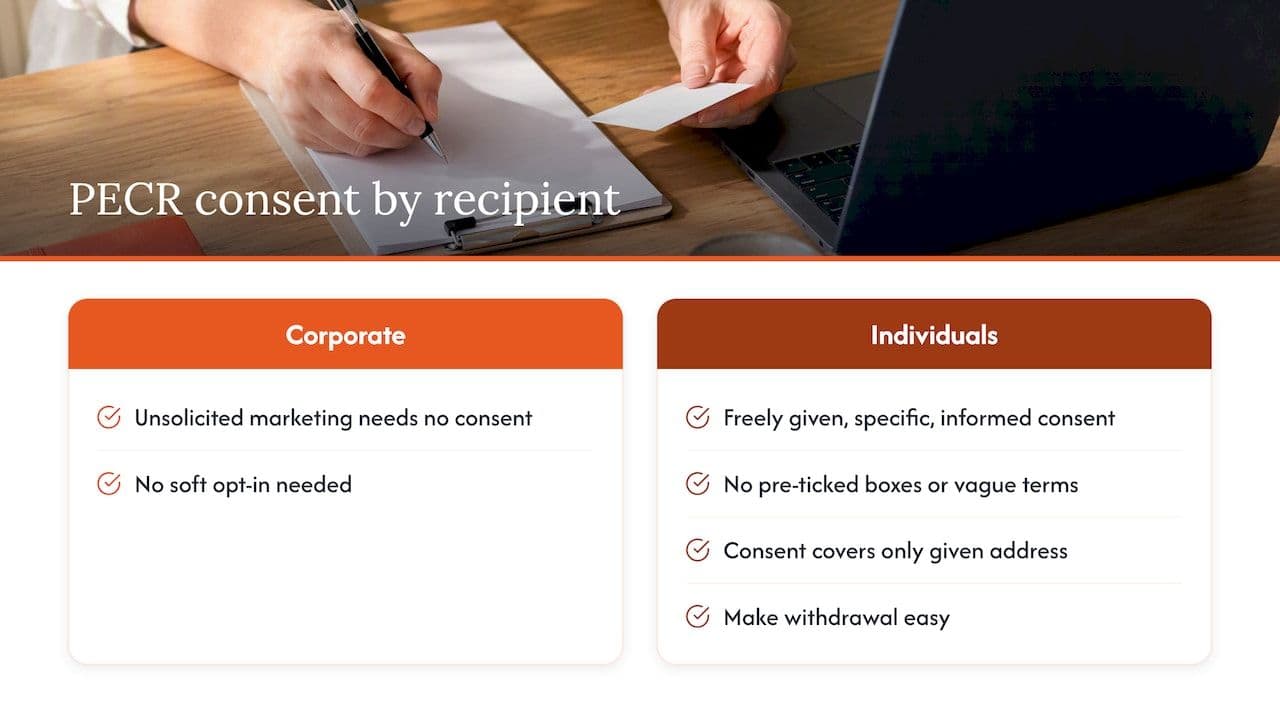
For a UK sender, there is a risk that no word list mentions at all. Under PECR, direct marketing by electronic mail has rules that depend on who the recipient is. You can send unsolicited marketing to corporate subscribers without consent or a soft opt-in, but you must not disguise or hide your identity to either type of subscriber, and you must provide a valid contact address for recipients to opt out.
For individual subscribers, consent has to be freely given, specific, informed and unambiguous, which rules out pre-ticked boxes and vague wording buried in terms and conditions. The ICO also makes the point that consent given for one email address does not cover other addresses the same person uses, and that you must make it easy for people to withdraw it.
This matters for deliverability as well as compliance. A list built on weak consent produces more complaints, and complaints are exactly what Gmail and Yahoo measure. Simply avoiding “spammy” language protects you from neither, because the issue is how the address was obtained and how easily someone can leave. If you sell to existing customers or supporters, our article on the PECR soft opt-in explains where that exception applies and where it does not, and the piece on UK GDPR versus EU GDPR is useful if you also send to the EEA.
The unsubscribe route deserves particular care. Google’s rules for bulk senders expect one-click unsubscribe and prompt handling of requests, and the practical point for a marketing team is that an obvious, working opt-out is a deliverability asset: a recipient who can leave easily is far less likely to hit the spam button instead.
A better order of work when mail lands in spam
If you arrived here because campaigns are going to junk, resist the urge to start rewriting subject lines. We would work in this order, which is also how most engineering and marketing teams find the real cause fastest.
- Check authentication. Confirm SPF, DKIM and DMARC are published, that every sending platform is covered, and that the domain in your From header aligns with the one that passes authentication. Fixing records often changes results quickly, while copy changes rarely do.
- Check complaint and bounce data. Look at Postmaster Tools and your platform’s reports for spam rate, hard bounces and blocks, and compare them against the 0.1% and 0.3% thresholds above.
- Look at who you are sending to. Segment by recency of engagement, and consider pausing or re-confirming addresses that have not opened anything for a long time. Sending to them is a quiet way of teaching filters that your mail is unwanted.
- Review sending patterns. Sudden volume jumps, new IPs without a proper warm-up, or a migration between platforms can all trigger throttling and deferrals that look like a content problem.
- Only then, review the copy. Use the table above as a sense check rather than a checklist to be ticked.
The order matters because the earlier steps cost less to fix and explain more of the variance. It is common for a team to spend a month testing subject lines when a DKIM key had been broken since a platform change.
When to bring in a specialist
Some problems are hard to diagnose from the inside: reputation that has dropped on one mailbox provider but not another, mail that is accepted but never seen, or a domain that has been quietly discarded by filters after a spike in complaints. Our own work starts from the premise that deliverability is both a technical and a commercial question, and our guide to what a deliverability consultant actually checks sets out what a proper review covers if you want to judge any provider on the same basis.
How Digistrat can help
We work with UK and European businesses that send opted-in email and are seeing spam placement or falling open rates. Every engagement is carried out directly by a senior specialist with experience inside major ESPs, and we implement the fixes rather than handing over a report and leaving you to interpret it. The usual starting point is our free health check, which tells you whether the problem sits in authentication, infrastructure, reputation or list quality. From there, depending on what we find, you might need a deliverability review and fix, authentication setup, reputation recovery, or ongoing reputation monitoring.
If you would rather talk it through first, our advisory session is a 90-minute call priced at £250 one-off, useful when a marketing lead and an engineer need an outside view on the same problem. If you want a structured look at the whole programme, the email deliverability audit page explains what is covered.
Frequently asked questions
Do spam trigger words still exist?
Some phrases still raise suspicion, but they are only one input among a great many. Filters now lean on authentication, sender reputation and recipient behaviour, which is why established brands can use “free” and “offer” regularly without penalty. Treat any word list as a guide to tone rather than a set of rules.
Which subject line words should I avoid?
Be cautious with false urgency (“act now”, “last chance”), unrealistic promises (“guaranteed”, “no risk”), and anything in capitals or followed by several exclamation marks. A real deadline or a plain description of the contents does the same job without looking like junk. If the words are accurate and proportionate, they are unlikely to be the problem.
Can I check my email for spam words before sending?
Yes, many free scanners will flag risky phrases, and they can be a useful second pair of eyes on tone. Their scores do not predict inbox placement, though, because they cannot see your authentication, complaint rate or engagement history. If results are poor, check those first.
Why are my emails going to spam when I haven’t used any spam words?
The most likely causes are missing or misaligned SPF, DKIM or DMARC, a complaint rate approaching 0.3%, or a list that has stopped engaging. Gmail and Yahoo both publish requirements on these points, so start with their guidelines and your Postmaster data. A sudden change after a platform move or a volume increase points strongly to infrastructure.
Does PECR stop me using certain words in marketing emails?
PECR does not ban particular words. It governs consent, identifying yourself and giving people a valid way to opt out. Misleading senders or missing opt-outs are where the ICO tends to focus, so those deserve more attention than your vocabulary.
Sources
- Email sender guidelines, Gmail Help
- Email sender guidelines FAQ, Gmail Help
- Sender Best Practices, Yahoo Sender Hub
- How do we comply with the PECR electronic mail marketing rules? ICO
- Spam trigger words: How to keep your emails out of the spam folder, HubSpot
- 600+ Email Spam Trigger Words, Overloop
