
The SPF lookup limit is 10: when a receiving server evaluates your SPF record, it will follow no more than ten DNS-querying terms (include, a, mx, ptr, exists and redirect), and if the evaluation needs an eleventh, SPF returns a PermError instead of a pass. That error means your domain gets no positive SPF authentication for that message, which is how a record that looked fine when you published it can quietly start costing you inbox placement as you add senders. This guide explains what counts towards the ten, how nested includes eat the budget, how to check where you stand, and how to bring a record back under the limit without breaking mail that currently works.
Table of Contents
- Why SPF has a lookup limit at all
- What counts towards the ten (and what does not)
- How nested includes use up the budget
- What actually happens when you go over
- How to check your lookup count
- Fixing a record that is over the limit
- Keeping the count under control
- When to bring in a specialist
- FAQ
- Sources
Why SPF has a lookup limit at all
SPF lets a domain publish a list of the servers allowed to send on its behalf, and every receiving mail server has to fetch that list over DNS and follow any references inside it. Without a ceiling, a badly built or deliberately malicious record could send a receiver off on an endless chain of queries. The NCSC explains that the protocol limits domain lookups to 10 as a protection against denial-of-service attacks on receiving mail servers, and that the limit is often breached through nested lookups caused by the include mechanism.
The practical consequence is that the limit is not a guideline you can stretch. It is a fixed budget, and every service you authorise spends part of it, whether you chose to or not.
What counts towards the ten (and what does not)
The rule in the standard is that an SPF check may run at most ten DNS-querying mechanisms and modifiers, including the lookups caused by include or redirect, and that a receiver must return a PermError when the limit is exceeded. In practice, that sorts the terms in a record into two groups.
| Term | Costs a lookup? | Notes |
|---|---|---|
| include | Yes | One for the include itself, plus every DNS-querying term inside the record it points to |
| a | Yes | Resolves a hostname to its addresses |
| mx | Yes | Resolves your MX records, then their addresses |
| ptr | Yes | Deprecated in practice, so best removed altogether |
| exists | Yes | Used in more advanced macro-based setups |
| redirect | Yes | Hands evaluation to another domain’s record |
| ip4 / ip6 | No | The address range is written directly in the record |
| all | No | Just the closing instruction |
The initial fetch of your own SPF TXT record does not count towards the ten. The budget is spent on the work that record then sets in motion, which is why counting the includes you can see in your root record is never enough on its own.
The order of terms changes the work done, not the count
SPF is evaluated from left to right and stops at the first mechanism that matches the sending IP. That means a message sent through the first provider in your record may pass before the later includes are ever evaluated. It does not mean you have fewer lookups on paper, though. A sender that matches none of your listed providers can follow the longest path through the record before it reaches the final -all, and a record is judged on that worst case. If you are tempted to think you are safe because your busiest platform sits first in the record, remember that a forwarded message, a new tool or a spoofing attempt will walk the whole thing.
How nested includes use up the budget
The reason so many records go over is that one include rarely costs one lookup. The NCSC points out that including _spf.google.com alone results in four lookups in total, because Google’s record references further records. Add a marketing platform, a CRM, a helpdesk, a transactional email service and an invoicing tool, and a record that looked tidy with six includes can quietly run to fifteen or more lookups.
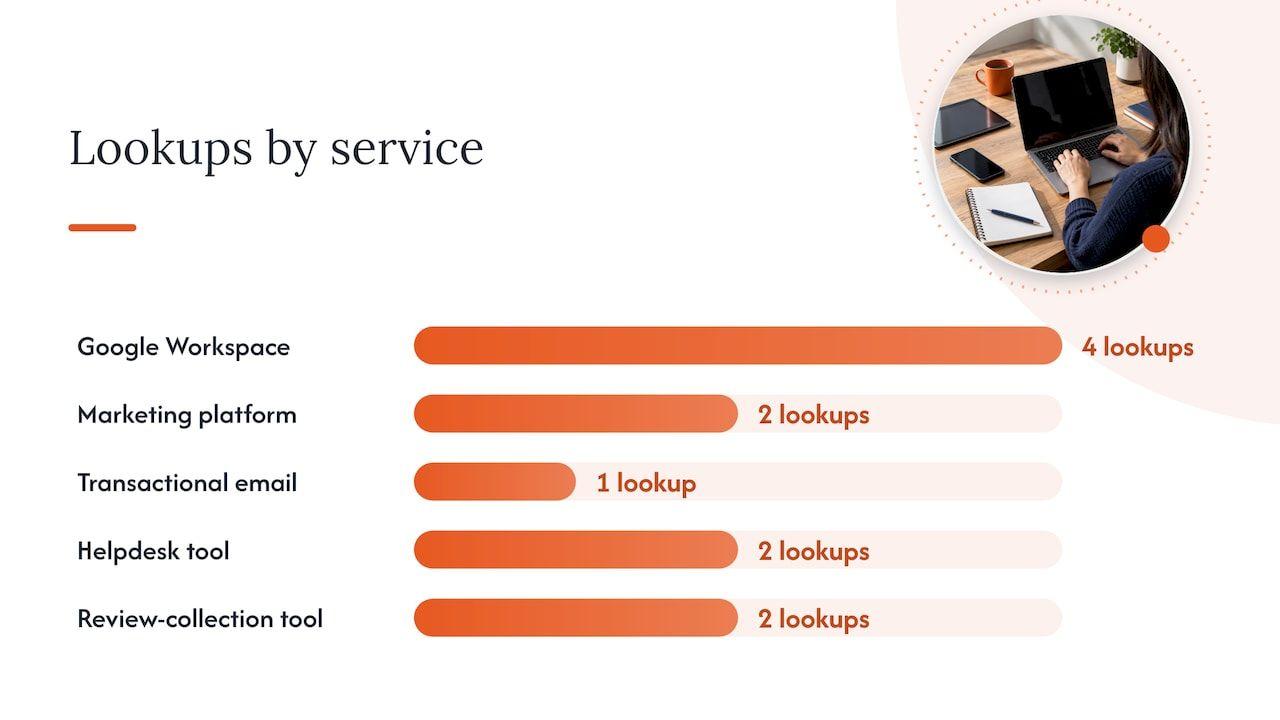
A worked example makes this concrete. Imagine a growth-stage ecommerce business whose record includes:
- Google Workspace for staff email (4 lookups, per the NCSC figure above)
- A marketing platform for newsletters (say 2 lookups)
- A transactional email service for order confirmations (say 1 lookup)
- A helpdesk tool (say 2 lookups)
- A review-collection tool (say 2 lookups)
That is 11 lookups from five includes, and nobody made an obviously bad decision along the way. Each tool was added by a different person in a different quarter, and each was individually reasonable. The figures for the last four are illustrative, because providers differ and change their records, but the arithmetic is the same one that catches real teams out.
One more point matters here. The limit applies to the whole evaluation path, including mechanisms referenced by other SPF records, not simply to the number of entries in your visible record. A nested provider record can also change at any time, so a domain that sits at nine lookups today can be at eleven next month without anyone touching your DNS. DNS caching does not rescue you either, since the limit concerns the DNS-triggering terms encountered during evaluation rather than the number of unique network queries that happen to go out.
What actually happens when you go over
The UK Government Security guidance states that exceeding the limit means SPF processing may fail, that email relying on passing SPF checks may not be delivered successfully, and that the chances of spoofed email being sent from your domain increase. So the risk runs in both directions: your genuine mail is less likely to land, and your domain is easier to impersonate.
The technical result is a PermError, which signals a permanent configuration problem with the domain’s SPF. GEN’s support documentation is clear that a strict -all at the end of your record does not convert a lookup-limit error into an ordinary fail, and that each receiver decides what to do with a PermError: it may reject the message, defer it, quarantine it, or simply give it a higher spam score. That inconsistency is part of what makes the problem so awkward to diagnose. One mailbox provider might shrug and another might send your newsletter to junk, so you see an uneven, confusing pattern rather than a clean outage.
The knock-on effect on DMARC
DMARC passes when either SPF or DKIM passes and aligns with the visible From domain. If SPF is throwing a PermError, the SPF half of that equation is gone and your domain is relying entirely on DKIM. That is fine until the day one platform sends a message without a valid, aligned DKIM signature, at which point legitimate mail fails DMARC, and if you are enforcing a quarantine or reject policy, it is the real mail that suffers. If you want a refresher on how the three protocols fit together, this overview of how SPF, DKIM and DMARC work is a good companion, and our own piece on DMARC alignment and checking vendors before enforcement covers the sequencing in more detail.
The symptoms in the real world tend to be vague: a dip in open rates on one provider, password resets arriving late, DMARC aggregate reports showing spf=permerror against sources you thought were fine. Because those signs overlap with a dozen other deliverability problems, the lookup count is worth checking early in any investigation rather than last.
How to check your lookup count
The UK Government Security guidance recommends using the NCSC’s Check your email security tool or the Hardenize domain report to check for this issue. Whichever tool you choose, a reliable count needs the following:
- The right domain. Check the domain that appears in the envelope sender (the Return-Path), which is often a subdomain managed by your email platform, and not only your main domain.
- The full resolved tree. A checker that only lists the includes in your root record is not counting what a receiver counts. You want one that follows every nested include and reports the total.
- A repeat check. Run it again after any change to your sending tools, and put a recurring reminder in the diary, since nested provider records can move underneath you.
If the number comes back at ten or below, you are compliant today, though you may have no headroom for the next tool somebody wants to connect. If it is eleven or more, work through the fixes below in order, because the early ones cost nothing and carry the least risk.
Fixing a record that is over the limit
The order matters. Start with tidy-up work that removes lookups safely, and only move to structural changes or flattening when that is not enough. The government guidance suggests reviewing the record to see whether any a, mx or include statements are unnecessary or can be merged, checking third-party includes for optimisation, and considering subdomains for services that send email.
Step 1: remove includes for services you no longer use
This is almost always where the first savings are. Old marketing platforms, a CRM you migrated away from, a survey tool someone trialled in 2022: each one is still spending part of your budget and, worse, still authorising a third party to send as your domain. Before deleting anything, check your DMARC aggregate reports and the sending platforms themselves, so you remove only what is genuinely dormant. A stale include pointing at a vendor whose record has since been removed can also trigger a PermError of its own, since receivers treat too many lookups that return nothing as an error as well.
Step 2: replace a and mx with fixed addresses
If your a or mx mechanism exists only to authorise one or two servers whose IP addresses never change, swap it for the equivalent ip4 or ip6 entries. Those cost nothing. Do this only where the addresses really are static, and keep a note of why they are there, so that whoever migrates your mail server in two years knows to update the record.
Step 3: delete any ptr mechanism
The ptr mechanism is slow, unreliable and discouraged. It costs lookups and is capped in how many names it will resolve, so there is almost never a reason to keep it.
Step 4: move senders onto subdomains
This is the change that gives you lasting headroom. The NCSC notes that each subdomain has its own 10-lookup budget (and its own 450-character limit on record size), and recommends that organisations using third-party suppliers create a subdomain for each, with a marketing subdomain for mass mailings and newsletters given as the example. Rather than cramming every vendor into the root domain, you might send newsletters from one subdomain, product notifications from another and staff mail from the main domain.
There are further benefits beyond SPF. Separate subdomains give you separate reputations, so a bad campaign does not drag down password resets, and they make it much easier to see which stream is responsible when something goes wrong. The cost is planning: DKIM, return-path and DMARC alignment need to be set up for each subdomain, and sending patterns on a new subdomain need to be warmed up sensibly. Our guide to sending architecture and authentication explains how to structure this, and our practical SPF record setup guide covers the record syntax itself.
Step 5: consider flattening, carefully
Flattening means replacing includes with the IP addresses they resolve to, so the lookups disappear. It does work, and it is sometimes the only route when you genuinely need many providers on one domain. The catch is that a flattened list is a snapshot. When a provider adds or changes its sending ranges, your hand-written copy becomes out of date and mail from the new addresses begins to fail SPF, usually without any warning. Some providers already publish records that list addresses directly, while others nest several regional includes, so the saving varies enormously from one to the next.
If you flatten, do it for a provider whose ranges are stable, document who is responsible for refreshing it, and monitor for failures. Flattening without an owner trades a loud problem for a silent one.
Keeping the count under control
Most records go over the limit because nobody owns the record. A few habits prevent that:
- Add a check to your onboarding process. Any new tool that sends email should be assessed for its SPF cost and its DKIM alignment before it goes live, not afterwards.
- Keep a register of senders. List every platform that sends as your domain, who owns it, which stream it carries and which subdomain it uses.
- Review quarterly. Nested provider records change on their own schedule, so a regular recount catches drift before it reaches your recipients.
- Watch the DMARC reports. A sudden appearance of permerror results is the earliest signal you will get.
The SPF record is only one part of the picture. Even a perfectly counted record will not rescue a sending stream with poor list quality or overlapping lifecycle triggers, which is why we look at authentication alongside sending behaviour when we investigate a problem. If you want the wider foundation, our explainer on SPF, DKIM and DMARC sets it out in plain language.
When to bring in a specialist
If your record is over the limit and you cannot tell which senders are safe to remove, or if you are partway through an ESP migration and the old and new platforms must both be authorised for a while, the risk of breaking live mail is real. This is the kind of work we do for UK and European SaaS, ecommerce and fintech teams. Our Deliverability Review and Fix combines a detailed investigation with 45 days of implementation support, with a senior consultant working in your platforms alongside your team, and Managed Deliverability adds daily monitoring, incident response and one agreed improvement each month so the record does not drift back over the limit.
If you only have a specific question, such as whether your subdomain plan will hold together, an advisory session is £250 one-off. Or if you would rather start with a free look at where things stand, you can book a free deliverability check-up.
FAQ
Does the SPF 10 lookup limit include the first TXT lookup for my domain?
No. Fetching your own domain’s SPF record does not count towards the ten. The budget is spent on the include, a, mx, ptr, exists and redirect terms that the record then triggers, including any that sit inside the records of the providers you include.
Is an SPF record with too many DNS lookups the same as an SPF fail?
No, it is a PermError, which signals a permanent configuration problem rather than an unauthorised sender. Having -all in the record does not turn it into a normal fail, and each receiver decides whether to reject, defer, quarantine or simply score the message higher for spam.
Can I just create a second SPF record to get more lookups?
No. A domain should publish a single SPF record, and splitting your senders across two records on the same name is a separate error that breaks evaluation. The supported way to gain more budget is to use subdomains, because each one has its own set of ten lookups.
How often should I recheck my SPF lookup count?
Recheck whenever you add or remove a sending tool, and at least quarterly in any case. A provider can edit its own nested record at any time, so your total can rise without any change on your side.
Sources
- NCSC: Create and iterate an SPF record
- UK Government Security: SPF DNS lookups over limit
- Adobe Marketo Engage: Common SPF errors and fixes
- SPF, DKIM and DMARC: How They Work and How to Roll Them Out