
SPF macros are placeholders inside an SPF record that the receiving mail server replaces with details of the message in front of it (the connecting IP address, the sender’s domain, the local part of the address and so on) at the moment the check runs. They are defined in RFC 7208, they are almost always paired with the exists mechanism, and they are useful in a small number of genuinely awkward setups. For most senders they are unnecessary, and for some they are an expensive way to break authentication quietly, so this guide covers how they work, what the syntax means, where they help and where they hurt.
Table of Contents
- What an SPF macro actually is
- The syntax, piece by piece
- How macros get expanded in a real check
- A worked example with exists
- Macros and the 10-lookup limit
- Where macros go wrong
- Testing and troubleshooting macro-based records
- Should you use SPF macros?
- Getting a second pair of eyes on your record
- FAQ
- Sources
What an SPF macro actually is
An ordinary SPF record is static: it lists networks and includes, and the receiver walks through them in order until something matches. A macro makes part of a domain name inside that record dynamic. When the receiving server evaluates the record, it swaps each macro for a value taken from the current connection or message, then carries on as if you had written the resulting string by hand. The RFC describes macro expansion as part of the evaluation itself, which is why you cannot see the finished value by looking at your DNS zone.
That last point catches people out. Macro values only exist while a particular message is being processed, so a record containing them cannot be “checked” in the abstract. As Suped’s guidance on checking macro values puts it, validating the syntax with an SPF checker is the most you can do statically; to see real behaviour you need to test with actual messages or simulate a specific IP and sender.
The syntax, piece by piece
Every macro begins with a percent sign followed by a letter in braces, for example %{i}. After the letter you can add optional transformers and delimiters, and the whole thing is then expanded in place. The structure is set out in section 7 of the RFC, and it is simpler than it looks once you split it into three parts.
The macro letters
The letters you will meet most often are these:
| Macro | What it expands to | Typical use |
|---|---|---|
| %{s} | The full sender address (from the envelope) | Per-sender lookups |
| %{l} | The local part of the sender address (before the @) | Restricting a service to one mailbox |
| %{o} | The domain part of the sender address | Per-domain policies |
| %{d} | The domain currently being checked | Building names that follow the domain |
| %{i} | The connecting IP address | Per-IP allow lists via exists |
| %{p} | The validated reverse-DNS name of the IP | Rarely used, discouraged |
| %{v} | in-addr for IPv4 or ip6 for IPv6 | Choosing the right zone for each IP version |
| %{h} | The HELO/EHLO domain | HELO-based checks |
The RFC also defines %{c}, %{r} and %{t} (the readable IP, the receiving host name and a timestamp), but these are only allowed in the explanation string of an exp modifier, not in ordinary mechanisms. Two further literal forms exist: %% for a percent sign, %_ for a space and %- for a URL-encoded space.
Upper-case letters do the same job as lower-case ones but URL-escape the result, which matters only when an expanded value is going to end up in a web address.
Transformers: digits and reversal
After the letter you can add a number, the letter r, or both. A number keeps only that many right-hand parts of the value once it has been split, and r reverses the order of the parts. So if the sender is strong-bad@email.example.com, then %{d2} gives example.com, and %{l} gives strong-bad. Reversal is what makes IP lookups line up with DNS conventions: %{ir} turns 192.0.2.3 into 3.2.0.192, which is the order reverse-DNS style zones expect.
Delimiters
By default the value is split on full stops. You can name other delimiters (the RFC allows ., -, +, ,, /, _ and =) so that, for instance, a local part such as first-last can be split on the hyphen and recombined with dots, giving you something that is a legal DNS label sequence. Combining all three, %{l1r+-} means: take the local part, split on + and -, reverse the parts, keep the right-most one.
How macros get expanded in a real check
Walk through a single message. A server at 192.0.2.10 connects and says it is sending for news@example.co.uk. The receiver fetches the SPF record for example.co.uk and reaches a mechanism such as exists:%{i}._spf.example.co.uk. It expands %{i} to the connecting IP, builds 192.0.2.10._spf.example.co.uk, and asks DNS whether an A record exists for that name. If it does, the mechanism matches and the qualifier applies; if not, evaluation moves on to the next term.
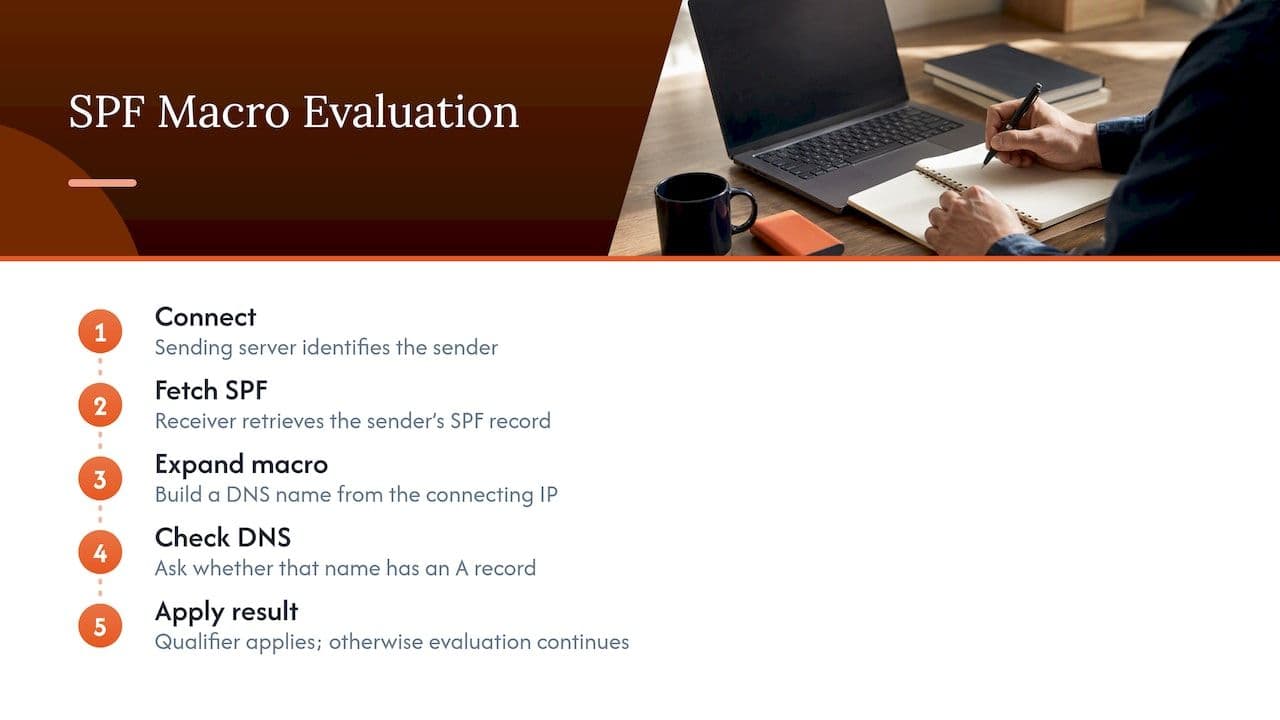
For IPv6, %{i} expands into dotted nibbles (thirty-two hexadecimal digits separated by full stops) so the name remains a valid DNS name, which is exactly why the %{v} letter exists for building a zone name that works for both address families.
Two details matter in practice. First, if the expanded name grows beyond 253 characters, the implementation drops labels from the left until it fits, so very long local parts can produce lookups you did not intend. Second, if the syntax is wrong, for example a percent sign followed by a character the specification does not allow, the whole evaluation ends in a permerror, and many receivers will treat that as a failure.
A worked example with exists
The exists mechanism matches when the name you give it resolves to any A record at all; the address it resolves to is irrelevant. Because the name can contain macros, that makes it a tiny remote database: you decide which IP addresses are allowed by publishing or withholding DNS entries rather than editing the SPF record itself. The mechanism is described in section 5.7 of the RFC, and the pattern looks like this:
<code>example.co.uk.  TXT  "v=spf1 exists:%{ir}.%{v}._spf.example.co.uk -all"
</code>
To authorise 192.0.2.10, you publish an A record (any value, conventionally 127.0.0.2) at 10.2.0.192.in-addr._spf.example.co.uk. To revoke it, you delete that record. The SPF record never changes, it stays tiny, and it costs the receiver exactly one lookup for the exists term however many senders you have approved. A detailed walkthrough of this technique as a dynamic allow list shows it applied to a larger estate, and is worth reading if you want to see the zone layout in full.
A second, more common pattern uses the local part to restrict a third-party service to one mailbox. If a ticketing platform should only ever send as support@yourdomain, a macro on %{l} lets you publish an allowance for that single local part, so the platform cannot send as ceo@yourdomain even though its servers are otherwise authorised. It is a neat idea, and it is also the sort of thing that works beautifully until a supplier changes the envelope sender it uses and mail starts failing.
The big vendors use macros too. Cisco’s recommended SPF record for its Cloud Email Security service uses a macro to cut down the number of lookups, and Cisco maintains the records behind it, so customers never have to touch them. That is the ideal division of labour: someone with a good reason builds the machinery, and the people publishing the record simply include it.
Macros and the 10-lookup limit
This is the question that brings most people to the topic, so it is worth being blunt. Macros do not raise the limit. The specification caps the number of DNS-querying terms in one evaluation at ten, and every exists that a macro expands into still counts as one of them, as the RFC’s evaluation rules make clear. What macros change is the shape of the problem: instead of ten includes that each hide further nested lookups, you can have one exists that answers for hundreds of authorised IPs.
That is why macros are often presented as a “better flattening”. Flattening copies the IP ranges of your vendors into your own record, which gets you under the limit but leaves you with a static snapshot that goes stale when a vendor adds a range. A macro-driven exists keeps the lookup count at one but moves the maintenance burden into a DNS zone you have to keep accurate yourself. Neither approach removes the work; each relocates it.
The simpler option most teams should try first
Before building a dynamic zone, look at what the UK government’s own guidance suggests. The NCSC recommends using subdomains to get around the 450-byte record size and 10-lookup restrictions, and says subdomains also give you more visibility and control over each stream of mail. Separately, the guidance on SPF records that exceed the DNS lookup limit advises removing unnecessary mechanisms, merging a, mx or include statements, optimising third-party includes and considering subdomains for email services.
In our experience of audits, the usual cause of an over-limit record is not a lack of cleverness but a pile of includes left behind by tools nobody uses any more. Clearing those, and moving marketing, transactional and corporate mail onto separate subdomains, normally gets a record comfortably under the limit with no macros at all. If you want the fundamentals of getting a record right first, our guide to SPF record setup for UK teams covers them, and the way sending streams are split is explained in our piece on sending architecture and authentication.
Where macros go wrong
The specification itself is candid about the downsides. Its security and operational considerations note that macros reduce how effectively SPF results can be cached, because each message can generate a different query, and that this can put real strain on DNS. It also warns about reliance on %{p}, since the reverse-DNS name it uses is controlled by whoever owns the IP range, not by you, which is why the ptr mechanism and %{p} are both discouraged in the RFC. The practical failure modes look like this:
- Syntax slips. One stray percent sign or an invalid letter returns
permerrorfor every message, not just some of them. - Invalid DNS characters. A local part can contain characters that are legal in an email address but not in a DNS label. The expanded name then fails to resolve and the
existsquietly does not match. - Operational drift. The record says one thing and the zone behind it says another. Nobody remembers why
10.2.0.192.in-addr._spfexists, so the first person to tidy the zone removes a sender. - Information leakage. Because the receiver queries your DNS with expanded values, your naming scheme and, depending on design, parts of your internal structure become visible in query logs.
- Patchy support. Some validators and libraries have historically handled macros badly, which produces false failures at particular receivers. You may never see them unless you are watching DMARC reports closely.
Order matters as well. In a setup with several sending platforms, a record where a macro-based term sits ahead of an include can produce results that differ depending on which term matches first, and the symptom is intermittent failures from a single vendor rather than a clean outage. That sort of fault is miserable to diagnose from a ticket that merely says “some emails are going to spam”.
Testing and troubleshooting macro-based records
Because the expansion happens on the receiving side, testing is a matter of simulating the inputs. A workable routine runs as follows.
- Validate the syntax. Run the record through an SPF checker to catch typos, a missing
v=spf1tag (the version tag must be there, and deprecated forms such asspf2.0should be corrected) and lookup overages. - Expand by hand. Pick a real sending IP and a real envelope sender, work out what each macro becomes, and query that exact name with
digornslookup. If it returns an A record, theexistswill match. - Test each family. Do the same for an IPv6 sender if you have any, since the expansion differs.
- Send real messages. Mail an external mailbox from each platform and read the
Received-SPForAuthentication-Resultsheader to confirm the outcome. - Watch the reports. After going live, DMARC aggregate reports show you per-source SPF results. If you are heading towards enforcement, check alignment as well as pass or fail, which is what our note on DMARC alignment, vendors and forwarding is about.
The exp modifier can help during troubleshooting. It points to a TXT record whose text is returned to the sender in the rejection message when SPF fails, and this is one of the few places the %{c}, %{r} and %{t} macros are permitted, so you can include the readable IP and receiving host in the explanation. Keep the wording free of anything you would not want a stranger to read, because it goes to whoever was rejected.
Should you use SPF macros?
A short decision guide helps:
- Your record is over ten lookups because of stale includes. Clean it up. No macros needed.
- You send from several business units or brands. Use subdomains, each with its own short record, as the NCSC suggests.
- You operate a large, changing estate of your own IPs (a hosting provider or an in-house MTA fleet) and the team can maintain a DNS zone properly. A macro-based
existscan be justified, with documented ownership and monitoring. - You want to stop one vendor sending as arbitrary mailboxes. A
%{l}restriction is possible, but test it with the vendor’s real envelope sender first, and weigh it against simply tightening DMARC and the vendor’s own settings. - You are tempted because a blog said macros are self-healing. They are self-maintaining only if the zone behind them is.
It is also worth remembering that SPF is one layer of three. Authentication gets your mail judged fairly, but whether recipients then engage depends on who you send to and what they receive, and a well-run email target marketing approach is what turns a clean authentication result into opens rather than complaints.
Getting a second pair of eyes on your record
Macro-heavy SPF is exactly the kind of configuration where a fresh review pays for itself, because the failures are intermittent and the symptoms (a dip in open rates, a slice of mail in spam) look like a dozen other problems. At Digistrat, the work is carried out directly by a senior specialist with experience inside major ESPs, and we fix what we find rather than handing over a list of warnings. If you want a quick view of whether authentication is part of your problem, start with the free health check, or book a one-off advisory session at £250 to talk through a specific record with someone who will read it line by line.
For wider changes such as authentication setup, ESP migration or reputation recovery, the same page lists the engagements we offer, and the Email Deliverability Audit is the usual starting point when you want the whole picture, not just SPF.
FAQ
Do SPF macros get around the 10 DNS lookup limit?
No. Each exists mechanism that a macro expands into still counts as one lookup against the limit of ten, so macros do not raise the ceiling. What they can do is let a single lookup stand in for a large number of authorised senders, which changes how you organise the record rather than how many lookups are allowed.
Which SPF macro should I use most often?
In practice %{i} (the connecting IP) and %{d} (the current domain) cover most legitimate uses, usually inside an exists term, with %{l} for restricting a service to one local part. Avoid %{p}, because the RFC discourages it and it relies on reverse DNS that you do not control.
Why does my SPF record show permerror after I added a macro?
The usual cause is invalid syntax: a percent sign not followed by a valid macro form, a wrongly written letter or a malformed transformer. The specification treats an invalid macro as a permanent error, so correct the string, then retest with a sample IP and sender.
Can I check what an SPF macro will expand to?
Not from the DNS record alone, because values only exist when a message is processed. Work out the expansion for a real IP and sender by hand, query the resulting name in DNS, and then confirm the outcome in the headers of a test message.
Are SPF macros better than SPF flattening?
They solve the same problem with different trade-offs. Flattening is static and can go stale, while macros stay current only if the DNS zone behind them is carefully maintained. For most organisations, cleaning up includes and using subdomains beats both.
Sources
- RFC 7208: Sender Policy Framework (SPF)
- NCSC: Create and iterate an SPF record
- UK Government Security: SPF DNS lookups over limit
- Cisco: Understanding the CES SPF record
- Suped: How to check SPF macro values
- JamieWeb: Using SPF macros to solve the operational challenges of SPF
- Loop Optimizations: Email target marketing
