
A DMARC forensic report, now more formally called a failure report, is a message-level notification that a receiving mail server may send to the address in your ruf= tag when an individual email fails DMARC. It is useful for debugging a specific authentication problem, but it is patchy (many large receivers never send one), it can carry personal data (which matters under UK GDPR), and it is no substitute for the aggregate reports that tell you what is actually happening across your domain. This guide explains what is inside a forensic report, who sends them, how to switch them on safely, and when it is sensible to leave them off.
Table of Contents
- What a DMARC forensic report actually is
- What is inside a failure report
- Who sends them, and why Gmail does not
- How to request forensic reports
- Privacy: the part to settle first
- When forensic reports genuinely help
- A worked example
- Making reports someone’s job
- Getting help with your set-up
- FAQ
- Sources
What a DMARC forensic report actually is
DMARC gives a domain owner two feedback channels. The first is the aggregate report, sent to the address in rua=, which is a daily XML summary of what a receiver saw from your domain. The second is the failure report, sent to the address in ruf=, which is generated per message when something fails. RFC 9991 is the document that now describes failure reporting, having taken over from the failure-reporting parts of the original RFC 7489, and it is where the term “failure report” comes from. Plenty of people still say forensic report, RUF report or just “the ruf thing”, and all of them mean the same mechanism.
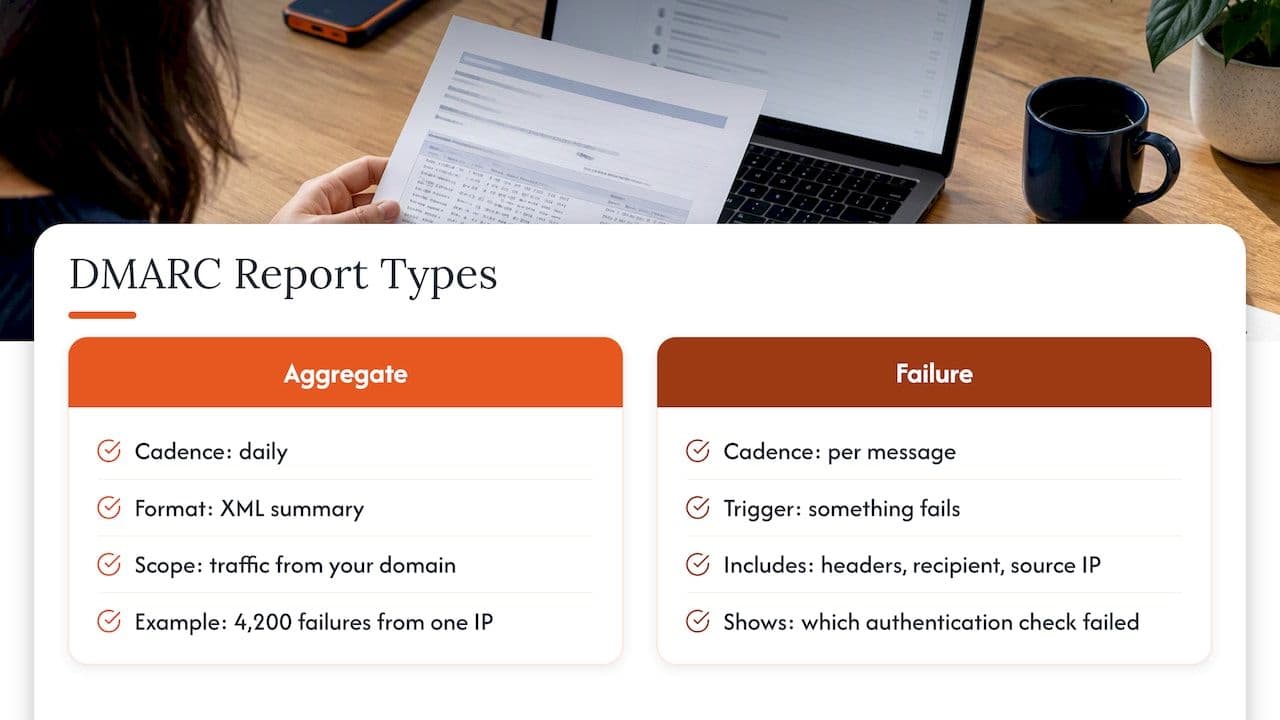
The practical difference is granularity. An aggregate report might tell you that 4,200 messages from one IP address failed alignment yesterday. A failure report tells you about one of them: the original headers, the recipient, the source IP, and which authentication check went wrong. That level of detail is exactly why people want them, and exactly why receivers are cautious about sending them.
Aggregate and forensic reports side by side
| Aggregate (RUA) | Forensic or failure (RUF) | |
|---|---|---|
| Scope | Summary of all traffic from a receiver over a period | One message that failed |
| Typical content | Source IPs, volumes, SPF, DKIM and alignment results, disposition | Headers, sometimes body snippets, authentication results |
| Arrival | Regularly, usually daily, from each reporting receiver | Only when a failure occurs and the receiver chooses to send |
| Reliability | Broad receiver support | Patchy, many large receivers send none |
| Privacy risk | Low, mostly IP-level data | Higher, may include personal data |
| Best use | Ongoing monitoring and policy decisions | Targeted investigation of a specific failure |
If you take one idea from the table, make it the last row. Google Workspace’s guidance for administrators is to regularly monitor the daily aggregate reports, because they show your own infrastructure, your third-party senders and your pass rates without the per-message exposure.
What is inside a failure report
A failure report normally arrives as an email with a machine-readable part in the Abuse Reporting Format, alongside a copy of the failed message or, more often, just its headers. The fields you will care about are these:
- Source IP. The server that tried to deliver the message. This is usually the first thing to check, because it tells you whether the sender is one of yours, one of your vendors or somebody pretending to be you.
- Authentication results. The receiver’s verdict for SPF, DKIM and DMARC, including which domain was evaluated (the domain in the return path for SPF and the
d=domain in the DKIM signature). - Original headers. The
From,Subject,Message-IDand the routing trail, which let you trace the message back through your own logs. - Delivery result. Whether the receiver delivered, quarantined or rejected the message under your policy.
- Reported domain and arrival date. Useful for correlating with a campaign send or a DNS change.
What you cannot rely on is consistency. Different receivers redact different things, and some include only a handful of headers. Treat each report as a clue rather than as evidence.
Who sends them, and why Gmail does not
This is the part that surprises most teams. Reports are generated at the receiver’s discretion, so adding a ruf= tag is a request and never a guarantee. Google’s setup documentation for DMARC covers the reports Google Workspace and Gmail work with, and per-message forensic data is not part of that picture, which is consistent with the privacy concerns that have made large mailbox providers reluctant to send raw message details to third parties. Other receivers, including some smaller providers and self-hosted mail servers, may send them depending on how their software is configured.
The consequence for a sender in the UK is simple: the volume of failure reports you receive will tell you almost nothing about how many messages are failing. A quiet ruf= mailbox does not mean authentication is healthy, and a busy one does not mean it is broken. It means that a particular subset of receivers chose to report.
A second consequence is that failure reports skew towards the receivers least like your customers. If most of your subscribers sit on the large consumer mailbox providers, the reports you do receive come from the minority of your audience whose providers happen to send them. That is another reason to read them as anecdotes and to confirm anything important in your aggregate data.
How to request forensic reports
The set-up is a small change to the DMARC TXT record at _dmarc.yourdomain.co.uk. A record that requests both report types looks like this:
v=DMARC1; p=none; rua=mailto:dmarc-agg@yourdomain.co.uk; ruf=mailto:dmarc-forensic@yourdomain.co.uk; fo=1
The ruf= tag names where failure reports should go, and, as RFC 9991 sets out, the fo= tag decides what triggers one. Before you publish anything, work through this sequence:
- Create a dedicated mailbox or alias. Do not point
ruf=at a shared inbox that sales or support also read. Failure reports are not meant for the general workforce. - Restrict access. Give it to the smallest group that can act on it, usually deliverability, IT security or a named engineer.
- Decide retention before you collect. Agree how long reports are kept and who deletes them. Seven to thirty days is a common working window for debugging, though your own data protection lead should set the figure.
- Start with one problem in mind. Ask what you are trying to find out, for example why a particular vendor stream fails alignment, then pick the
fo=value accordingly. - Set a review date. Switch the tag off again when the investigation is finished, or at least review whether it is still earning its keep.
If you send reports to an external address (a different domain from the one being protected), the receiving domain has to publish a DNS record authorising it, which is a verification step defined in the specification. Many teams forget this and then wonder why nothing arrives.
Choosing a value for fo=
The options matter more than most guides admit:
- fo=0 (the default) asks for a report only when both SPF and DKIM fail to produce an aligned pass. This keeps volume down and surfaces the genuine DMARC failures.
- fo=1 asks for a report when any underlying mechanism fails. This is the setting for debugging a specific SPF or DKIM problem, for example a forwarding scenario where SPF breaks but DKIM survives. The original specification defines these values, and the catch is volume: if your domain is being spoofed or one of your senders is misconfigured,
fo=1can fill a mailbox quickly. - fo=d reports on DKIM failures only, and fo=s reports on SPF failures only. These are handy when you already know which mechanism is the suspect.
A sensible pattern is to run fo=1 for a few days against a single known problem, read what arrives, and then drop back to fo=0 or remove ruf= altogether.
Privacy: the part to settle first
The reason receivers are cautious is the reason you should be. A failure report copies headers and sometimes body fragments from a real message, which means it can contain recipient addresses, subject lines and routing data about identifiable people. The ICO makes the underlying point in its guidance that information relating to an identifiable person is personal data, and where you use personal information for email marketing you must comply with UK GDPR and the Data Protection Act 2018 as well as PECR. Headers and routing information about an identifiable person can fall on the personal data side of that line.
In practice, that raises four questions you should be able to answer before you publish a ruf= address:
- Who is the controller for these reports? If your own staff receive and read them, you are processing personal data and should record that.
- Are you sending them to a third-party platform? Many DMARC reporting tools offer to ingest
ruf=data. That makes the vendor a processor, which needs the usual contract and due diligence, and it widens the number of places a recipient’s address can end up. The ICO’s own advice on disclosing information safely is a good prompt for the mindset: think about who can see what before you share it. - Is your retention period documented? Keeping failure reports indefinitely because nobody got round to deleting them is the easy mistake.
- Have you told your data protection lead? Ask them whether it belongs in your record of processing, rather than assuming it does not.
This is not legal advice, and your DPO or legal adviser should make the final call for your organisation. The point is that the question gets asked before the tag goes live rather than after.
When forensic reports genuinely help
There is a narrow set of situations where failure reports earn their place:
- A vendor stream that fails alignment and you cannot see why. A single report may show that the return path domain belongs to the vendor while the visible
Fromis yours, which is the classic alignment gap. Our guide to checking vendors and forwarding before enforcement goes through how to close it. - A forwarding problem. Mailing lists and forwarders often break SPF, and the report can show the pattern.
- Suspected spoofing. A report that shows an unfamiliar source IP using your domain in the
Fromheader is a quick confirmation, although your aggregate data will show the same IP in volume terms. - A DKIM key or selector issue. After a rotation or an ESP change, a failure report can point to the selector that no longer verifies.
Where teams run into trouble is expecting that same mailbox to behave as a monitoring system. It will not, for the reasons above. A deliverability incident that costs revenue (a sudden fall in inbox placement after an ESP migration, say) is solved by comparing aggregate data, DNS records, ESP logs and mailbox provider tools, with a few failure reports as supporting detail.
A worked example
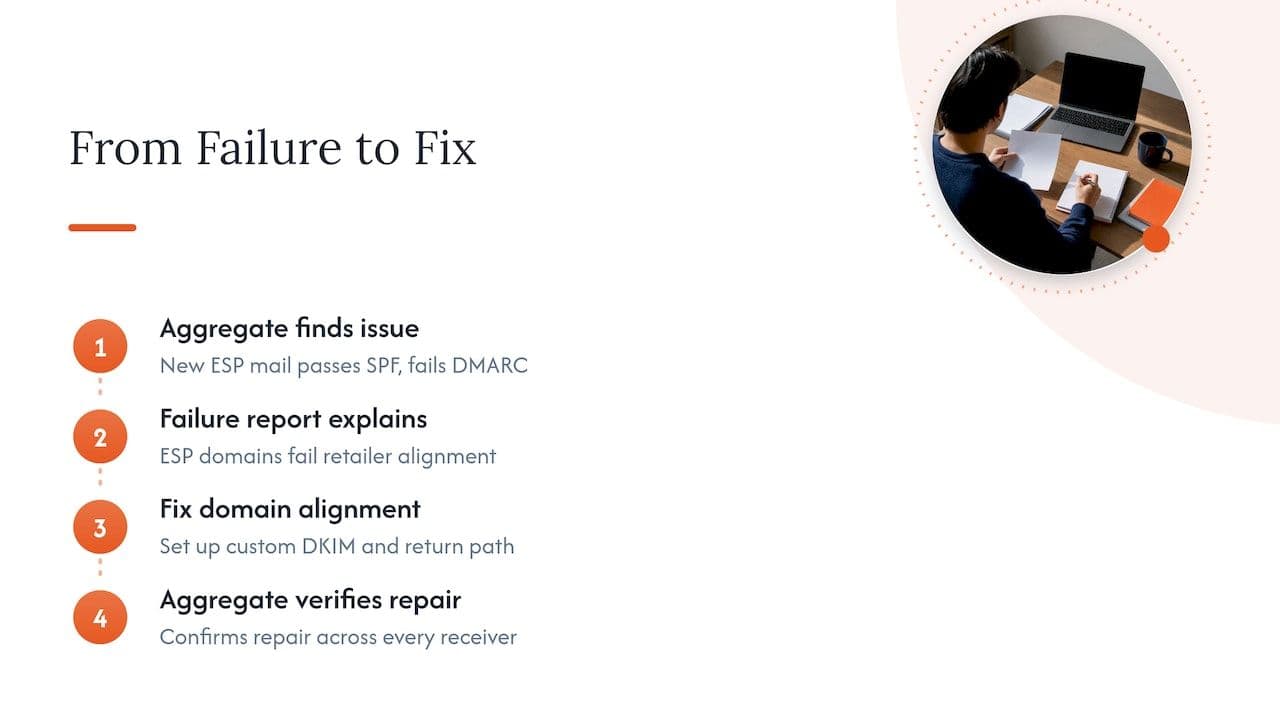
Imagine a UK retailer that moves its promotional email to a new ESP in the autumn, ahead of the busy season. Three weeks after the switch, open rates on one mailbox provider drop and a handful of customers say messages are missing. The aggregate reports show a block of mail from the new ESP’s IP range passing SPF but failing DMARC, because the ESP signs with its own domain rather than the retailer’s.
A failure report from a smaller receiver confirms the detail: the DKIM d= domain is the ESP’s, the SPF return path is the ESP’s, and neither aligns with the retailer’s From domain. The fix is to set up custom DKIM signing and a custom return path on the retailer’s own domain. The aggregate data then confirms the repair across every receiver, which is the part the single failure report could never do. That division of labour, with aggregate reports to find and verify and failure reports to explain, is the sensible way to use both.
If you are earlier in the journey and still planning enforcement, the sequencing in our 90-day DMARC plan for UK teams shows where reporting fits, and our plain-English guide to SPF, DKIM and DMARC covers the foundations.
Making reports someone’s job
The usual failure is organisational rather than technical. Reports arrive, nobody owns them, and six months later the mailbox holds thousands of unread messages and a policy still sitting at p=none. Name an owner, agree who gets alerted when a new unknown source appears, and write down what happens next. Where marketing, IT and security each assume another team is watching, a simple shared workflow helps, and even a general-purpose tool for automating follow-up and record updates can keep an investigation from stalling between teams, though the judgement about what a failure means stays with a person who understands your sending estate.
Whatever route you take, tie the work back to outcomes. A failing authentication stream is not an abstract compliance matter, it is mail that is quietly discarded or filed in spam, and the cost shows up as lost orders and sign-ups. Our piece on sending architecture and authentication looks at how those technical choices turn into inbox placement.
Getting help with your set-up
If your reports are confusing, your policy has been stuck at monitoring for months, or you are about to change ESP and want authentication right first time, we can help. Our deliverability services include a free health check, authentication setup, ESP migration support and reputation recovery, all carried out directly by a senior specialist who has worked inside major ESPs. If you would rather talk a specific problem through first, a 90-minute advisory session is available for £250 as a one-off fee.
FAQ
Why am I not receiving any DMARC forensic reports?
Most often it is because the receivers that handle your mail do not send them. Failure reports are optional, and the largest mailbox providers do not supply them in the way aggregate reports are supplied, as Google’s DMARC documentation reflects. Also check that the ruf= address is valid, that any external domain has published its authorisation record, and that your fo= value actually matches the failures you are seeing.
What is the difference between RUA and RUF?
RUA is the address for aggregate reports, which summarise the mail a receiver saw from your domain over a period. RUF is the address for failure reports, which describe individual messages that failed. Aggregate data is the reliable, continuous view, while failure reports are an occasional, receiver-dependent extra.
Are DMARC forensic reports personal data under UK GDPR?
They can be, because they may contain recipient addresses, subject lines and routing details linked to identifiable people. The ICO’s direct marketing guidance confirms that UK GDPR applies where personal information is used for email marketing. Speak to your data protection officer or legal adviser about access, retention and any third-party processing before you enable ruf=.
Should I use fo=0 or fo=1?
Use fo=0 as the quiet default, because it only reports when both SPF and DKIM fail. Switch to fo=1 temporarily when you are debugging a specific mechanism, for example forwarding that breaks SPF, and expect a high volume if the domain is being spoofed. Return to the lower setting when you are done.
Sources
- RFC 9991: DMARC Failure Reporting
- RFC 7489: DMARC
- Google Workspace Help: Set up DMARC
- Google Workspace Help: About DMARC reports
- ICO: What else do we need to consider? (electronic mail marketing)
- ICO: How to disclose information safely
