IP warming is the deliberate, gradual increase of email volume from a new or dedicated IP address so mailbox providers learn to trust it before you rely on it for full-scale sending. The correct approach is always the same: confirm your SPF, DKIM and DMARC records first, start with your most engaged subscribers, increase volume slowly over several weeks rather than days, and watch bounce and complaint rates at every step. Rush any of those stages and you risk landing in spam long before your campaigns get a fair hearing.
Table of Contents
- What is IP warming and how do mailbox providers judge a new IP?
- Why does skipping the warm-up put revenue at risk?
- What needs to be in place before you send a single warming email?
- How should a realistic IP warming plan progress week by week?
- What operational habits protect reputation while you warm an IP?
- Which metrics and thresholds actually need daily attention?
- What are the most common IP warming mistakes and how do you recover?
- What does a practical, checklist-driven approach to warming look like?
- The editorial verdict: what most warming advice gets wrong
- Book an email deliverability audit before you next warm an IP
- Sources
- FAQ
What is IP warming and how do mailbox providers judge a new IP?
Mailbox providers treat a new IP address rather like a lender treats someone with no credit history. They have no record of your sending behaviour, so they watch closely and grant trust in small increments, not all at once. Every message you send in those early weeks either builds that trust or erodes it, and the providers themselves openly document this behaviour rather than leaving senders to guess.
Reputation, in this context, is not one number but an aggregate of many signals. Spamhaus, one of the industry’s most widely used reputation and blocklist services, describes IP reputation as something mailbox providers compute from a mix of sending patterns, engagement, complaints and blocklist history, then use to decide whether mail lands in the inbox or gets filtered out.
The signals that matter most during warming include:
- Volume trajectory: sudden jumps look suspicious even when the content is legitimate.
- Engagement: opens and clicks tell a provider real humans want this mail.
- Complaint rate: recipients marking mail as spam is the fastest way to sink a new IP.
- Bounce rate: hitting invalid or dead addresses signals poor list hygiene.
- Deferrals: a provider temporarily refusing mail is an early warning, not yet a failure.
Shared IPs, used by many senders through the same platform, benefit from an existing reputation built by others, which is why they rarely need formal warming. Dedicated IPs give you full control over that reputation, but the responsibility for building and protecting it sits entirely with you.
Why does skipping the warm-up put revenue at risk?
Send at full volume from day one on a new dedicated IP and the short-term risk is immediate: providers throttle or defer your mail while they work out whether you are a legitimate sender or a spam source. The longer-term risk is worse, because a poor reputation earned in week one can take months to repair, not days.
For any business where email drives revenue, that delay is not abstract. Campaigns queued behind a damaged IP simply do not arrive, and open rates that should convert into sales instead convert into wasted marketing spend. Mailchimp’s guidance is explicit that senders should pause volume increases the moment complaint or bounce rates climb, precisely because pushing through a bad signal compounds the damage rather than working through it.
Different mailbox providers also tolerate different speeds. A pace that Gmail accepts without complaint might trigger deferrals at Microsoft, which is why Microsoft’s own warm-up guidance recommends monitoring and adapting pace by provider individually rather than applying one blanket schedule everywhere.
What needs to be in place before you send a single warming email?
A warm-up plan built on shaky foundations is a waste of five weeks. Before you send anything from a new IP, work through this checklist in order:
- Verify authentication. SPF, DKIM and DMARC records must be published, correctly aligned, and tested against a real send, not just configured on paper.
- Set up bounce handling and complaint logging. You need automatic capture of hard bounces, soft bounces and feedback-loop complaints from day one, because you cannot react to a signal you are not recording.
- Segment your list by recency. Split subscribers into 30, 60 and 90-day engaged cohorts. Mailchimp’s own recommendation is to begin with the most recently engaged group and expand outward only once the IP shows stable performance.
- Decide shared versus dedicated. If your volume is modest, a shared IP with an established reputation is usually the sensible route. Dedicated IPs make sense once you are sending consistently enough (commonly cited as somewhere north of 50,000 to 100,000 emails a month) to justify the ongoing maintenance a dedicated reputation demands.
- Plan capacity honestly. Warming takes weeks of restrained sending, so build that runway into your marketing calendar now rather than discovering it when a launch campaign is due.
Pro Tip: Do not wait until your migration date to test DKIM alignment. Send a handful of test messages to your own mailboxes at Gmail, Outlook and Yahoo a full week before warming begins, so any authentication fault gets fixed while there is still no reputation at stake.
How should a realistic IP warming plan progress week by week?
There is no single universal schedule, but the shape of a sensible one is well established. A conservative example, suitable for most mid-sized senders, might look like this:
- Week 1: send to your most engaged 30-day subscribers only, starting at a few hundred emails a day.
- Week 2: double that volume if bounce and complaint rates stayed low, and begin folding in your 60-day engaged cohort.
- Week 3 to 4: continue doubling roughly every few days, widening to your 90-day engaged segment as metrics hold steady.
- Week 5 onward: approach full planned volume, now sending to your broader active list rather than only the most engaged tier.
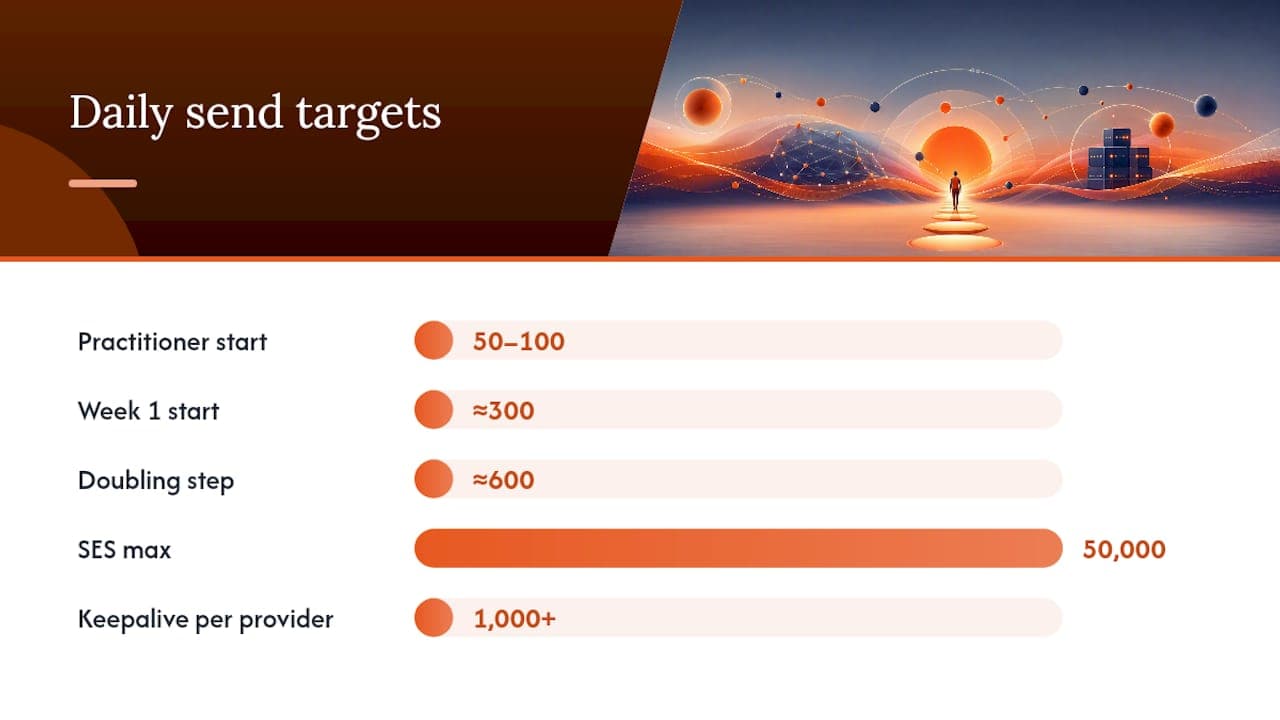
Vendors have codified similar logic into automatic systems. Amazon SES’s documented warm-up process increases the percentage of traffic routed through a new dedicated IP automatically, reaching a maximum of 50,000 emails a day over a 45-day period, and recommends senders keep at least roughly 1,000 emails a day flowing per provider afterwards simply to keep that reputation alive. A 45-day horizon from a major cloud provider is a useful reality check for anyone hoping to compress this into a fortnight.
Some practitioner guides suggest starting smaller still, with an initial step of only 50 to 100 sends to your top engaged users before doubling at measured intervals, according to one deliverability resource. The right pace ultimately depends on your provider mix. If Outlook starts deferring mail while Gmail stays calm, slow down for Outlook specifically rather than pausing the whole programme.
What operational habits protect reputation while you warm an IP?
The content and cadence decisions you make during warming matter as much as the volume schedule itself. Get the mechanics right but send the wrong kind of mail, and the reputation you build will not match the reputation you actually need.
- Send your real, representative content during warming, not a stripped-down “warming only” template. Mailbox providers build a content profile for each IP, and switching templates dramatically once warming ends can undo the trust you just earned.
- Keep cadence predictable. A steady daily rhythm reads as legitimate business mail; a sudden spike after days of quiet reads as a burst campaign or, worse, a compromised account.
- Target your highest-engagement subscribers first, then widen the net only as metrics confirm the IP is performing well, exactly as WordStream’s deliverability checklist recommends alongside consistent authentication and cadence.
- Automate retry and deferral handling so temporary rejections get requeued sensibly rather than hammering a provider that has just asked you to slow down.
- Apply ISP-specific pacing rules where your sending platform allows it, since one provider accepting your volume happily does not guarantee another will.
Pro Tip: Keep your warming-period headers, sending domain and templates identical to what you intend to use permanently. A mailbox provider that learns the profile of one kind of mail, then sees a completely different one the week warming ends, effectively has to start evaluating you from scratch.
Which metrics and thresholds actually need daily attention?
Warming without daily measurement is really just guessing on a schedule. The core KPIs worth tracking, with the thresholds most deliverability practitioners treat as red lines, are:
- Delivery rate: should stay consistently high; a dip signals filtering, not just bad luck.
- Bounce rate: keep below roughly 2%, in line with Mailchimp’s guidance, and treat sustained breaches as a stop signal.
- Complaint rate: hold below roughly 0.1%; this is the single fastest metric to sink a young IP.
- Open and click rates: falling engagement during a ramp often precedes a reputation problem by days, giving you an early warning if you are watching.
- Deferral volume: rising deferrals from one specific provider mean slow down for that provider specifically, not the whole programme.
Google Postmaster Tools remains the most direct window into how Gmail specifically sees your domain and IP reputation, and pairing it with each ISP’s own postmaster or feedback dashboards gives a fuller picture than any single source alone. Reputation feeds and blocklist checkers, including Spamhaus’s own lookup tools, belong in a daily or weekly routine too, since a listing can appear before your internal metrics show any obvious damage. Break every metric down by both ISP and by individual IP if you are warming more than one, because an average across providers can hide a serious problem at just one of them.
What are the most common IP warming mistakes and how do you recover?
Most warming failures trace back to one of three habits: sending to a stale, unsegmented list rather than an engaged cohort; using a bespoke “warming template” that bears no resemblance to your real campaigns; or increasing volume on a fixed calendar regardless of what the metrics are actually saying. All three are avoidable, and all three are common.
If bounce rates spike, complaints climb, or you notice deferrals turning into outright blocklisting, the recovery sequence is the same every time:
- Stop increasing volume immediately. Freeze at the current send level or drop back a step.
- Diagnose the cause. Check whether it is list quality, a content change, or a genuine authentication fault.
- Request delisting from any blocklist you appear on, once the underlying cause is fixed, not before.
- Re-segment down to your most engaged cohort again and restart the ramp from a lower step.
- Resume gradually, watching the same thresholds even more closely for the first week back.
What does a practical, checklist-driven approach to warming look like?
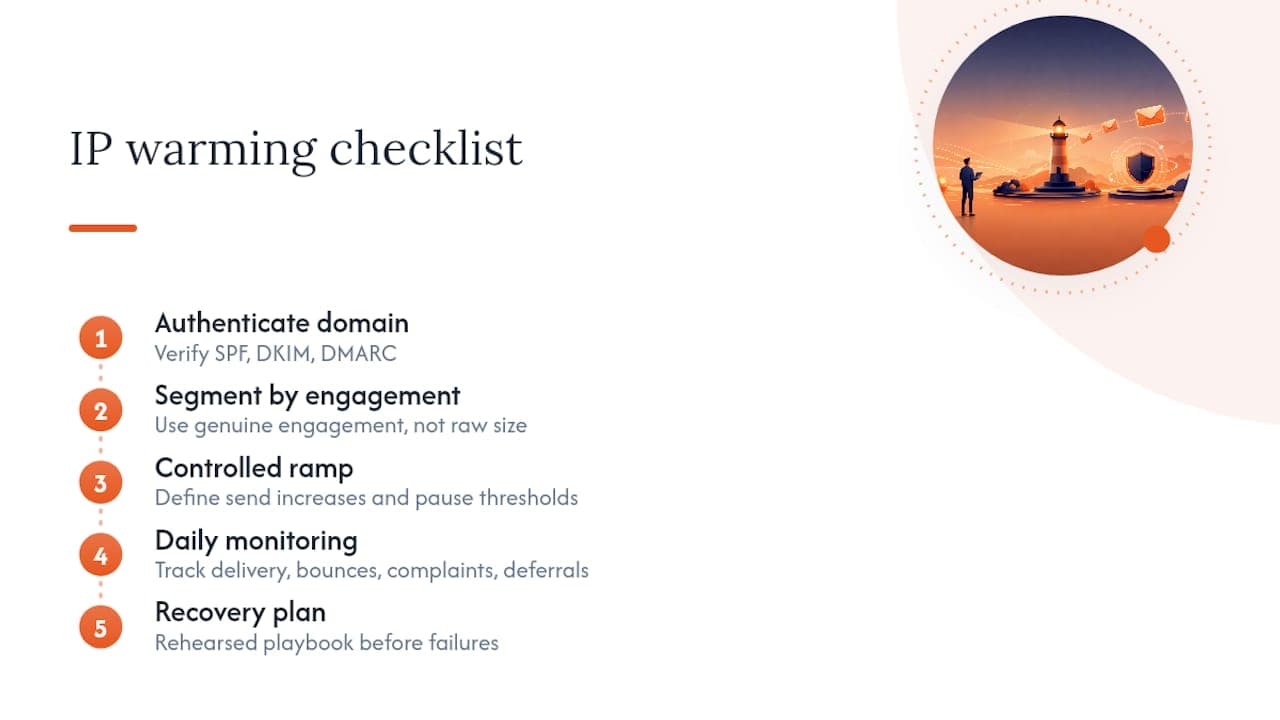
Email deliverability audits typically return to the same short list of failure points, which is why the checklist stays short rather than exhaustive: authentication verified and tested, lists segmented by genuine engagement rather than raw size, a controlled ramp with defined pause thresholds, daily monitoring across delivery, bounce, complaint and deferral metrics, and a rehearsed recovery plan before it is ever needed.
Businesses that have undergone a structured email deliverability audit tend to see the biggest gains not from any single fix, but from having all five pieces working together rather than patched in isolation. A properly authenticated domain with a poorly segmented list still warms slowly and unevenly; a well-segmented list on broken DKIM never gets a fair evaluation from the mailbox provider at all.
The editorial verdict: what most warming advice gets wrong
Most guidance on IP warming treats it as a purely mechanical exercise. Follow this schedule, hit these numbers, and reputation follows automatically. That is a comfortable story, but it is incomplete. Reputation is not built by volume progression alone; it is built by the mailbox provider’s confidence that your content, cadence and audience match what you claimed they would be. A perfectly executed 45-day ramp sending to a poorly segmented list still fails, because the schedule was never the point.
The conventional advice also underweights how differently individual providers behave. Treating Gmail and Outlook as one audience with one pace is the single most repeated error, because it hides a genuine ISP-specific problem inside an average that still looks fine. If you take one thing from this guide, prioritise segmentation and per-provider monitoring over the schedule itself. The schedule is a starting assumption. The engagement data you gather along the way is what actually tells you whether it is working.
Book an email deliverability audit before you next warm an IP
Digistrat exists for exactly the scenario this guide has walked through: a business that needs its next IP warm-up, migration or reputation recovery to work first time rather than after a costly correction. Where a DIY schedule leaves you guessing whether a deferral at Outlook is normal or a warning sign, an Email Deliverability Audit gives you a full authentication review, a tailored warm-up plan matched to your actual sending volume, and a clear set of remediation steps if anything is already wrong before you start.
Expect the audit to cover your SPF, DKIM and DMARC configuration in detail, assess whether a shared or dedicated IP suits your volume, and hand you a realistic ramp schedule with the thresholds worth watching. For businesses that want that vigilance to continue after the ramp finishes, ongoing reputation monitoring keeps watch on blocklists and ISP-specific signals long after the initial warm-up is done. Book a consultation and get a plan built around your actual list and infrastructure, not a generic template.
Sources
- How to warm up a new IP address for better email deliverability — Mailchimp
- IP reputation — Spamhaus
- The complete email deliverability checklist for 2026 — WordStream
FAQ
What is IP warming?
IP warming is the gradual, staged increase of email volume from a new or dedicated IP address, done so mailbox providers can build a positive reputation for that IP before it carries full sending volume.
How can I tell if someone is monitoring my IP’s reputation externally?
You cannot detect who is checking your reputation, but you can see the same signals they see by running regular checks through blocklist and reputation tools such as Spamhaus and your Google Postmaster Tools dashboard.
What is IP warming in marketing cloud platforms?
Marketing cloud platforms apply the same underlying principle as any dedicated IP setup: new sending infrastructure needs a gradual, monitored ramp in volume, usually starting with the platform’s most engaged contacts, before it can be trusted with full campaign sends.
How long should an IP warm-up plan take?
Plan in weeks rather than days. Documented vendor schedules such as Amazon SES’s automatic warm-up run for 45 days to reach full volume, and most practitioner schedules fall somewhere in that same four to six week range.
