A custom tracking domain replaces a shared, vendor-branded link with one that carries your own domain name, and the single most important reason to set one up is deliverability: unbranded tracking links attached to a third party’s reputation can drag your emails into spam regardless of how clean your own sending history is. Getting one working properly needs control over your DNS records and, ideally, SPF and DKIM already configured on your sending domain.
TL;DR:
- Custom tracking domains improve deliverability by reducing spam classification and isolating your reputation from shared vendor domains.
- Proper setup requires creating a CNAME record pointing your subdomain to your platform’s tracking host, along with verifying TLS certificates for security.
- A dedicated return-path domain is essential for bounce handling and DMARC alignment, especially at higher email volumes or strict enforcement policies.
- Ongoing monitoring of DNS, authentication, and reputation reports helps maintain consistent performance and troubleshoot issues early.
- Most problems stem from misconfigured DNS records or missing sibling records for return-path support, which can usually be fixed with careful verification and troubleshooting.
Digistrat
digistrat.co.uk
Improve Your Email Deliverability
Digistrat assesses sender reputation, infrastructure, and list quality to help email teams address spam placement and engagement issues.
Table of Contents
- What a custom tracking domain is and how it works
- Benefits: why deliverability and brand consistency improve
- Step-by-step setup: from naming to platform verification
- Return-path vs tracking domain: what they do and when you need both
- Verification and testing checklist
- Common problems and troubleshooting steps
- Operational best practices and governance
- How Digistrat approaches tracking domains and when to ask for help
- Balancing DIY and specialist help
- Digistrat services: deliverability review, authentication setup and monitoring
- Sources
- FAQ
What a custom tracking domain is and how it works
A custom tracking domain is the subdomain your platform uses to rewrite the links and pixels inside your emails, so that when a recipient clicks a link or opens a message, the request travels through a host you control rather than a generic vendor URL. It sits alongside, but separately from, your sending domain and your return-path domain, and confusing the three is one of the most common setup mistakes email teams make.
Your sending domain is what appears after the @ symbol in your “from” address. Your return-path domain governs where bounce messages go and how SPF checks are performed at the SMTP level. Your tracking domain is neither of these: it is purely about what recipients see when they hover over a link, and what your platform sees when it logs a click or an open.
Technically, most tracking works through two mechanisms. Link redirects rewrite every URL in your email so that a click first hits your tracking domain, gets logged, and then forwards the recipient to the real destination. Tracking pixels are tiny, invisible images hosted on that same domain, and when an email client loads them, the request registers as an “open.” Both rely on a CNAME record pointing your chosen subdomain at your platform’s tracking host.
There is a privacy dimension worth understanding before you build anything:
- Using your own domain for tracking creates a first-party context, which several browsers and email clients treat more leniently than third-party tracking calls.
- Server-side, first-party cookie handling under your own domain tends to survive privacy restrictions that block cross-site trackers.
- A branded tracking link is visually distinct from a generic vendor string, which matters both for trust and for spam filters that flag unfamiliar redirect domains.
None of this replaces authentication. A tracking domain improves how links look and where tracking data is collected, but it does nothing for SPF, DKIM or DMARC on its own, those are separate jobs that still need doing properly.
Benefits: why deliverability and brand consistency improve
The commercial case for a custom tracking domain rests on two things: recipients trust what they recognise, and mailbox providers reward senders whose infrastructure looks coherent rather than borrowed.
When a recipient hovers over a link and sees your own domain rather than an unfamiliar redirect string belonging to a bulk email vendor, they are more likely to click it. Practitioner guidance connecting technical setup to commercial outcomes makes this point directly: branded links increase recipient trust and can lift click-through by exposing a URL the recipient already associates with your brand, rather than one shared across thousands of unrelated senders.
That shared-domain problem is worth taking seriously on its own. A generic tracking domain used by a platform’s entire customer base carries the reputation of every sender on it, including the ones who behave badly. If another company using the same tracking infrastructure gets flagged for spam complaints or malicious redirects, your links can inherit some of that suspicion purely by association. A custom tracking domain separates your reputation from theirs entirely.
There is also a security and authentication angle that is easy to overlook. Properly configured domains, tracking included, contribute to a coherent DMARC posture. The DMARC specification explains that DMARC works by relying on SPF and DKIM results and then reporting back to domain owners on how messages claiming to be from their domain were handled by receivers. A tidy, consistently branded domain estate, sending domain, return-path and tracking domain all aligned to the same organisation, makes it far harder for a spoofed sender to hide behind confusion about which parts of your infrastructure are legitimate.
The practical benefits stack up as follows:
- Reputation isolation: your click and open data, and your domain’s standing, are no longer tied to strangers on the same shared platform.
- Improved recipient trust: a familiar domain in a link reduces the hesitation that unfamiliar redirect strings can create.
- Cleaner DMARC alignment: a coherent domain structure supports the reporting and enforcement DMARC depends on.
- Reduced spoofing surface: consistent, branded infrastructure gives attackers fewer places to hide a convincing fake.
Gmail’s published sender guidelines state that senders must configure SPF or DKIM and recommends DMARC reporting to monitor authentication continuously, underlining that tracking domain hygiene is one part of a larger authentication picture rather than a standalone fix.
For any business where email drives a meaningful share of revenue, the cost of ignoring this is not abstract. A drop in deliverability caused by a tarnished shared tracking domain, or a DMARC failure nobody noticed, translates directly into fewer inboxed messages and fewer conversions.
Step-by-step setup: from naming to platform verification
Setting up a custom tracking domain is not difficult, but it does require sequencing the steps correctly and being precise about DNS syntax. The process below is platform-agnostic and should work with minor adjustments across most email service providers and marketing automation tools.
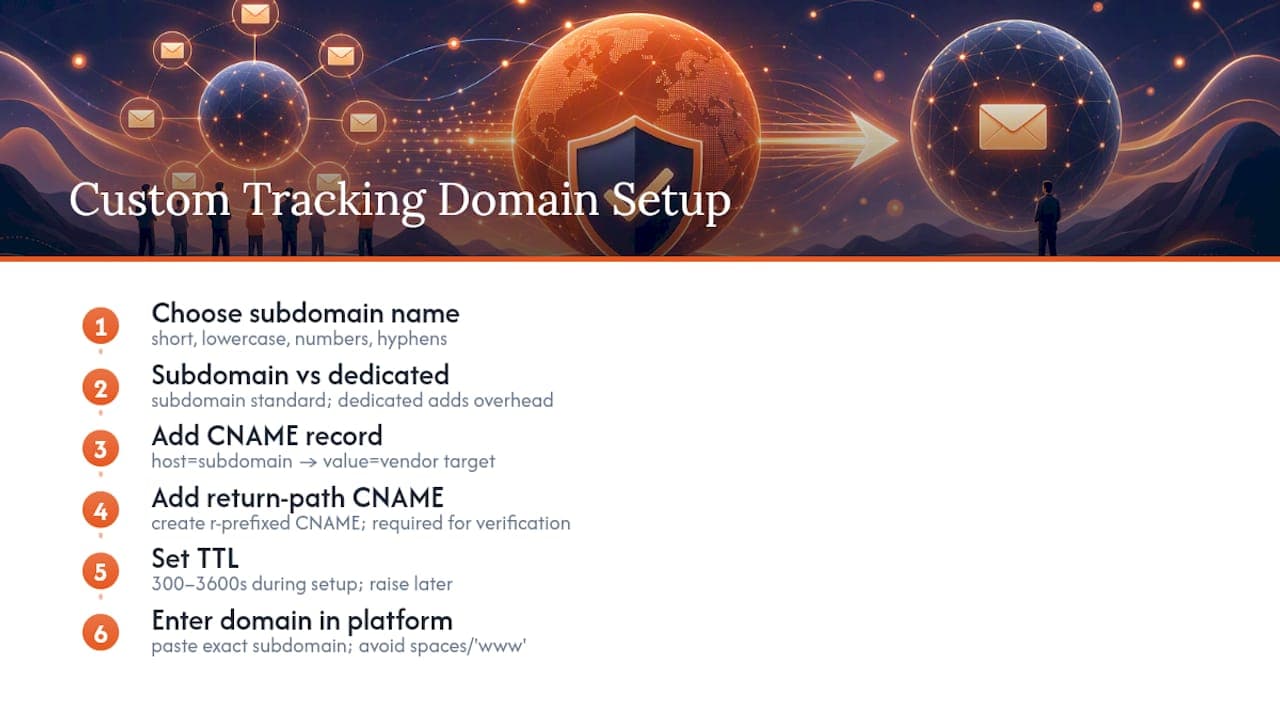
1. Choose a subdomain name. Most teams use something short and functional, such as link.yourdomain.com, track.yourdomain.com or click.yourdomain.com. Avoid anything that looks suspicious or unrelated to your brand, since recipients (and spam filters) respond better to predictable, brand-consistent naming. Stick to lowercase letters, numbers and hyphens where needed, and keep the subdomain reasonably short: some platforms impose length limits, and unnecessarily long strings are harder to verify visually during troubleshooting.
2. Decide between a subdomain and a dedicated domain. A subdomain of your main sending domain is the standard approach and is what most ESPs expect. A fully separate domain is sometimes used by larger senders who want to isolate tracking infrastructure completely from their core domain’s reputation, but this adds administrative overhead (a domain to renew, its own DNS zone to maintain) for most teams without a corresponding benefit.
3. Log into your DNS host and add the CNAME record. Your platform will supply a target hostname, something like track.espvendor.com. You create a CNAME record where the “host” or “name” field is your chosen subdomain (for example link) and the “value” or “points to” field is the vendor’s target. This is the core mechanism: practical setup guides consistently recommend creating a subdomain and pointing it at the vendor’s tracking host, then confirming that the subdomain resolves correctly before moving on.
4. Add any required sibling records for return-path support. If your platform also uses this domain, or a related one, for return-path handling, you may need a second CNAME with an “r” prefix (commonly something like r.yourdomain.com or rp.yourdomain.com, depending on the vendor). Vendor documentation for custom return paths is explicit that multiple CNAMEs are commonly required, including this r-prefixed sibling, and that skipping it is one of the most frequent causes of failed verification. Treat this as a genuinely separate step, not an optional extra.
5. Set your TTL sensibly. A TTL (time to live) of 300 to 3,600 seconds during initial setup lets changes propagate quickly if you need to fix a typo. Once everything verifies successfully, raising the TTL to a more standard 24 hours reduces unnecessary DNS query load without causing problems.
6. Enter the domain into your platform’s settings. Every ESP or marketing automation tool has a dedicated field, usually under domain authentication or link tracking settings, where you paste the exact subdomain you created. Double-check for trailing spaces or an accidental “www” prefix, both of which cause otherwise correct setups to fail verification.
7. Wait for propagation, then trigger verification. DNS changes typically propagate within 15 minutes to a few hours, though in rare cases, particularly with registrars that cache aggressively, it can take up to 48 hours. Most platforms offer a “verify” or “check domain” button that performs a live DNS lookup against what you configured; do not assume success just because the record shows up in your DNS host’s dashboard.
8. Confirm TLS is provisioned. Once verification succeeds, most vendors automatically provision a TLS certificate for your new subdomain, often within minutes, sometimes requiring a further short wait. Check that visiting the tracking subdomain directly in a browser (or inspecting a tracked link) shows a valid certificate with no warnings. HTTP Strict Transport Security and certificate validity both matter here because a broken or self-signed certificate on a tracking link produces a browser warning that will make even a legitimate email look suspicious to the recipient.
Pro Tip: Set up the return-path CNAME at the same time as your tracking CNAME rather than as an afterthought; doing both together avoids a second DNS change request and a second wait for propagation.
Return-path vs tracking domain: what they do and when you need both
The return-path domain and the tracking domain solve different problems, and treating them as interchangeable is where a lot of setups go wrong. The SMTP return-path (sometimes shown as the “envelope from” or “bounce address”) is the address that receiving mail servers use to send back non-delivery reports, and it is invisible to the recipient reading the email. The tracking domain, by contrast, is entirely visible: it is embedded in every link and pixel the recipient’s client actually loads.
A custom return-path matters most for two reasons: bounce monitoring and DMARC alignment. Bounce monitoring depends on having a return-path you control, so that failed deliveries land somewhere you can actually see and act on, rather than disappearing into a shared vendor mailbox you have no visibility into. DMARC alignment depends on the return-path domain matching (or being a subdomain of) your visible “from” domain, because SPF checks the return-path address specifically. Oracle’s documentation on configuring a custom return path notes that some enterprise mail systems require DKIM to be active first before a custom return path can be added, and that the setup typically needs its own additional CNAME record dedicated to bounce validation.
The practical relationship between the two domains breaks down as follows:
- Tracking domain: visible in links and pixels, drives click and open data, has no direct bearing on SPF or DMARC.
- Return-path domain: invisible to recipients, handles bounces, and is checked directly by SPF during DMARC alignment.
- Shared infrastructure risk: relying on a vendor’s default return-path (rather than your own) means your bounce handling and alignment depend on their reputation, not yours.
- The sibling record trap: forgetting the r-prefixed CNAME that some platforms require for return-path support commonly causes SPF to fail for bounce messages even when everything else looks correctly configured.
Not every sender needs a fully custom return-path immediately. A small volume of transactional email might tolerate the vendor default. Anyone sending at meaningful commercial volume, or anyone who has committed to a DMARC enforcement policy of quarantine or reject, should treat a custom return-path as close to mandatory, since without it, alignment failures under a strict policy can start silently discarding legitimate mail.
Verification and testing checklist
Configuring the records is only half the job. Confirming that everything actually works, and continues to work, is what separates a tracking domain that quietly fails for weeks from one that performs as intended.
- Run a DNS lookup on your tracking subdomain using a tool such as
digor an online DNS checker, and confirm the CNAME resolves to the exact target your vendor specified, not a typo or an outdated value. - Check the TLS certificate by visiting the tracking subdomain directly in a browser or using an SSL checker tool, confirming there are no expiry warnings, mismatched hostname errors or self-signed certificate alerts.
- Send test emails to multiple clients, including Gmail, Outlook and at least one mobile client, then click every link and confirm the click registers in your platform’s reporting within a reasonable window.
- Trigger an open event deliberately by opening the test email in a client that loads images by default, and confirm the pixel fires and logs correctly, bearing in mind that many clients now block automatic image loading, which will affect open data regardless of tracking domain setup.
- Review your DMARC aggregate reports a few days after setup to confirm your sending and return-path domains are aligning correctly and that no unexpected sources are showing up as sending on your behalf.
- Check Google Postmaster Tools (if you send meaningful volume to Gmail addresses) for authentication and spam-rate signals that might flag a configuration problem before it becomes a deliverability crisis.
Gmail’s sender guidelines are explicit that authentication and alignment checks are an ongoing requirement rather than a one-time setup task, and Postmaster tooling is the primary way most senders get visibility into how Gmail specifically is treating their traffic. Building a recurring five-minute check of these reports into your monitoring routine catches problems long before recipients start complaining.
Common problems and troubleshooting steps
Most tracking domain failures trace back to a small number of predictable causes, and knowing which one you are looking at usually saves considerable time.
- A mispointed or missing CNAME is the most frequent culprit: double-check the exact target hostname against what your vendor’s documentation specifies, since a single missing character will cause silent verification failure.
- A missing sibling record for return-path support produces SPF failures that look unrelated to tracking at first glance; if bounce handling or DMARC alignment breaks after adding a tracking domain, check whether an r-prefixed CNAME was required and skipped.
- SSL provisioning delays or errors usually resolve within a short window after DNS verification succeeds, since most vendors issue certificates automatically once ownership is confirmed; if a certificate error persists beyond a few hours, contact platform support rather than assuming a DNS problem.
- Apparent tracking loss that is actually a privacy setting affects opens far more than clicks: several mail clients now block automatic image loading or proxy pixel requests, which can make open rates look artificially low even when the domain is configured correctly.
- Persistent verification failures after 48 hours despite correct-looking records usually point to registrar-level caching or a conflicting existing record on the same subdomain, and are worth escalating to platform support with your exact DNS configuration in hand.
- Recurring authentication or alignment problems that keep resurfacing despite repeated fixes are a signal that the issue sits deeper than a single DNS record, at which point a deliverability consultant can diagnose the underlying infrastructure faster than another round of trial and error.
Operational best practices and governance
A tracking domain that works on day one is not the same as one that keeps working. Ongoing governance is what prevents small configuration drift from turning into a deliverability incident six months later.
- Use predictable naming conventions across all your domain infrastructure (sending, return-path, tracking) so that anyone auditing your DNS zone can immediately understand what each record does and why.
- Assign clear ownership of DNS access, ideally to a named technical owner or a small group, rather than leaving records editable by anyone with vague admin access, since accidental changes are far more common than malicious ones.
- Review DMARC aggregate reports on a fixed cadence, weekly for high-volume senders or monthly for smaller programmes, rather than only when something visibly breaks.
- Track bounce rate and reputation alerts continuously, since a sudden shift often reveals a return-path or alignment problem before it shows up anywhere else.
- Set a clear trigger point for bringing in specialist help: if authentication issues recur after two or three internal fix attempts, or if DMARC reports show persistent unexplained failures, the cost of continued internal troubleshooting usually exceeds the cost of a focused external review.
Pro Tip: Keep a single internal document listing every DNS record your email programme depends on, what it does, and who added it; this alone cuts troubleshooting time dramatically when something eventually goes wrong.
Further background on sequencing authentication correctly is covered in Digistrat’s plain-English DMARC implementation plan, and the mechanics of SPF, DKIM and DMARC together are explained in more depth in this explainer on getting authentication right.
How Digistrat approaches tracking domains and when to ask for help
Specialist deliverability consultants work directly on the authentication and infrastructure problems that tracking domain setups often expose, including DMARC alignment, SPF and DKIM configuration, and ongoing sender reputation monitoring for businesses sending opted-in email. Such work focuses on fixing the underlying issue rather than only reporting on it.
A typical engagement starts with a technical review that identifies where alignment or reputation problems originate, such as a missing return-path record, an unmonitored DMARC policy or a shared tracking domain contributing to spam placement. From there, remediation work addresses the specific gaps found, with monitoring put in place afterwards so problems can be caught early rather than discovered through a sudden drop in open rates.
Balancing DIY and specialist help
Most tracking domain problems are genuinely solvable with a careful read of your vendor’s documentation and patience through DNS propagation. The signal that you are dealing with something bigger is when fixes hold for a few days and then quietly unravel, or when DMARC reports keep showing failures you cannot trace to a single record.
At that point, the cost of continued guesswork, measured in inboxed emails and lost revenue, usually exceeds the cost of a focused review. My advice is straightforward: fix what you can see first, then bring in a specialist the moment the problem stops behaving predictably.
Digistrat services: deliverability review, authentication setup and monitoring
If your tracking domain setup has surfaced a deeper authentication problem, that is exactly the gap Digistrat’s deliverability review and remediation services are built to close, covering DMARC setup, SPF and DKIM configuration, reputation recovery and ongoing monitoring for businesses that depend on email revenue.
A free health check is typically the starting point: a technical review of current authentication and domain setup that identifies where alignment or reputation issues arise, without committing to further work. Where the problem needs faster resolution, a chargeable 90-minute advisory session at £250 gives you direct access to a specialist for troubleshooting or planning a remediation path. For ongoing peace of mind once records are fixed, Digistrat’s reputation monitoring service keeps watch on DMARC reports and sender reputation signals so problems get flagged before they affect deliverability.
Book a free health check to find out exactly where your setup stands.
Sources
For readers who want to go straight to primary sources: the DMARCbis draft on IETF datatracker explains how DMARC reporting and enforcement actually work, and Gmail’s sender guidelines set out the authentication requirements most senders now have to meet. Vendor-specific setup steps for custom return-paths are documented by Resend and by Oracle. For a look at how DMARC policy levels differ in practice, Notix’s guide to DMARC record examples sets out none, quarantine and reject side by side.
FAQ
What is a custom tracking domain?
A custom tracking domain is a subdomain you control that your email platform uses to rewrite links and host tracking pixels, so clicks and opens are logged through your own domain rather than a shared vendor URL. It requires a CNAME record pointing to your platform’s tracking host and improves both recipient trust and reputation isolation.
What are the different types of domains used in email sending?
Email programmes typically rely on a sending domain (what appears in the “from” address), a return-path domain (used for bounce handling and SPF checks), and a tracking domain (used for link redirects and open pixels). Some senders also maintain a separate domain purely for authentication testing before rolling changes out to production.
What is a tracker domain?
A tracker domain is another common name for a custom tracking domain: the subdomain that hosts the redirect and pixel infrastructure behind the links and images in your emails. It is configured through a CNAME record and verified through your email platform’s domain settings.
What is an example of a custom domain used for tracking?
A typical example is a subdomain such as link.yourcompany.com or track.yourcompany.com, created with a CNAME record pointing to your platform’s designated tracking host. Once verified, your platform automatically rewrites outgoing email links to route through that subdomain.
Does a custom tracking domain affect DMARC or SPF directly?
A tracking domain itself does not affect SPF or DMARC, since those checks apply to the sending and return-path domains rather than link infrastructure. However, DMARC relies on SPF and DKIM alignment, so a poorly configured return-path domain set up alongside your tracking domain can cause alignment failures even though the tracking links work fine.
