
Email relevancy is key, but not only for the reason most marketing advice gives. Relevance decides whether people open, click and buy, and it also decides whether mailbox providers keep placing your messages in the inbox at all, because they judge you on how recipients behave towards your mail over weeks and months. When results drop and nobody can say why, the cause is often not the content: it is who is being mailed, how often, from which systems, and whether the platform’s own reports are hiding a reach problem behind a message problem. If you want a second pair of eyes on that, our free health check is the quickest place to start.
Table of Contents
- What relevance actually means for a sender
- The gap between how marketers and customers see relevance
- Why irrelevant email ends up in the spam folder
- Four places relevance quietly leaks away
- Reach, audience or message: reading the signals in order
- A worked example of finding the real cause
- Planning for peak season
- Where we fit in
- A practical routine you can start this month
- FAQ
- Sources
What relevance actually means for a sender
Most teams hear relevance and think of a first name in the subject line. The Chartered Institute of Marketing (CIM) takes a broader view: in its 2026 look at what works in email, relevance is understanding where customers are in their journey and addressing their current motivations, not merely adding a name, and it adds that disengagement leaves clues, with the brands that notice them earliest having the most room to respond.
That definition is useful because it is operational. A person who bought last week does not need the acquisition offer you built for prospects. A trial user who has already activated does not need the onboarding nudge that was queued three days ago. A customer who has not clicked anything since spring is telling you something, and a sender who keeps mailing them at full frequency is, in effect, ignoring it.
For teams who own the sending side (CRM leads, lifecycle managers, engineering and IT), relevance therefore splits into three questions that can be answered separately:
- Reach: is the email arriving in the inbox, or being filtered, throttled or quietly discarded before anyone sees it?
- Audience: are you mailing the right people, at the right point in their relationship with you, and not the ones who stopped caring a year ago?
- Message: given that it arrives and the audience is right, does the content earn a response?
Most relevance advice online addresses only the third. The first two are where a large share of unexplained drops come from, and they are the ones your email platform’s dashboard tends to show you least.
The gap between how marketers and customers see relevance
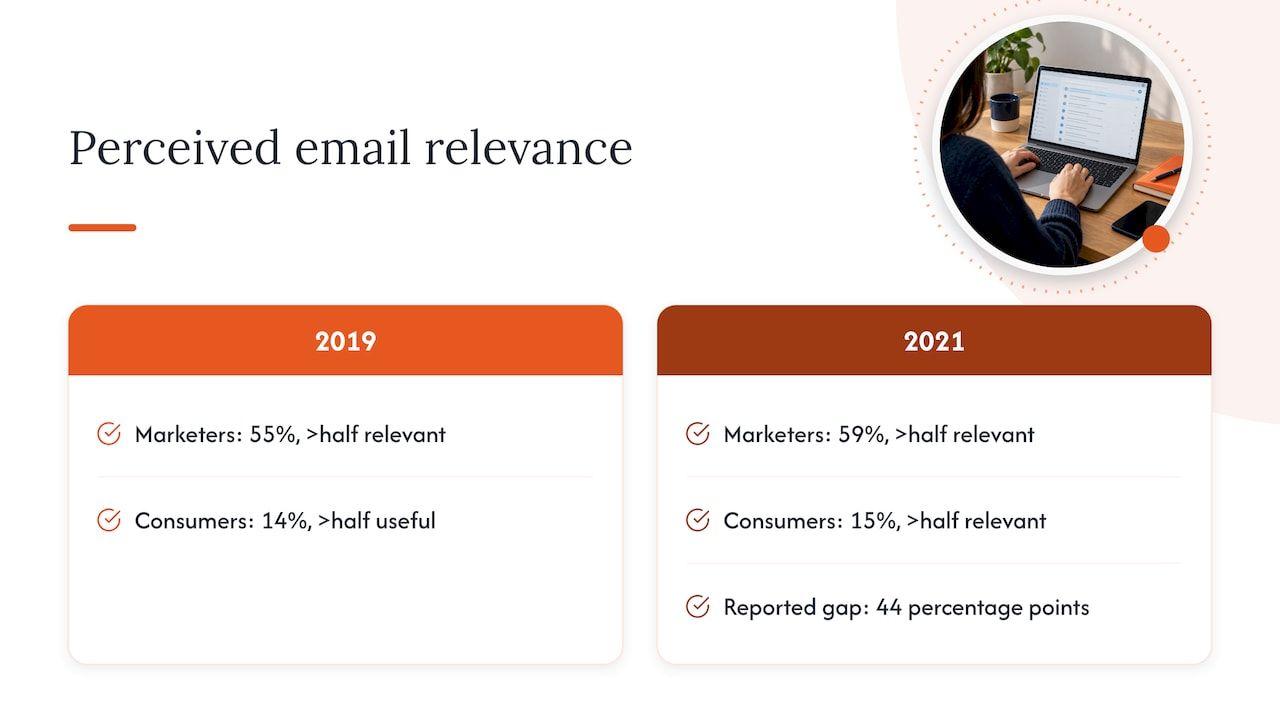
If you suspect your own view of your email programme is rosier than your customers’, you are in good company. WARC’s 2021 analysis of Data & Marketing Association (DMA) tracker research found that 59% of UK marketers believed more than half of their emails were relevant to recipients, while only 15% of consumers agreed, a gap of 44 percentage points. The author’s explanation is that relevance has several dimensions: how people read email (device, skimming or reading in full), where they are in the buying cycle, and whether email is the right channel for the message at all.
The DMA’s earlier Marketer Email Tracker 2019, a survey of 197 UK marketers, shows the same pattern from another angle: 55% of marketers thought more than half their emails were relevant to the individual, against 14% of consumers who said more than half of what they received was of use, and 76% of marketers used click-throughs to gauge relevance.
The figures are a few years old, but more recent evidence points the same way. A DecisionMarketing report from August 2026 found that 75% of UK consumers regularly receive marketing that is irrelevant to them, that 69% often receive duplicate messages, that 42% disengage when content feels irrelevant and that 35% are more likely to unsubscribe after a poor experience. Duplicate messages are worth dwelling on, because they are rarely a creative decision. They usually come from automations that were each sensible when built and were never looked at together.
Why irrelevant email ends up in the spam folder
The connection between relevance and placement is the part that turns a marketing preference into a revenue issue. Mailbox providers do not read your campaign brief; they watch what recipients do. People who open, click, reply and move your messages out of spam raise your standing, and people who ignore, delete unread or report you as spam lower it.
Google’s own email sender guidelines make the stakes concrete. Senders are expected to set up SPF and DKIM authentication, and bulk senders should also set up DMARC, which tells receiving servers what to do with mail that fails those checks. The same page asks senders to keep the spam rate reported in Google Postmaster Tools below 0.30%, and to send only to people who want to receive messages, because those recipients are less likely to report you. In other words, audience quality is written into the technical requirements.
Two consequences follow that catch teams out:
- Reputation is shared. Marketing, transactional and lifecycle mail sent from the same domain or IP pool contribute to one reputation, so a poorly targeted promotional blast can drag down password resets and order confirmations that were perfectly relevant.
- The damage is silent. A message routed to spam is typically still counted as delivered by the sending platform, so the dashboard can look healthy while the audience is simply not seeing your emails. Non-openers may be people who never had the chance.
Four places relevance quietly leaks away
In our experience of how sending programmes are built (as a description of the problem, not a claim about any one client), the same four weak points keep appearing. None of them is a copywriting issue.
Mailing people who have stopped engaging
Every list contains people who signed up for a discount, changed jobs or simply moved on. Continuing to mail them at the same rate as your active customers produces exactly the pattern mailbox providers read as low interest: lots of volume, little engagement. A tiered approach works better, with active recipients on the full programme, lapsing recipients on a reduced and more carefully targeted cadence, and a defined point at which a re-permission message is sent and, failing a response, mailing stops. The aim is to let people leave quietly through an unsubscribe rather than through a spam complaint, which is far more damaging to your reputation.
Overlapping lifecycle triggers
A welcome series, a browse-abandonment flow, a post-purchase sequence, a loyalty reminder and the weekly newsletter can all fire for the same person within a day or two. Each team sees only its own flow. The recipient sees one brand sending five emails in 48 hours, none of which acknowledges the others. Priority rules (which flow wins when two qualify) and suppression windows (nobody gets a promotional email within a set period of a transactional or service message, for example) are the usual fixes, and they need agreeing across teams rather than inside one tool.
Frequency you cannot see
A frequency cap in your marketing platform only counts what that platform sends. Sales sequences, support replies, billing notices, webinar tools and product notifications all reach the same inbox, often from the same domain. The real frequency a person experiences is the total, and few teams have ever added it up. Building that picture is usually the first surprising result of a proper investigation.
Erratic volume
Mailbox providers prefer predictability. Sending a very large campaign after weeks of near silence, or sending to a long-dormant segment all at once, looks unlike a sender with a consistent, engaged audience. Spreading large sends over several days, ramping up gradually and warming new IPs before they carry full volume are all ways of making your pattern look like what it should be: a steady business mailing people who expect it.
Reach, audience or message: reading the signals in order
When engagement falls, the instinct is to rewrite the subject line. The sounder order is to work from the infrastructure outward, because a failure upstream hides everything downstream. The table below is a working guide to which symptom points where; treat it as a starting hypothesis, not a verdict.
| What you see | Most likely area | What to check first |
|---|---|---|
| Open rate falls sharply with no change to list, subject lines or timing | Reach | Authentication results, bounce and complaint rates, inbox placement at the major mailbox providers |
| Opens hold steady but clicks or replies fall | Message or audience fit | Segment definitions, offer relevance to lifecycle stage, click-to-open rate by segment |
| Engagement declines gradually while volume per person climbs | Audience and frequency | Total sends per recipient across all systems, overlapping flows, time since last engagement |
| Complaints or unsubscribes jump after a specific campaign | Audience | Who was included, how long since they last engaged, how they were acquired |
| Transactional mail starts landing in spam | Reach, shared reputation | Whether marketing and transactional mail share a domain or IP, and recent marketing volume spikes |
One caution on measurement. Open rates have become a weaker signal since mailbox privacy features began pre-loading messages, and the CIM’s 2026 panel view is that opens should not be a primary success measure; it suggests click-through, conversion, post-click behaviour, revenue contribution and retention instead, matched to each campaign’s objective. A sudden collapse in opens can still be a useful alarm for a placement problem, but a slow drift tells you much less than it used to. Defining an engaged contact by clicks, purchases, visits or replies gives a firmer basis for deciding who stays on the list.
We cover the first checks in more detail in the 48-hour signals to check first, and tracking deliverability early explains what is worth measuring week to week.
A worked example of finding the real cause
Imagine a UK ecommerce brand whose email revenue falls by a fifth over two months. The marketing team has rewritten subject lines twice, with no effect. A sequence of checks would run roughly as follows.
First, authentication: SPF, DKIM and DMARC records are checked for the domains actually sending, including any third-party tools added in the past year. A new support desk or review platform sending on the brand’s behalf without being included in the SPF record is a common finding, and it makes legitimate mail look suspicious.
Second, reputation and feedback: bounce rates, complaint rates and Postmaster Tools data are reviewed for the period when the drop began. Here the team might see complaints creeping towards the 0.30% line Google sets, concentrated in one acquisition source.
Third, audience: who was mailed in the weeks before the dip? Perhaps a seasonal campaign went to the whole file, including customers who had not engaged for more than a year.
Only then does it make sense to examine the creative. In this scenario the content was never the problem: the message was fine, but fewer of the right people were seeing it. The fix is then a combination of authentication repair, a tighter audience rule, a frequency ceiling across systems and a gradual return to normal volume, not another round of copy tests.
Planning for peak season
Black Friday and the January sales are when relevance mistakes get expensive, because volume rises, frequency rises and audiences are stretched to include everyone who might possibly buy. A sensible approach is to build the plan backwards from the inbox:
- Segment sends by recent engagement so that your most responsive recipients receive the heaviest schedule and the least engaged receive little or none.
- Ramp volume across the weeks before the peak, not in a single jump, so mailbox providers see a gradual increase.
- Agree one calendar covering marketing, lifecycle and transactional sends so that overlapping messages are spotted before launch.
- Decide in advance what thresholds for bounces and complaints will pause a send, and who has the authority to pause it.
- Keep the January sales audience honest: the people who bought in November are not the same audience as those who went quiet in the summer.
Where we fit in
The reason this work is hard to do internally is that it sits between teams. Marketing owns the content, engineering owns the infrastructure, the CRM lead owns the segments and nobody owns the overall picture of what reaches the inbox. We start with the evidence your platform does not show you: authentication, sender reputation, bounces, complaints and who is being mailed. You work directly with one senior deliverability consultant, with senior SendGrid and Twilio experience, who works inside your platforms alongside your team to establish whether the cause is reach, audience or message, and then helps to fix it.
There are several ways in, depending on how much you already know:
- The free health check and the 15-minute inbox check-up call show where to start.
- The advisory session is a 90-minute conversation costing £250 one-off, suited to a specific question such as an overlap between lifecycle flows.
- Deliverability Review and Fix combines a detailed investigation with 45 days of implementation support, and you can see it alongside our other services on the deliverability services page.
- Managed Deliverability provides daily monitoring, incident response, monthly inbox placement testing and one agreed improvement each month, which gives relevance and reach a clear owner rather than a periodic rescue.
If you would rather talk it through first, you can book a free check-up.
A practical routine you can start this month
Whatever route you take, a lightweight monthly routine will keep relevance from drifting:
- List every system that sends mail as your domain, including the ones outside marketing, and confirm each is covered by your SPF and DKIM set-up with a DMARC policy in place.
- Pull complaint and bounce rates by source and segment, not only as a single average, and compare complaint rates with the 0.30% ceiling in Google’s guidelines.
- Calculate total sends per recipient across all systems for a typical 30 days, and look at the top decile.
- Define engagement by clicks, purchases and visits, then divide your file into engaged, lapsing and never-engaged groups with a different cadence for each.
- Map your lifecycle triggers on one page and write down which one wins when two apply to the same person.
- Review volume patterns for the coming month and smooth out any single-day spikes.
- Only then review creative, segment by segment, using click-to-open rate and conversion rather than opens alone.
This is also what we describe in what monitoring actually looks like when it is run as an ongoing discipline rather than a post-mortem.
FAQ
Why is email relevance so important for deliverability?
Mailbox providers judge your mail partly on how recipients respond to it. Relevant messages are opened, clicked and replied to, while irrelevant ones are ignored, deleted or reported, and a rising complaint rate puts you in conflict with the limits Google sets for senders. Over time, relevance therefore influences whether you reach the inbox at all.
How can I tell whether my problem is relevance or deliverability?
Start with reach. A sudden fall in opens that no list, subject line or timing change explains points towards placement, while steady opens with falling clicks or replies point towards audience fit or content. Because the two can occur together, checking authentication, bounces, complaints and audience before touching the copy saves time.
Does sending less email make it more relevant?
Not automatically, but sending less to the people who have stopped engaging usually helps. What matters is the right frequency for each segment, counted across every system that mails the same person, not a single global cap. A DecisionMarketing report from 2026 found that 69% of UK consumers often receive duplicate messages, so overlap is a good place to look first.
Should I still use open rates to measure relevance?
Use them as a rough alarm, not as the main measure. Privacy changes have reduced their reliability, so the CIM suggests focusing on click-through, conversion, post-click behaviour and revenue instead. Defining engaged contacts by clicks and purchases gives a firmer basis for list decisions.
Sources
- What really works in email marketing in 2026? (CIM)
- Why do marketers and consumers view email relevance differently? (WARC)
- Marketer Email Tracker 2019 (DMA)
- Brits bemoan repetitive, poorly targeted and generic ads (DecisionMarketing)
- Email sender guidelines (Gmail Help)