
To get off an email blocklist, you identify which list has flagged your IP address or domain, find and fix the behaviour or fault that caused the listing, and only then submit a removal request through that operator’s own process, from a proper business email address. Skipping the fix is the most common reason a request fails or a listing returns a few days later, so most of this guide is about diagnosis and repair, with the request itself being the shortest step.
It is written for the people who usually inherit this problem: CRM and lifecycle managers who have seen bounces spike, and engineering or IT leads who have been told that email is “broken” without a clear reason.
Table of Contents
- First, confirm it really is a blocklist
- Stop the damage and gather evidence
- Work out which list and why
- Fix the cause before you ask for removal
- Submit the removal request properly
- How long removal takes
- Confirm that delivery has recovered
- Stay off the list
- Where Digistrat can help
- FAQ
- Sources
First, confirm it really is a blocklist
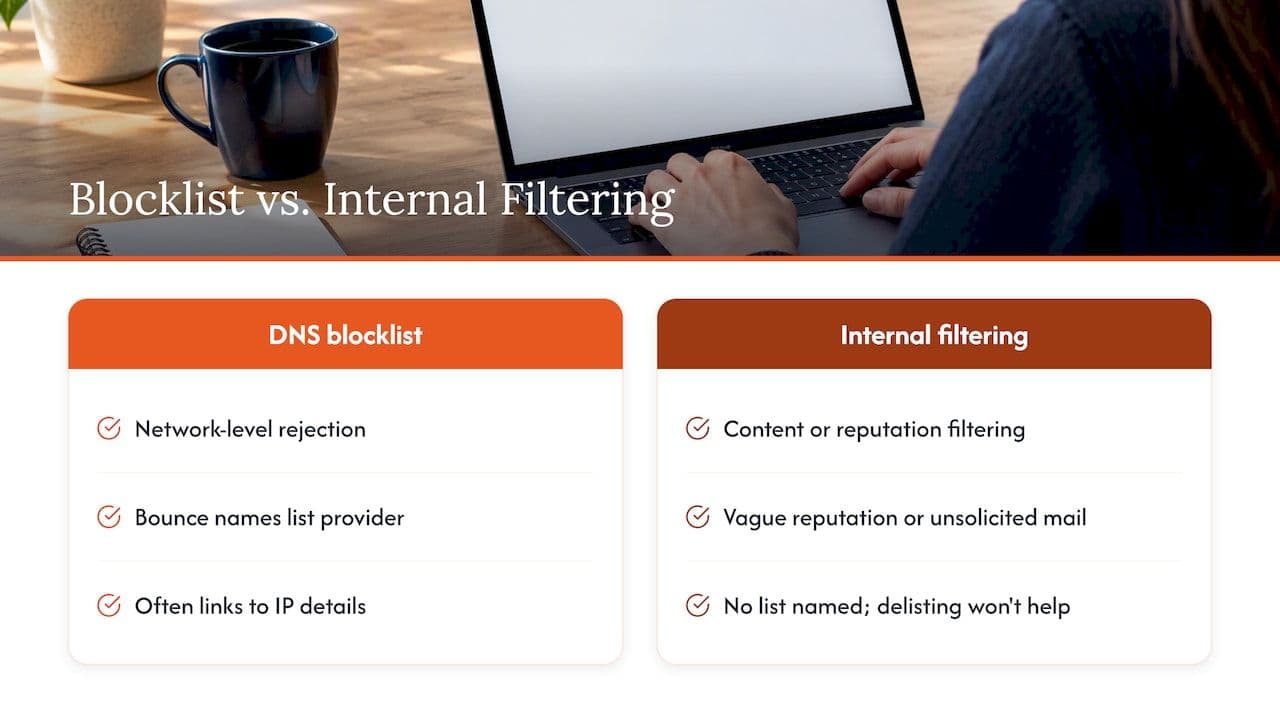
Before you start filing requests, make sure a blocklist is the cause, because plenty of delivery problems look identical from the outside. Mail can be rejected at the network level because your IP is on a DNS-based blocklist, or it can be filtered or sent to spam on the strength of content, engagement or domain reputation, and the fix for each is quite different. The Messaging, Malware and Mobile Anti-Abuse Working Group (M3AAWG) makes the point in its guidance on blocklist problems that a blocklist is not always the only reason mail fails, and that administrators need to separate network-level blocks from content or reputation-based filtering by reading their bounce data and logs carefully.
In practice, the quickest tell is the bounce itself. When a message is refused because of a DNS blocklist, the bounce notification normally names the blocklist provider and often includes a link to that provider’s information page for the specific IP address, as the Amazon SES documentation on DNSBLs explains. If your bounces say something vague about reputation or “unsolicited mail” with no list named, you may be dealing with a mailbox provider’s internal filtering instead, and a delisting request will have nothing to act on.
If you want a structured way to look first, our own email blocklist check walks through how to test whether a domain or IP is listed, and our piece on the signals worth checking in the first 48 hours helps you decide whether the blocklist is the main problem or just the most visible symptom.
Stop the damage and gather evidence
The first hour matters more than people expect. If you are listed because something on your network is compromised or because a campaign went to a badly sourced list, every further message adds to the evidence against you, so pause or heavily throttle the affected stream while you investigate. You do not need to stop every message your business sends. If your transactional mail (password resets, receipts, order confirmations) and your marketing mail leave from separate IPs or subdomains, you can often leave the unaffected stream running while you deal with the listed one, which is one of the better arguments for keeping those streams apart in the first place.
Then collect the material you will need later:
- The full bounce messages, including the raw SMTP response and the timestamp, for several different recipient domains.
- The sending IP address and the hostname it was using at the time.
- The send history for the previous few weeks: which campaigns, which lists, which automated triggers, and any change in volume.
- Your current SPF, DKIM and DMARC records and the results from a recent message header.
- Any complaint or unsubscribe data you have from feedback loops.
M3AAWG notes that you can find a listing either by proactively searching mail logs for phrases such as “blocked by” or “spam”, or reactively when customers report missing mail or bounces arrive. If nobody on your team is searching the logs on a schedule, you are in the reactive group, and it is worth fixing that once this incident is over.
Work out which list and why
Blocklists are not interchangeable. Each operator has its own criteria, its own meaning for a listing and its own way of removing one, so “get off the blacklist” is really a family of different jobs. Reading the operator’s own explanation of why an address is listed is the step that separates a one-day fix from a month of repeated requests.
Policy listings are not accusations
Some of the most common listings say nothing about your behaviour at all. The Spamhaus Policy Blocklist (PBL) covers IP space that is not meant to send mail directly to the internet, such as residential broadband ranges, and the Spamhaus PBL FAQ is clear that inclusion does not necessarily indicate malicious behaviour. Spamhaus has also stressed in its writing on misuse of its blocklists that the PBL is a structural list rather than a punishment for spam. If a small office server, a branch location or a developer’s test box is trying to deliver mail directly from a broadband line, a PBL listing is the expected result, and the real fix is to route mail through your proper sending infrastructure or an authenticated relay rather than to argue for an exception.
Exploit listings point to compromised machines
An IP can appear in the Spamhaus Exploits Blocklist (XBL) when there is evidence that machines or devices behind it are insecure, compromised or infected, for instance as part of a botnet. The Spamhaus XBL FAQ describes remediation such as closing port 25 where it is not needed and patching or cleaning the affected systems. For a company that sends from cloud infrastructure, the usual culprits are a compromised web form that is being used as a relay, a leaked SMTP credential, or an old server that nobody remembered to retire. Find the source before you do anything else, because a request submitted while the machine is still sending will simply be undone.
Informational listings are early warnings
Not every listing blocks your mail. Spamhaus describes “informational listings” in its piece on poor sending practices as early warning signs that flag habits such as missing opt-in or weak bounce management, which can lead to a full block if left alone. If you see one, treat it as a free, polite warning and look at how your lists are collected and cleaned before it becomes an incident.
Operator-specific guides
The detail of each removal process differs enough that we have written separate walkthroughs for the two we are asked about most. If you are dealing with the Spamhaus family, our guide to getting delisted from Spamhaus on the first request covers what to include and what to avoid, and if the rejections are coming from a gateway appliance, our Barracuda blocklist removal guide explains that process.
Fix the cause before you ask for removal
It is tempting to submit the form straight away and investigate afterwards, and it is also the approach most likely to cost you time. Delisting without changing the behaviour that caused the listing can lead to being blocked again, and some operators become less willing to help with each repeat request. The fix depends on the cause, and in our experience the causes cluster into a handful of groups.
| Likely cause | What to check | Typical fix |
|---|---|---|
| Compromised system or credential | Outbound connections on port 25, unexpected queue growth, unfamiliar login activity | Remove the source, rotate credentials, close unneeded outbound SMTP, patch |
| Poorly sourced or stale list | Hard bounce rate, spam trap hits, age of the oldest addresses | Suppress unengaged and invalid addresses, stop sending to purchased or scraped data, move to confirmed opt-in |
| Complaint spike | Feedback loop data, unsubscribe visibility, send frequency | Cut frequency to engaged recipients, make unsubscribing easy, review overlapping triggers |
| Authentication gaps | SPF alignment, DKIM signing, DMARC policy and reports | Correct records, sign every stream, publish and monitor DMARC |
| Policy listing (PBL) | Is this IP meant to send mail directly? | Send through an authorised relay or your provider |
| Sudden volume change | Recent migration, new IP, big campaign | Throttle and warm up gradually |
Two of these deserve a closer look because they are the ones teams overlook. The first is overlapping lifecycle emails. A customer who receives a welcome series, a promotional campaign and a re-engagement flow in the same week is likely to mark one of them as spam, and the complaint lands on your IP regardless of which team sent it. The second is bounce management: if your platform keeps retrying invalid addresses, or your own system sends to addresses that have already hard bounced, you are quietly building the exact profile that operators describe as poor practice.
If your authentication is part of the problem, our explainer on SPF, DKIM and DMARC covers how the three fit together, and our broader guide on how to fix email deliverability issues sets out the order in which to tackle the rest.
Submit the removal request properly
Once the cause is dealt with, follow the operator’s published route, which is usually a web form or a lookup page where you enter the IP address and are shown the reason for the listing. Some listings expire on their own and some cannot be removed by request at all until the problem stops, so read the lookup page before you write anything.
A few practical points make the difference between a clean first request and a frustrating run of replies:
- Use an address on your own domain. For PBL removals, Spamhaus does not generally accept free webmail addresses such as Gmail or Yahoo, because it expects the request to come from an address matching the domain associated with the mail server, as its PBL FAQ sets out.
- Be specific and brief. Say what caused the listing, what you changed and when, and what controls you have added. Operators read a great many of these, and a factual three or four sentences is more convincing than a long apology.
- Keep proof of consent to hand. Spamhaus notes in its guidance on address acquisition that when a block needs manual intervention, reputation providers often ask for evidence of opt-in. Timestamps, the source form or page, and the IP address recorded at sign-up are the kind of records that settle that question quickly.
- Do not resubmit repeatedly. Sending the same request several times without changing anything tends to make the next one harder, so wait for a response and, if the answer is a refusal, treat the reply as a to-do list.
When the listing belongs to someone else’s infrastructure
If you send through a shared mail provider rather than your own servers, you may be listed through no fault of your own and without the ability to make the changes yourself. The Amazon SES documentation suggests contacting the provider’s postmaster to request an exception if the provider will not change its policies, and considering a dedicated IP if it remains unwilling. For smaller teams whose mail is hosted on a shared platform with limited control, it can also be worth reviewing how the mailboxes were set up in the first place, and a guide to business email setup is a sensible reference when you are weighing up whether to move to a provider that gives you proper control over sending.
How long removal takes
There is no honest single answer, because the time depends on the operator, whether this is a first listing and whether the underlying problem has really stopped. Some listings clear automatically once the evidence ages out, some need a manual request and a human response, and repeat listings tend to be treated more cautiously. Plan for the process to take from a few hours to several days in the straightforward cases, and make sure the business knows in advance that your first estimate is a range rather than a promise. While you wait, keep the affected stream paused or throttled, and send time-critical messages such as password resets through a clean, separately authenticated route if you have one.
Confirm that delivery has recovered
Getting a “removed” message is not the same as recovered inbox placement, and this is the part most guides skip. A delisting only removes one reason for rejection, and mailbox providers may still be treating your domain or IP cautiously because of the behaviour that led to the listing.
A sensible verification sequence looks like this:
- Re-run the lookup for the IP and domain to confirm the listing is gone and no second list has picked you up.
- Send a small test batch to a spread of recipient domains, including your own seed mailboxes at the major providers, and read the bounces and headers.
- Check Google Postmaster Tools if you send meaningful volume to Gmail. The Postmaster Tools dashboards show your spam rate, IP and domain reputation, authentication results and delivery errors, which gives you a view that is independent of your own platform’s reporting.
- Compare against your baseline: bounce rate, deferral rate, complaint rate and open or click trends by mailbox provider, over several days rather than a single afternoon.
- Ramp up gradually, starting with your most engaged recipients and increasing volume in steps, much as you would for a new IP.
Open rates alone are a poor guide here, since privacy features in some mail clients inflate them, so lean on bounces, deferrals and complaint data instead. If your platform shows healthy delivery but your customers still say they are not seeing mail, the placement problem is probably in the spam folder rather than in rejection, and that needs inbox placement testing rather than another look at blocklists.
Stay off the list
The Spamhaus Sender Guidelines are a useful benchmark, and the guidelines point towards the same handful of habits: confirmed opt-in and clean lists, correctly configured SPF, DKIM and DMARC, active bounce management, and careful warm-up of new IPs and domains. None of that is glamorous, but the businesses that stay off blocklists tend to be those that do these things consistently rather than those that have the cleverest tooling.
Beyond the basics, three habits are worth building into the way your team works:
- Monitor before it hurts. Watching blocklists, complaint rates, bounce patterns and authentication reports daily means you hear about a listing from a dashboard rather than from a customer. Our overview of what deliverability monitoring actually looks like describes what is worth tracking and what is noise.
- Control who can send as you. Every tool, department and agency that sends from your domain is a potential source of the next incident, so keep an inventory and make sure each one is authenticated.
- Give deliverability an owner. The most common root cause behind repeat listings is not a technical gap but the lack of a named person responsible across marketing, product and engineering sending.
Where Digistrat can help
Most blocklist removals are straightforward once the cause is known, and plenty of teams handle them in-house. Where it gets harder is when the listing is a symptom: repeated listings, several lists at once, or a drop in inbox placement that continues after delisting.
We are a UK-based deliverability consultancy, and you work directly with a senior consultant who investigates the problem and carries out the agreed fixes alongside your team.
A good starting point is our free health check, and if you have a specific question, such as whether a particular listing needs a fix on your side or the provider’s, a 90-minute advisory session is available at £250. For a wider investigation, Deliverability Review and Fix combines a detailed review with 45 days of implementation support, and Managed Deliverability adds daily monitoring, incident response and monthly inbox placement testing so the next listing is caught early.
FAQ
Can I get removed from a blocklist without fixing anything?
Sometimes a listing expires or is lifted on request, but it is likely to return if the cause is still there. Delisting without changing the behaviour that triggered it can lead to being blocked again, and repeated requests may make later removals harder. Fix the cause first and keep a record of what you changed.
How do I know which blocklist is blocking my email?
Read the bounce message, because rejections caused by a DNS blocklist typically name the provider and often link to its information page for your IP. Server logs help if you send in volume. If no list is named, the problem may be mailbox provider filtering rather than a blocklist.
Why was my office or small server listed on the Spamhaus PBL?
The PBL covers IP space that is not intended to send mail directly, such as residential broadband, so a listing does not necessarily mean you did anything wrong. The usual fix is to send through an authorised relay or your mail provider, and any removal request has to come from an address on your own domain rather than a free webmail account.
What should I do if my shared email provider is the reason I am listed?
Contact the provider’s postmaster, explain which list and IP are involved, and ask for an exception or a change of policy. If it will not act, a dedicated IP or a different provider with more control over sending is the practical alternative.
How can I tell my email has recovered after delisting?
Re-check the lists, send a small test batch to several mailbox providers, and watch bounces, deferrals and complaint data over several days. Google Postmaster Tools adds an independent view of spam rate and reputation for Gmail. Increase volume in stages instead of returning to full sending in one go.
Sources
- M3AAWG: Blocklist help
- Amazon SES: DNS Blackhole List (DNSBL) FAQs
- Spamhaus: Policy Blocklist (PBL) FAQs
- Spamhaus: Exploits Blocklist (XBL) FAQs
- Spamhaus: Poor sending practices and informational listings
- Spamhaus: A misuse of Spamhaus blocklists, part 1
- Spamhaus: Address acquisition for mailing lists
- Spamhaus Sender Guidelines
- Gmail Help: Postmaster Tools dashboards