
A hard bounce is a permanent failure, usually flagged by a 5xx or 5.x.x SMTP code, and the address should be suppressed straight away. A soft bounce is temporary, usually a 4xx or 4.x.x code, and the correct response is to retry and watch for a pattern rather than suppress on sight. When the code is ambiguous, read the enhanced status code and the diagnostic text before you suppress anything, because acting on the wrong signal costs you a subscriber who might have opened your next campaign perfectly well.
Table of Contents
- Understanding email bounce types through the SMTP code system
- Common causes and examples you will see in reports
- Operational handling: retry, suppress and investigate rules
- Metrics and thresholds: what counts as too many bounces
- Beyond hard and soft: a five-category taxonomy for automation
- Monitoring and reporting: what to watch and when to escalate
- Why this distinction matters more than most teams assume
- Where Digistrat fits when the bounce data gets complicated
- Sources
- FAQ
Understanding email bounce types through the SMTP code system
Every bounce your platform records begins life as a numeric reply from a receiving mail server, and that number is not decoration. It is the entire basis for deciding what happens next. The first digit tells you the class of outcome: 2xx means the message was accepted, 3xx means further action is needed, 4xx signals a transient failure, and 5xx signals a permanent one. This structure comes from the core SMTP specification, and the finer detail sits in what are called enhanced status codes, written as X.Y.Z, which were formalised to give senders more than a blunt success or failure signal.
A raw 4xx or 5xx alone rarely tells the full story. The enhanced code narrows it down considerably:
- 4.2.2 typically means the recipient’s mailbox is full, a temporary and often self-resolving problem.
- 5.1.1 means the user is unknown at that domain, a genuinely permanent failure.
- 5.7.1 means the message was rejected on policy grounds, which needs investigation rather than instant suppression.
Pro Tip: Never suppress purely on the leading digit. The enhanced status code and the diagnostic text that follows it usually tell you far more than the class digit ever will, and mailbox providers are notoriously inconsistent in how strictly they apply the standard.
Some providers reuse a 5xx code for what is really a temporary block, particularly during a reputation dispute, so the diagnostic phrase sitting alongside the code often matters more than the number itself.
Common causes and examples you will see in reports
Reading a bounce report without recognising the underlying cause is a bit like reading a doctor’s chart without knowing what any of the numbers mean. The following causes are common in many deliverability reviews.
- Full mailbox – a soft bounce, common with inactive personal accounts that have hit their storage limit and will likely accept mail again within days.
- Temporary server outage – a soft bounce caused by the receiving server being unreachable, restarting, or under maintenance.
- Greylisting – a soft bounce deliberately triggered by the receiving server to slow down unfamiliar senders, expecting a legitimate sender to retry.
- Message too large or rate limiting – soft bounces caused by size restrictions or a receiving server throttling volume from your IP or domain.
- Nonexistent address – a hard bounce; the mailbox has never existed or has been permanently closed.
- Invalid domain – a hard bounce where the domain itself cannot be resolved, often a typo or a company that has ceased trading.
- Permanent policy or reputation block – a hard bounce (or a stubborn-looking soft one) triggered by a blocklist listing or a strict content policy.
- Authentication failure – frequently reported as a hard bounce when SPF, DKIM, or DMARC checks fail outright at a strict receiving domain.
The trick with ambiguous cases, particularly reputation blocks, is to read the human-readable diagnostic text in the DSN rather than relying on the code alone, since a poorly configured server will sometimes send a 5xx code for what is genuinely a temporary reputation issue that clears within a day or two.
Operational handling: retry, suppress and investigate rules
Getting this stage wrong is where marketers lose subscribers they never needed to lose, or worse, keep hammering addresses that were dead months ago. Build these rules into your automation and you will avoid both traps.
- For any 4xx transient failure, apply exponential backoff and retry within a defined window, with most production senders settling on somewhere between 48 and 72 hours before treating a persistently soft-bouncing address as a de facto hard bounce.
- For 5.1.x address failures, suppress immediately. There is no legitimate reason to keep sending to a mailbox that does not exist.
- For 5.7.x policy failures, hold suppression and investigate first, checking your authentication records and content triggers before assuming the address itself is bad.
- Re-evaluate any address that soft bounces repeatedly over several sends, since a mailbox that has been full for three weeks running is behaving like a hard bounce in every practical sense, even if the code never changes.
The safeguard worth repeating to your team, and to anyone building the suppression logic, is this: never apply a blanket suppression rule to every 5xx code without inspection. Doing so on a policy rejection can quietly remove genuinely engaged subscribers, and it can mask an authentication or content problem that will keep causing failures for every other recipient at that domain until somebody actually looks at it. That is a mistake that compounds, because the next campaign hits the same wall for reasons nobody investigated the first time.
Metrics and thresholds: what counts as too many bounces
Deliverability practitioners generally work to two figures worth memorising: keep your hard bounce rate under roughly 2% and your total bounce rate under roughly 5% of attempted sends. Cross those lines consistently and mailbox providers start treating your traffic with suspicion, which shows up as slower delivery, more spam-folder placement, and reduced inbox reach even for your cleanest segments.
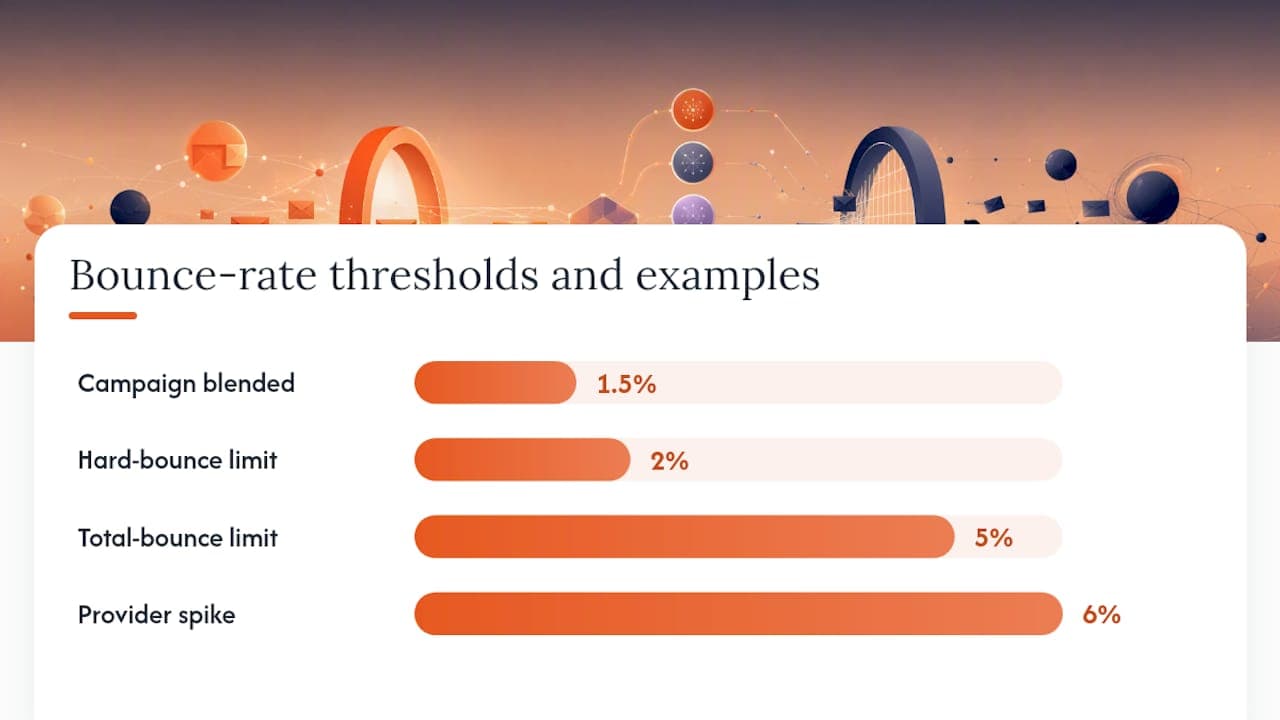
Calculate bounce rate at both the campaign level and the provider level. A campaign-wide figure of 1.5% can hide a Gmail-specific spike of 6% that a blended number will never surface, and provider-specific spikes are usually the first sign of an authentication problem or a reputation issue with one mailbox provider rather than your list as a whole.
Bounce rate rarely moves in isolation either. A rising bounce rate alongside a rising complaint rate is a much stronger warning sign than either metric alone, because it points to a list quality or targeting problem rather than a one off technical fault.
Beyond hard and soft: a five-category taxonomy for automation
Treating every bounce as either “hard” or “soft” is a fine starting point, but it is an entry-level strategy once your sending volume grows. Production deliverability systems tend to normalise bounce events into five practical categories, each mapped to a distinct automated action.
| Category | Example enhanced codes | Recommended action |
|---|---|---|
| Address | 5.1.1, 5.1.2 | Suppress immediately |
| Mailbox | 4.2.1, 4.2.2 | Retry with backoff |
| Policy | 5.7.1 | Hold and investigate |
| Content | 5.6.1, 5.7.1 | Escalate for review |
| Technical | 4.3.0 | Retry, then investigate if persistent |
This kind of five-way classification is genuinely useful because address and mailbox failures can be handled with no human involvement at all, while policy and content rejections almost always benefit from a person checking authentication records and message content before the system takes any permanent action.
The practical difficulty is that ESP event schemas are not standardised. One platform’s “blocked” event and another’s “rejected” event can both map to the same underlying enhanced code, so normalising provider-specific event names against the enhanced code is the step that actually makes a classifier reliable. If you are building this in house rather than relying on your ESP’s own logic, start by logging the raw DSN and enhanced code for every bounce, then layer the five-category mapping on top rather than trying to guess intent from the ESP’s own event label.
Monitoring and reporting: what to watch and when to escalate
A handful of dashboards catch most deliverability problems before they become revenue problems.
- Bounce trend over time, split by hard and soft, to spot a slow creep rather than only a sudden spike.
- Provider-specific unknown-user rate, since a rise at one major mailbox provider almost always points to a list quality or authentication issue specific to that provider.
- Repeat soft-bounce addresses, flagging any contact that has soft bounced across three or more consecutive sends.
- Complaint rate alongside bounce rate, because the two moving together is a stronger signal than either alone.
Escalate to an internal investigation, or bring in outside help, when you see a sudden spike at one provider, a run of authentication failures that were not there last week, or a blocklist hit. Before contacting your ESP or a mailbox provider directly, collect the raw DSNs, the enhanced codes involved, your recent sending volume, and any authentication changes made in the preceding fortnight. Marketing, IT, and whoever owns your sending infrastructure should all see this evidence together, because the fix is rarely confined to one team’s remit. Digistrat’s guide to monitoring deliverability covers the dashboard setup in more depth if you want to build this properly rather than checking bounce reports manually each week.
Why this distinction matters more than most teams assume
Mis-suppression is quietly expensive. Suppress a policy-rejected address that was actually reachable and you have removed a paying customer from your list based on a misread code, and that customer’s absence then distorts every open and click metric you report afterwards, making campaigns look worse than they were. Poor deliverability rarely announces itself with a dramatic failure; it shows up as a slow decline in inbox placement that gets blamed on content or timing when the real fault sits in authentication or list hygiene.
If your bounce rates are creeping past the thresholds discussed above, or you cannot confidently say why a spike happened at one provider last month, that is usually the point where a proper technical audit pays for itself faster than another round of subject line testing.
— James
Where Digistrat fits when the bounce data gets complicated
Reading enhanced codes correctly is one thing; fixing the authentication gaps, reputation damage, or infrastructure faults behind them is another matter entirely, and that is where Digistrat’s audits earn their keep for UK and European senders relying on email revenue.

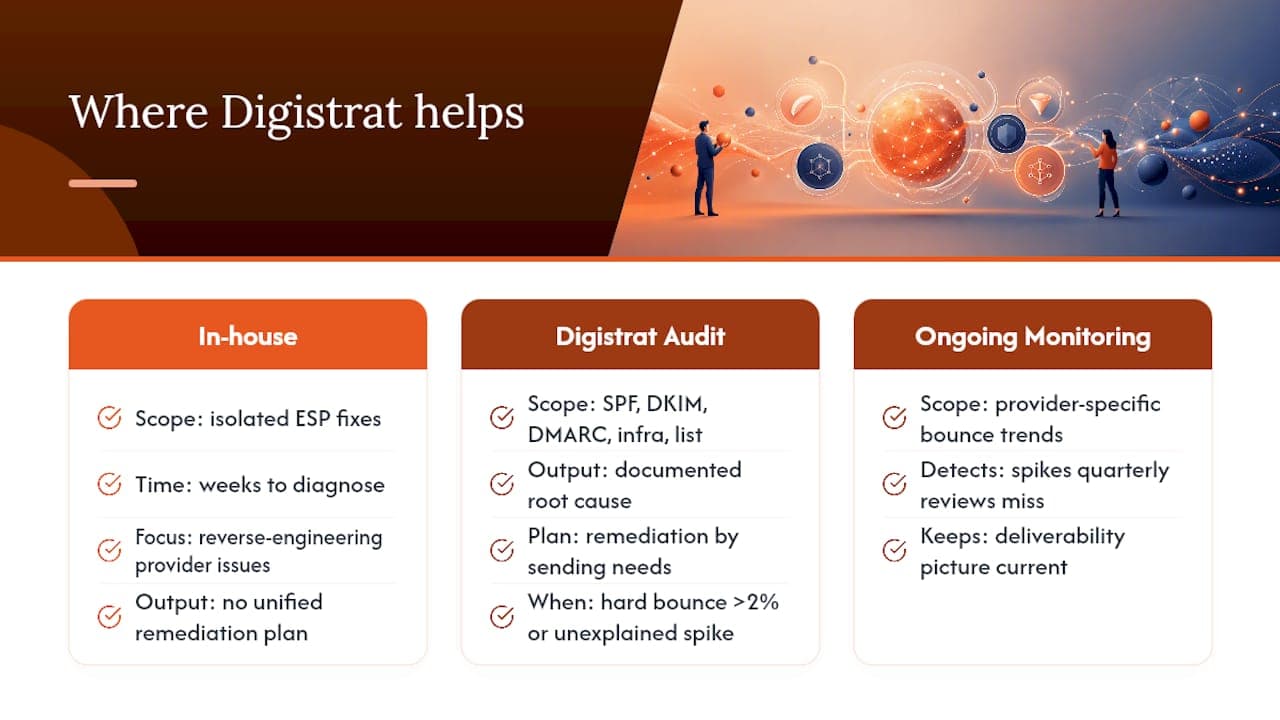
Digistrat’s deliverability audit examines your SPF, DKIM, and DMARC configuration, your sending infrastructure, and your list quality together, rather than treating bounces as an isolated problem to patch in your ESP settings. Where an in-house team might spend weeks reverse-engineering why one provider’s unknown-user rate keeps climbing, an audit gives you a documented root cause and a remediation plan built around what your sending actually needs, not a generic checklist. For senders who want the picture kept current rather than reviewed once a year, ongoing reputation monitoring tracks provider-specific bounce trends and flags the kind of spike that a quarterly review would miss entirely.
If your hard bounce rate has crept above 2%, or a provider-specific spike has appeared without an obvious cause, book a deliverability audit with Digistrat and get a clear answer instead of another guess.
Sources
For quick lookups, the SMTP bounce codes reference covers the full 4xx and 5xx range with enhanced code detail and the bounce rate thresholds cited above. The five-category bounce taxonomy guide is worth bookmarking if you are building or refining an automated classifier, and the guide to distinguishing soft and hard bounces is a solid refresher on why policy rejections deserve a second look before suppression. Deliverability agencies such as EVOLVE Commerce also publish case studies showing how bounce diagnosis played out in practice across different sectors.
- Senderreputation
- Soft bounce vs hard bounce guide | Nylas CLI
- Bounce categorization: beyond hard vs soft | SMTPedia
FAQ
Should I delete hard bounce emails from my list?
Yes. A hard bounce means the address is permanently undeliverable, so suppressing it protects your sender reputation and stops you wasting sends on a mailbox that will never accept mail again.
What is an acceptable hard bounce rate?
Most deliverability practitioners aim to keep hard bounce rate under roughly 2%, with anything sustained above that level starting to affect inbox placement across the board.
Is a 42% bounce rate good?
No. A bounce rate anywhere near 42% is a serious data or sending problem, whether that is a corrupted list, a broken integration, or a domain that has stopped accepting your mail entirely, and it needs investigating immediately rather than monitored.
Is a 90% bounce rate bad?
Yes, a 90% bounce rate almost never reflects genuine list decay; it usually points to a technical fault such as a misconfigured send, a blocked sending domain, or a broken data feed, and it warrants an urgent technical review rather than routine list cleaning.
