Stopping iCloud from filing your campaigns under Junk comes down to five things done properly and in order: aligned SPF, DKIM and DMARC (moving briskly towards p=quarantine or p=reject), valid reverse DNS on your sending IPs, immediate suppression of dead addresses and hard bounces; registering your domains and IPs for Apple’s Private Email Relay if Sign in with Apple is anywhere in your stack; and confirming actual placement with iCloud seed mailboxes rather than trusting your platform’s dashboard. Everything else is refinement.
Table of Contents
- What causes icloud mail spam problems and how to fix them
- Authentication and sending infrastructure: what iCloud expects
- List management and engagement: stop looking like anonymous bulk
- Which Apple-specific flows cause silent delivery failures?
- How do you monitor for iCloud deliverability problems early?
- Recovery playbook if iCloud delivery suddenly falls
- What does iCloud’s spam filter actually look for?
- How can you improve deliverability to iCloud recipients specifically?
- How does Mail Privacy Protection affect spam detection?
- What kinds of spam commonly target iCloud accounts?
- Author perspective: why Apple deserves its own delivery strategy
- How Digistrat can help with iCloud deliverability
- Sources
- FAQ
What causes icloud mail spam problems and how to fix them
Before you send anything else to an @icloud.com list, run this checklist. It will not catch everything, but it catches the mistakes that cause most of the damage.
- Authentication alignment: SPF and DKIM both pass, and both align with your visible From domain, with DMARC set to at least p=quarantine.
- Reverse DNS: every sending IP has a valid PTR record that resolves back to a hostname matching your sending infrastructure.
- List-Unsubscribe header: present and functional on every commercial send, ideally supporting one-click unsubscribe.
- A plain-text alternative: shipped alongside your HTML, not an afterthought.
- A monitored reply-to address: someone is actually reading what comes back.
- Hard bounces removed: immediately, not at the next scheduled clean-up.
- Subscribers inactive for 12 months or more: suppressed, in line with Apple’s own postmaster guidance.
- Private Email Relay registration: completed via the Apple Developer portal if your service touches Sign in with Apple.
Verification takes twenty minutes: check your SPF record resolves without a permanent error, confirm your DKIM selector is publishing correctly, pull a DMARC aggregate report and filter it for icloud.com, me.com and mac.com sources, then send live test messages to a handful of iCloud test accounts and watch where they land.
Pro Tip: A reply-to address that a human actually reads does more for your iCloud reputation than another round of subject line testing. A genuine reply from a recipient tends to whitelist you for that person going forward, and it costs nothing to set up.
Authentication and sending infrastructure: what iCloud expects
iCloud is stricter about authentication than most inbox providers, and it is unforgiving about the details. Senderreputation notes that SPF and DKIM alignment failures, along with SPF permanent errors caused by exceeding the ten DNS lookup limit, routinely tip messages into spam at Apple’s servers. That ten lookup ceiling catches out more senders than you would expect, particularly once a business has stacked several third-party tools (a CRM, a helpdesk, a marketing platform) all authorised under the same SPF record. The fix is SPF flattening, ideally combined with a dedicated bounce domain so your Return-Path stays aligned without dragging every vendor’s includes into one fragile record.
DKIM deserves the same discipline. Use 2048-bit keys where your sending platform supports them, make sure the d= domain in your DKIM signature aligns with your visible From address, and rotate keys periodically rather than leaving the same selector live for years. Our guide to SPF, DKIM and DMARC walks through the mechanics in more depth if your team is setting this up from scratch.
On DMARC, speed matters. Apple appears to treat a policy sitting at p=none as a weak trust signal, since it tells the receiving server you have not committed to enforcement. The sensible path is a fast, monitored progression: start at p=none purely to gather rua reports, then move to p=quarantine once you have confirmed legitimate mail is passing, and push on to p=reject as soon as you are confident nothing genuine will be caught. We cover the full sequence in our 90 day DMARC plan.
Do not neglect PTR records. A missing or mismatched reverse DNS entry on a sending IP is one of the strongest negative signals a mail server can send Apple, regardless of how clean everything else looks.
- Flatten SPF to stay under 10 lookups; use a dedicated bounce domain for Return-Path alignment.
- Publish DKIM at 2048-bit strength with the d= domain matching your From header.
- Move DMARC from p=none to p=quarantine, then p=reject, with rua reporting throughout.
- Confirm forward-confirmed reverse DNS on every sending IP before scaling volume.
List management and engagement: stop looking like anonymous bulk
Clean lists and genuine engagement are what separate a trusted sender from one that gets treated as anonymous bulk traffic. Apple’s own guidance recommends removing subscribers who have shown no activity for twelve months or longer, and suppressing hard bounces the moment they occur rather than batching the clean-up for later. Unsubscribes need honouring quickly too. A delayed opt-out is one of the fastest routes to a spam complaint, and complaints hurt reputation far more than the lost subscriber ever would.
There is a subtler point worth understanding here. Apple rewards genuine two-way conversation with per-recipient whitelisting, and even a single reply from a recipient often causes your subsequent messages to bypass that person’s filter entirely. That is a real incentive to design at least some campaigns to invite a reply, whether that is a customer service check-in, a feedback request, or simply a question worth answering, rather than treating every send as one-way broadcast.
Measuring engagement accurately for this audience takes extra care, because Mail Privacy Protection proxies image loads for a large share of Apple’s users, which inflates open rates and makes them unreliable as a signal. Click rate and reply behaviour are far sturdier metrics for judging how an Apple-heavy segment is actually responding, a point covered well by Mailflow Authority’s guide to iCloud filtering rules. Persistently dormant subscribers do more damage than most senders assume, and our piece on dormant subscribers and deliverability sets out why that is worth acting on rather than ignoring.
- Suppress subscribers inactive for 12+ months, per Apple’s own guidance.
- Remove hard bounces immediately, not on a delayed schedule.
- Honour unsubscribe requests promptly to avoid complaint-driven reputation damage.
- Design at least some sends to prompt genuine replies, which can whitelist you at the recipient level.
Which Apple-specific flows cause silent delivery failures?
Two Apple features cause more confusion among senders than almost anything else, mainly because they fail silently rather than throwing an obvious error.
The first is Private Email Relay, the mechanism behind Hide My Email. If your service uses Sign in with Apple, recipients may be interacting with you through a relay address rather than their real inbox. Developer-focused deliverability notes warn that unregistered sending domains or IPs can receive a clean 250 OK response from Apple’s servers, only for the message to be dropped afterwards with no bounce notification at all, according to MailerToGo’s developer guide to Apple Mail deliverability. The remedy is straightforward but easy to overlook: register your sending domains and IPs through the Apple Developer portal wherever Sign in with Apple is part of your product.
The second is Mail Privacy Protection, which proxies image loads for a substantial proportion of iCloud users. This means opens are being recorded even for messages a recipient never actually looked at, which quietly corrupts any engagement model built on open rate. BounceCheck’s guide to Apple Mail spam filtering explains that Apple layers server-side filtering with local client-side filters too, so a message can clear the first hurdle and still be filtered on-device, invisibly to you.
Worth keeping an eye on, though less urgent for most senders right now, is Apple Business Connect alongside BIMI and Verified Mark Certificates, which are becoming meaningful signals for brand visibility in Apple’s mail clients as adoption grows.
- Register sending domains and IPs via the Apple Developer portal if Sign in with Apple is in use.
- Treat unexplained silent drops as a Private Email Relay registration gap first.
- Stop relying on open rate for Apple cohorts; MPP proxy fetches distort the figure.
- Monitor BIMI/VMC and Apple Business Connect as emerging brand-trust signals.
Pro Tip: If your open rates for iCloud recipients look suspiciously healthy while replies and clicks have gone quiet, that gap is usually Mail Privacy Protection at work, not a sign your content is landing well.
How do you monitor for iCloud deliverability problems early?
Apple gives senders no public postmaster dashboard, which means diagnosis has to be built from indirect signals rather than a single source of truth.
- Pull DMARC aggregate reports and filter specifically for icloud.com, me.com and mac.com sending sources, watching SPF and DKIM pass rates for that segment against your overall numbers.
- Run seed-list tests monthly, and again immediately after any DNS, IP, or ESP infrastructure change, since industry practice treats this cadence as the minimum for catching regressions before they become expensive.
- Watch for accepted-but-not-seen patterns in your seed results, which usually point to a silent drop rather than a genuine spam-folder placement.
- Track bounce codes closely: a 550 5.7.1 typically signals a hard authentication or reputation rejection, while a 421 4.7.1 suggests rate limiting that calls for exponential backoff rather than an immediate retry.
- Segment every metric by recipient domain so an Apple-specific problem does not get diluted and hidden inside your overall Gmail-and-Outlook-dominated averages, and lean on click rate over open rate for that Apple slice.
Recovery playbook if iCloud delivery suddenly falls
When placement drops, speed and order both matter. Work through this sequence rather than trying everything at once.
- Pause or sharply reduce sending to Apple-domain recipients while you investigate, so you are not compounding a reputation problem with more volume.
- Run fresh seed-list tests immediately to confirm the scale and nature of the problem.
- Segment down to your most engaged Apple recipients only, and warm any new sending IP back up gradually rather than resuming full volume in one go.
- Remove hard bounces and check DMARC reports specifically for Apple-sourced authentication failures.
- Inspect recent headers for alignment failures and audit anything that changed recently, whether that is a new ESP, a DNS edit, or a content template swap.
- If the problem persists, gather your DMARC and seed-test evidence and consider a specialist deliverability audit to identify what in-house diagnosis has missed.
Pro Tip: Keep a simple change log of every DNS and ESP configuration update. When iCloud placement drops without warning, that log is usually the fastest route to the actual cause.
What does iCloud’s spam filter actually look for?
iCloud’s filtering system works in layers, combining server-side checks at Apple’s mail infrastructure with local, client-side filtering on the recipient’s device itself, a structure BounceCheck’s analysis describes as one reason messages can pass initial authentication checks and still get filtered later. On the server side, authentication results (SPF, DKIM, DMARC alignment), sender reputation history, and content characteristics such as link density and image-to-text ratio all feed into the initial placement decision. A message that clears that stage still faces a second, local pass on the recipient’s own iPhone, iPad or Mac, which draws on that individual’s personal interaction history with the sender.
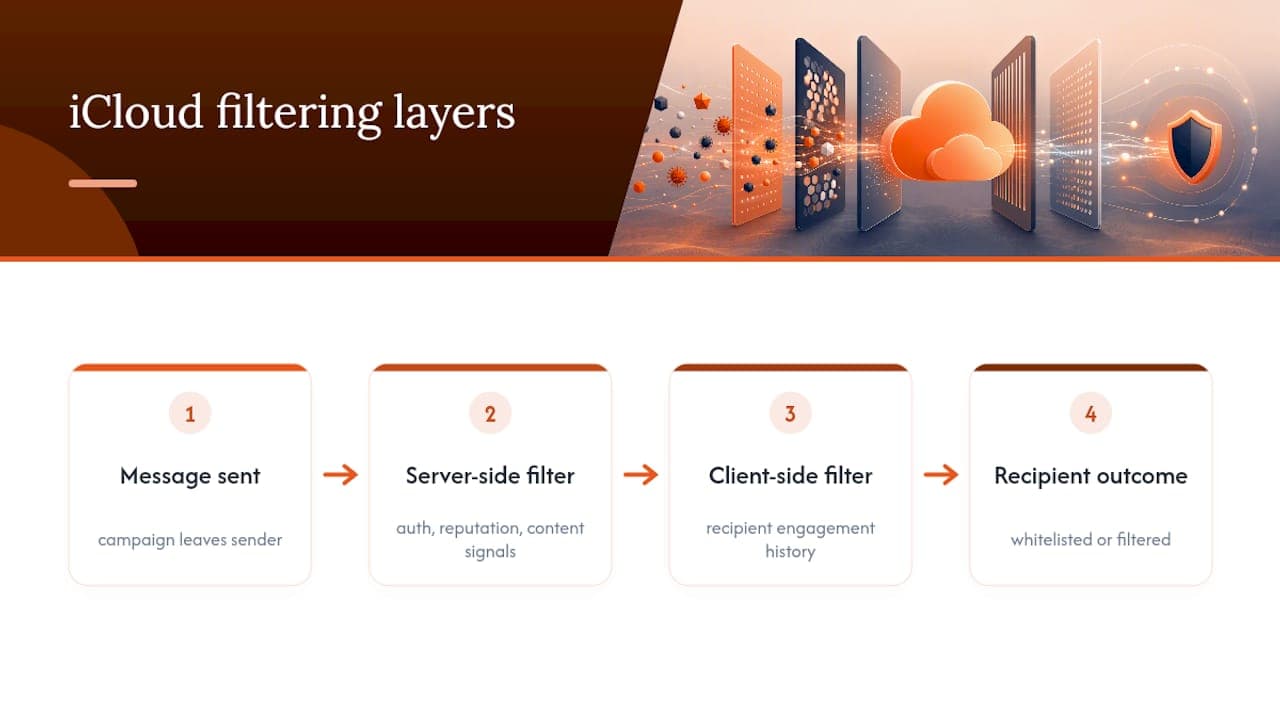
That second layer explains why two recipients on the same list can see wildly different placement for an identical message. One might have replied to you once, quietly earning permanent whitelisting for future sends, while the other has never opened a single email from your domain and gets filtered on pattern-matching alone. Sudden changes in sending volume, a spike in complaint rate, or a shift in content structure (a new template with far more images than usual, for instance) can all trigger a re-evaluation of a sender’s standing, even where authentication remains technically sound throughout. This is why authentication passing cleanly is necessary but not sufficient for iCloud. It is a floor, not a guarantee.
How can you improve deliverability to iCloud recipients specifically?
Technical fixes only get you halfway. The other half is behavioural, built around how you send rather than what you send.
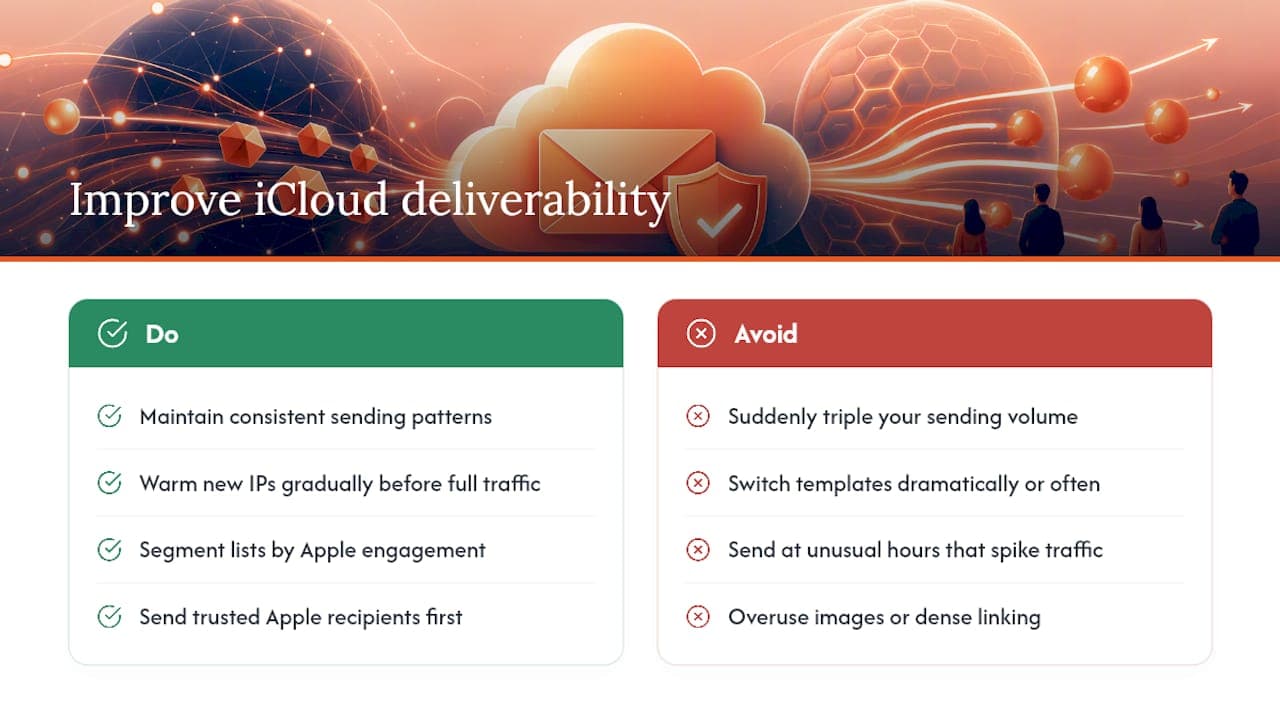
Consistency in sending patterns matters more at iCloud than most senders assume. A domain that suddenly triples its volume, switches templates dramatically, or starts sending at unusual hours can trigger heightened scrutiny even with authentication fully in order. Warming any new IP gradually, rather than launching straight into full-volume sending, gives Apple’s systems time to build a reputation baseline for you rather than treating your traffic as unknown and therefore suspicious.
Content plays a role too, though a smaller one than most people expect once authentication is sorted. Excessive use of images without accompanying text, unusually dense linking, and subject lines that mimic known spam patterns can all nudge a borderline message the wrong way. None of these factors override strong authentication and genuine engagement, but they can tip a message that is already sitting on the fence.
Segmenting your list by known Apple engagement, sending your most trusted, high-engagement Apple recipients first when rolling out a new campaign or infrastructure change, and treating this cohort’s metrics separately from your Gmail and Outlook data, are the practical habits that separate senders who solve this problem from those who keep guessing at it. Partner content on B2B outreach compliance, such as Waalaxy’s guide on protecting legitimate prospecting, covers similar ground on why properly consented, well-targeted sending outperforms broad blasting even before deliverability enters the conversation.
How does Mail Privacy Protection affect spam detection?
Mail Privacy Protection was built to protect user privacy, not to make life difficult for senders, but its side effects on deliverability measurement are significant. By routing image requests through Apple’s own proxy servers rather than letting them load directly from the recipient’s device, MPP means an “open” is recorded whether or not a human being actually looked at the message.
That has a direct effect on spam detection too, not just on your own reporting. Genuine engagement signals such as time spent reading, device type, and location, all of which some filtering systems have historically used as trust indicators, become far less reliable for Apple recipients once MPP is active for a given user. This does not mean iCloud’s spam filter has gone blind. It means the filter leans more heavily on signals MPP cannot obscure: authentication results, sending patterns, complaint rates and genuine click or reply behaviour.
For senders, the practical consequence is that any deliverability monitoring built primarily around open rate is now measuring the wrong thing for a meaningful share of an iCloud-heavy list. Click-based segmentation and reply tracking, as Mailflow Authority notes, give a far more honest picture of whether your content is actually landing with real, interested people rather than being quietly proxy-fetched and forgotten.
What kinds of spam commonly target iCloud accounts?
Understanding what iCloud’s filters are trained against helps explain why legitimate commercial mail sometimes gets caught in the crossfire. The most common categories reaching, or being blocked from, iCloud inboxes include phishing attempts impersonating Apple itself (fake “your Apple ID has been locked” messages remain a persistent favourite among attackers), financial scams, fraudulent delivery notifications, and low-quality bulk marketing from senders with poor or nonexistent authentication.
Because Apple’s filters are trained heavily against these high-volume, low-trust patterns, such as generic sender names, aggressive urgency language, mismatched reply domains, and poor authentication, legitimate commercial senders who share even a few of those surface characteristics can get caught in the same net. A marketing domain with a shaky SPF record, or a transactional sender using a generic no-reply address with no monitored reply-to, can look statistically similar to the fraudulent traffic Apple’s filters are built to catch, even when the intent behind it is entirely legitimate.
This is precisely why the technical fundamentals covered earlier in this guide carry so much weight for iCloud specifically. Every gap you leave (weak authentication, a cold sending domain, an unmonitored reply address) is a small resemblance to the fraudulent mail Apple’s filters are tuned to catch, and each one nudges you closer to a false positive you never intended to trigger.
Author perspective: why Apple deserves its own delivery strategy
Treating iCloud as just another inbox provider is the mistake most senders make, and it is an expensive one. Apple’s layered filtering, combined with Mail Privacy Protection quietly distorting the metrics teams rely on, makes this genuinely a different delivery problem, not a smaller version of Gmail’s. Digistrat’s audit work consistently finds that businesses lose Apple-domain revenue for months before anyone notices, simply because the dashboard still looks fine.
How Digistrat can help with iCloud deliverability
Fixing iCloud placement issues in-house usually means someone senior spending days chasing SPF lookups and DMARC reports instead of running the business. Digistrat exists as the alternative to that slow, uncertain DIY process: a fixed-scope audit that identifies exactly what is broken, in what order to fix it, and what it is likely costing you in lost revenue while it stays that way.
Professional email deliverability services cover the ground this article has walked through, applied properly rather than half finished. That includes a full Email Deliverability Audit that examines authentication, infrastructure and list quality together, DMARC implementation taken through to enforcement with proper monitoring, authentication remediation where SPF or DKIM has drifted out of alignment, and IP warm-up support for anyone migrating infrastructure. For businesses that need continuous oversight rather than a one-off fix, ongoing reputation monitoring keeps watch on Apple-specific signals long after the initial audit closes. If your Apple-domain metrics have been quietly sliding and you would rather have a specialist confirm the cause than keep guessing, book an audit or a 90-minute advisory session with Digistrat.
Sources
- Postmaster information for iCloud Mail - Apple Support (US)
- Senderreputation
- Apple iCloud and Mac Mail spam filtering: a sender’s guide (BounceCheck)
- Apple Mail deliverability guide for developers (MailerToGo resources)
FAQ
What is the fastest fix for icloud mail spam problems?
Confirm SPF and DKIM both pass and align with your From domain, check DMARC is at least at p=quarantine, and verify placement with a live send to iCloud seed accounts rather than trusting your ESP’s reported inbox rate.
Why does iCloud reject or silently drop mail that other providers accept?
iCloud enforces authentication alignment more strictly than most providers and gives no bounce notification for some Private Email Relay failures, so mail can be accepted with a 250 OK response and then dropped without any error reaching you.
Does Mail Privacy Protection affect how iCloud detects spam?
Yes. MPP proxies image loads for many iCloud users, which inflates open rates and makes them unreliable, so click rate and reply behaviour are better engagement signals for this audience.
How often should we run iCloud seed-list tests?
Monthly as a baseline, and immediately after any DNS, IP, or ESP infrastructure change, since that is when Apple-specific regressions are most likely to appear.
When does it make sense to bring in a specialist for iCloud deliverability?
If seed tests and DMARC reports show persistent Apple-specific placement problems after you have fixed authentication and list hygiene, a dedicated audit such as Digistrat’s Email Deliverability Audit can identify issues that in-house diagnosis typically misses.
