For most engineering teams, the right starting point is a shortlist of Resend, Mailtrap, Postmark, and Mailgun for deliverability-conscious transactional sending, with Amazon SES kept in reserve for cost-sensitive scale. The deciding factors should always be deliverability tooling and developer experience together, never one without the other. Check the comparison below, then run a staged trial before committing to any single provider.
Table of Contents
- What is the best email API for developers right now?
- REST API or SMTP: which should you use?
- What good developer experience actually looks like
- Getting authentication and deliverability right from day one
- Features that quietly shape your integration cost
- Budgeting for an email API: where costs actually escalate
- How to choose an email API: the checklist that saves you a rewrite
- Validating and migrating providers without breaking production
- Why deliverability expertise matters beyond the API layer
- The gap between a working API and a working inbox
- Need deliverability fixed rather than another API to integrate?
- Sources
- FAQ
What is the best email API for developers right now?
There is no single “best” email API, because the right choice depends heavily on what you are sending, how much of it, and how much deliverability engineering you are prepared to do yourselves. That said, some providers earn their reputation for good reason. Resend has become the default recommendation for teams that want a clean, well-documented REST experience without wading through a decade of legacy features. Postmark still leads for transactional-only workloads where speed and predictability matter more than marketing bells and whistles. Mailgun and SendGrid remain the safe, mature choices for organisations that need enterprise support contracts and extensive documentation built up over many years.
Here is how the field breaks down by what each provider does best.
- Resend suits teams wanting fast onboarding and clear event tracing, with SDK examples that read almost like plain English.
- Mailtrap is built for testing and QA, letting you emulate sending behaviour before anything touches a real inbox.
- Brevo works well when you need transactional sending and marketing campaigns under one roof rather than stitching two vendors together.
- Mailgun handles high-volume transactional systems and publishes a genuinely useful deliverability best-practices calendar.
- Postmark keeps transactional and marketing streams strictly separate, which protects your transactional reputation from marketing mistakes.
- SendGrid offers the broadest ecosystem and tiered enterprise support for large organisations with complex integration needs.
- Amazon SES delivers the strongest cost-per-send economics, particularly for teams already living inside AWS.
- MailerSend keeps pricing simple and leans on templates for teams that do not want to build personalisation logic from scratch.
- SMTP2GO focuses on reliable SMTP submission for legacy systems and third-party platforms that were never built with modern REST APIs in mind.
- SMTP.com, Elastic Email, SendPulse and AgentMail round out the market, each with their own take on pricing, templating and developer tooling worth checking directly against your requirements.
Message size limits and daily sending caps vary between providers, and most enforce stricter limits on free and entry-level tiers, so check the documentation before assuming your attachment-heavy application will fit comfortably. UK-based teams sending to European recipients should also confirm which data centres a provider uses, since some enforce EU-only processing by default and others require you to select a region explicitly.
REST API or SMTP: which should you use?
The honest answer is that most modern applications should default to a REST API and fall back to SMTP only when something forces their hand. A REST API generally returns richer, recipient-grouped delivery status, documents its error codes properly, and supports attachments within clearly stated size limits. That structured response is what makes idempotency, batching, and detailed event tracing genuinely practical to build against.
SMTP submission still earns its place, though, particularly when you are working with legacy applications, off-the-shelf platforms, or third-party tools that were never designed to speak REST. Plenty of established software, from ERP systems to older CMS platforms, only knows how to relay mail through a traditional SMTP connection, and rewriting that integration layer is rarely worth the effort just to gain a REST endpoint.
- REST gives you idempotency keys, structured JSON errors, and easier batching for high-throughput sending.
- SMTP gives you compatibility with legacy software and third-party tools that expect a mail relay, not an API call.
- Most providers support both, so you are rarely locked into one path for the life of the integration.
The practical connection details trip up more teams than the architectural decision does. Modern SMTP endpoints commonly require implicit TLS on port 465, with STARTTLS available on port 587 and sometimes 2525 for networks that block the standard ports outright. Getting the TLS mode wrong against the wrong port is the single most common cause of a silent connection failure during initial setup, and it rarely produces an error message that points you toward the actual problem.
Pro Tip: Before debugging application code, confirm your provider’s required TLS mode against the exact port you are connecting on. A mismatched STARTTLS attempt on an implicit-TLS port looks like a timeout, not a configuration error, and can burn hours of debugging time that a five-minute documentation check would have avoided.
What good developer experience actually looks like
A provider’s developer experience reveals itself long before you send your first real email, usually in how honestly the documentation handles failure. Strong providers publish a full o pen API specification alongside official SDKs for the languages your team actually uses, which lets you generate client code, validate requests before they leave your application, and catch malformed payloads early rather than discovering them from a bounce three days later.
Run through this before you commit to any provider:
- Pull the open API spec and check it against the documented endpoints. If they do not match, treat that as a signal about how well-maintained the whole platform is.
- Send a deliberately malformed request and read the error response. A clear, specific error code beats a generic “bad request” every time.
- Trigger a webhook event in the sandbox and verify the payload structure matches the documentation exactly.
- Check whether retry semantics are documented for transient failures, or whether you are expected to guess.
Error handling separates the providers worth trusting from the ones that will cost you support tickets later. Build retry logic around exponential back off for anything returning a transient failure code, and treat permanent failures (bad recipient addresses, hard bounces) as terminal rather than retrying them into oblivion and damaging your sender reputation in the process.
Delivery events and webhooks are where observability either earns its keep or quietly lets you down. Webhooks commonly rely on HMAC signatures for verification and return transient SMTP codes to signal that a retry is appropriate, so your event consumer needs to verify signatures properly and distinguish transient from permanent failures rather than treating every webhook the same way.
- Verify webhook signatures on every request; never trust an unsigned payload just because it arrived on the expected endpoint.
- Log every delivery event with its recipient and timestamp, even successful ones, so you have a full audit trail during an incident.
- Use sandbox environments and suppression lists during development so test sends never touch real inboxes or damage a shared reputation.
- Stage your testing: local sandbox first, then a small real-world batch, before anything approaching production volume.
Getting authentication and deliverability right from day one
SPF, DKIM and DMARC are not optional extras bolted onto an email API, they are the DNS-level foundation that determines whether your carefully built integration actually lands in an inbox rather than a spam folder. SPF publishes which servers are allowed to send on your domain’s behalf, DKIM cryptographically signs your messages so receiving servers can verify they were not tampered with in transit, and DMARC tells receiving servers what to do when a message fails either check, while also giving you visibility through aggregate reports.
Publishing these records correctly is an engineering task, not a marketing one, and it is worth treating it that way from the start.
- Publish SPF and DKIM records before your first production send, not after you notice deliverability problems.
- Set DMARC to a monitoring policy first, review the reports, then tighten enforcement once you trust the results.
- Rotate DKIM keys periodically where your provider supports automatic rotation, since DNS authentication and ongoing reputation monitoring are consistently cited as critical to sustained inbox placement.
- Watch bounce rates closely in the first weeks of any new sending domain, and suppress hard bounces immediately rather than retrying them.
A dedicated IP is worth considering once your volume is genuinely high and consistent, but it comes with a real obligation: a fresh IP has no reputation at all, and sending your full production volume from it on day one is close to guaranteed to land you in spam folders. A proper warm-up ramps volume gradually over one to two weeks while you watch bounce and complaint rates at every step.
Statistic Callout: DNS authentication and reputation monitoring are repeatedly flagged as the deciding factor in inbox placement, ahead of the API integration itself. An API can be technically flawless and still deliver poorly if the DNS records behind it are wrong.

Provider-managed deliverability features, things like automatic list hygiene, built-in suppression handling, and reputation dashboards, reduce the operational load on your team considerably. They do not remove the need for you to get SPF, DKIM and DMARC right in the first place, but they do mean you are not building bounce-handling logic entirely from scratch.
Features that quietly shape your integration cost
Batching, scheduling and attachment handling look like minor details in a feature comparison table, but they shape your actual integration architecture more than almost anything else on the list. Get these wrong early and you will be rewriting core sending logic months into a project, usually under pressure.
Batch endpoints deserve particular attention because their validation behaviour varies more than most developers expect. Some providers validate every row in a batch before queueing any of it, meaning a single malformed entry can reject the entire request rather than just the bad row. If your application sends batches of hundreds of personalised emails, that behaviour changes how defensively you need to validate data before it ever reaches the API.
- Check whether batch failures are all-or-nothing or per-row, since this dictates how much client-side validation you need to build.
- Use idempotency keys on any send that might be retried, so a network timeout does not result in a duplicate email reaching a customer.
- Confirm total message size limits, including attachments, before designing any feature that lets users upload files to be emailed.
- Look for server-side templating with variable substitution if you need personalisation at scale, rather than building strings in your application code.
- Check whether scheduled sends can be cancelled or modified after submission, since not every provider supports this cleanly.
Attachment limits catch teams out more often than any other constraint on this list, usually because nobody checks the ceiling until a customer tries to send a large PDF and the request silently fails.
Budgeting for an email API: where costs actually escalate
Pricing on the surface looks simple: a free tier, a monthly plan, then overage charges once you exceed your allowance. In practice, real project costs escalate in places that rarely appear in the headline pricing table.
Free tiers are almost always genuinely useful for development and early testing, letting you validate integration logic without spending anything, but most become impractical the moment you hit production volume or need features like dedicated IPs, advanced analytics, or priority support.
- Per-message and monthly-plan pricing both exist across the market; decide which shape fits your sending pattern before comparing numbers.
- Overage charges can turn a cheap-looking plan expensive quickly if your sending volume is unpredictable month to month.
- Dedicated IPs, advanced deliverability consulting and higher SLA tiers are usually priced separately from the base plan, not included in it.
- Seat-based support pricing catches teams out when more than one or two people need access to logs and dashboards.
Statistic Callout: Consider that DNS authentication and reputation monitoring, not the API plan you choose, are what most consistently determine whether your emails reach the inbox. That means the cheapest plan on paper can still cost you more overall if it leaves deliverability work entirely on your own shoulders.
A free tier is genuinely fine for development, staging, and low-volume proof of concept work. It becomes a liability the moment you rely on it for anything customer-facing at scale, both because of rate limits and because free tiers rarely include the deliverability tooling you will eventually need.
How to choose an email API: the checklist that saves you a rewrite
Run through these questions before you sign anything, not after your first production incident.
- Deliverability tooling: does the provider offer bounce handling, suppression lists, and reputation monitoring out of the box, or are you building all of that yourselves?
- Observability: are webhooks signed, are retry semantics documented, and can you see recipient-level delivery status without opening a support ticket?
- Integration effort: is there an OpenAPI spec, and do the official SDKs cover the languages your team actually uses in production?
- Cost at your real volume: model your actual expected sending volume against the pricing tiers, not the headline free-tier numbers.
- Support and SLA: what response time is contractually guaranteed, and does that match how critical email is to your revenue?
Ask sales or support directly what happens when a batch request contains one malformed recipient, and listen carefully to whether they can answer immediately or need to check. That single question tells you a great deal about how well they understand their own platform.
Pro Tip: Treat vague answers about error codes or missing documentation on webhook retry behaviour as a genuine red flag, not a minor gap. If a provider cannot tell you clearly how failures are handled, you will be the one discovering it during a production incident.
Run a short acceptance test in staging before committing: send a deliberately malformed batch, trigger a bounce, and confirm your webhook consumer handles both correctly. If either fails silently, that is worth knowing before go-live rather than after.
Validating and migrating providers without breaking production
Moving to a new email API, or trialling one for the first time, deserves the same discipline you would apply to any other production-critical migration. A staged approach catches problems while the blast radius is still small.
- Start in a local sandbox and confirm authentication, error handling, and webhook delivery all behave as documented.
- Move to a small-volume live test, sending to a handful of real addresses across major providers (Gmail, Outlook, and a couple of smaller ones) and check inbox placement directly, not just API success responses.
- Watch delivery rate, bounce rate, webhook success rate, and latency closely during this phase, since a low bounce rate with a poor webhook success rate often signals an observability gap rather than a sending problem.
- Ramp volume gradually over one to two weeks, particularly if you are warming a new domain or IP.
- Build a failover path or abstraction layer if email is genuinely revenue-critical, since relying on a single provider without any secondary routing leaves you exposed if that provider’s deliverability degrades for reasons entirely outside your control.
A short staged ramp with proper inbox-placement checks tends to catch problems that a purely API-level success response would miss entirely, because the API can report success while the message still lands in spam. That gap is exactly why deliverability monitoring matters as much as the integration itself.
Why deliverability expertise matters beyond the API layer
Choosing a well-documented API solves the send problem. It does not automatically solve the arriving problem, and those are two genuinely different things that get conflated constantly in vendor marketing.
Some consultancy firms work with UK and European businesses to close that gap through deliverability audits, DMARC, SPF and DKIM setup and remediation, ongoing sender reputation monitoring, and support during ESP migrations and IP warm-ups. The pattern across technical audits tends to repeat itself in ways that are worth knowing before you assume your own setup is fine.
- Misaligned or missing DMARC records that leave a domain wide open to spoofing, often unnoticed for months.
- DKIM keys that were never rotated, or worse, never verified after an ESP migration.
- Shared IP reputation issues inherited silently from a previous sender on the same infrastructure.
- List quality problems, stale addresses and unengaged recipients, quietly dragging down sender reputation over time.
If you have already worked through the checklist in this article and your delivery metrics still are not moving, that is usually the point where continuing to iterate in-house stops being the efficient path. A structured review of sending architecture and authentication tends to surface the root cause faster than another week of trial and error, particularly when revenue is riding on inbox placement.
The gap between a working API and a working inbox
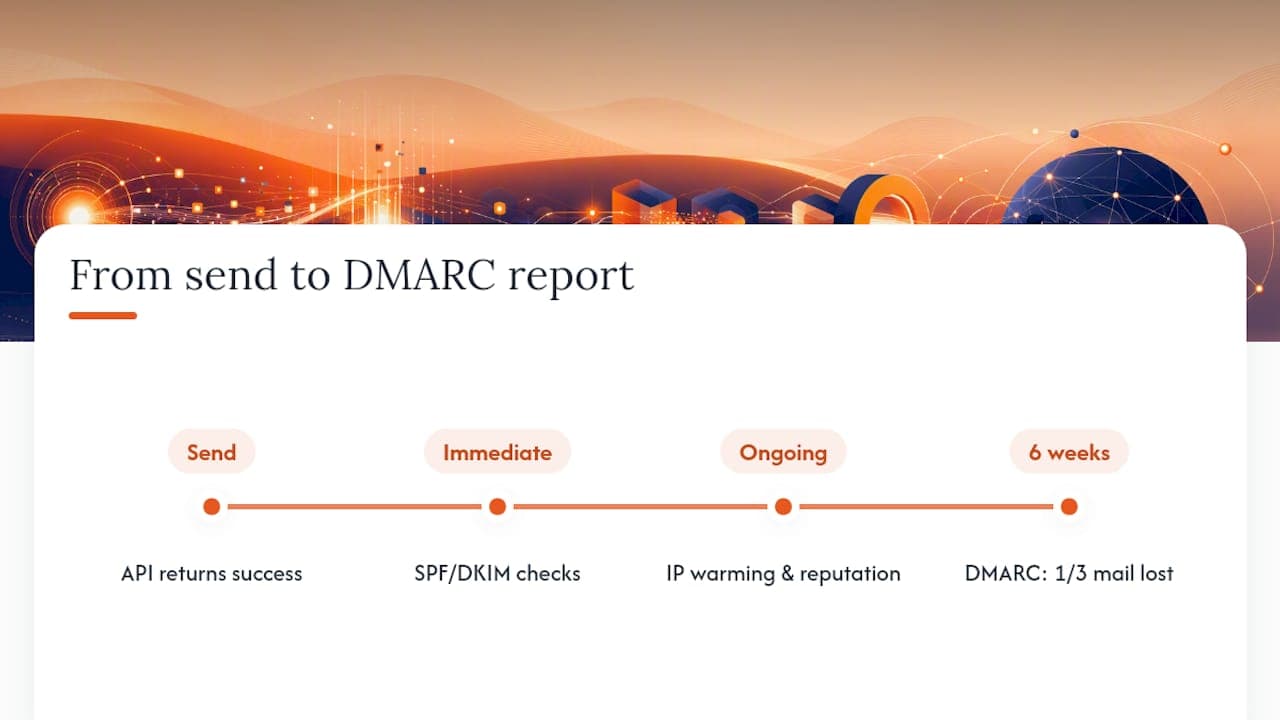
Most engineering teams over-index on the API decision and under-index on everything that happens after the send call returns a success response. That is not really a criticism of any individual team, it is a structural blind spot built into how vendors market these products: every provider’s homepage shows you a clean POST request and a green tick, and none of them show you the DMARC report six weeks later revealing that a third of your mail never reached an inbox at all.
The honest answer to “which email API should we use” is very often “any well-documented one, provided you also treat deliverability as a separate, ongoing discipline.” A REST API with good SDKs will save your team weeks of integration time. It will not fix a misconfigured SPF record, and it will not warm an IP for you safely. Those are operational and reputational problems, not integration problems, and they need a different kind of attention entirely.
Buy the API for the sending mechanics. Invest in deliverability support, whether that is in-house expertise or an external audit, the moment email becomes genuinely revenue-critical rather than a nice-to-have notification channel. If your delivery metrics look shaky after following the checklist in this article, getting an audit is usually faster and cheaper than continuing to guess.
Need deliverability fixed rather than another API to integrate?
Digistrat is the practical next step when the problem is not which API you chose, but why your mail is not reaching inboxes despite it. Every provider on the shortlist above handles sending mechanics well; none of them can fix a misconfigured DMARC record, a shared IP with a poor reputation, or a list quietly dragging your sender score down. That is a different job entirely, and it is the one Digistrat specialises in for UK and European businesses that depend on email revenue.
A deliverability audit can identify exactly where your sending architecture, authentication setup, or list quality is costing you inbox placement, and come with concrete remediation steps rather than a generic report. For teams that need ongoing visibility beyond what an API’s dashboard shows, reputation monitoring tracks sender health continuously so problems surface before they hit revenue. Some case studies show measurable improvements in open and delivery rates following remediation work. If your metrics have plateaued despite a technically sound integration, book a deliverability audit and get a clear answer on what is actually happening at the DNS and reputation level.
Sources
Engineers wanting to dig deeper into the specifics covered here should start with the primary provider documentation referenced throughout this article, alongside Digistrat’s own technical resources on authentication and monitoring.
FAQ
What is an API for email?
An email API is a programmatic interface that lets applications send, and sometimes receive, email directly through code rather than through a manual mail client, typically returning structured delivery status and event data.
Is there a free email API?
Yes, most major providers including Resend, Brevo, Mailgun, SendGrid and Amazon SES offer free tiers suitable for development and low-volume testing, though limits and included features vary considerably between them.
Can I use the Gmail API for free?
Google’s Gmail API has a free usage quota suitable for small-scale personal or development projects, but it is designed for mailbox access and automation rather than high-volume transactional sending, so it is a poor fit for production application email.
Is the Outlook email API free?
Microsoft’s Outlook and Graph APIs include free usage tiers within Microsoft development accounts, though like Gmail’s API they are built for mailbox integration rather than transactional sending at scale, which is where dedicated providers on this shortlist perform better.
How do SPF, DKIM and DMARC affect API-sent email?
These DNS records determine whether receiving mail servers trust messages sent through your API, and getting them wrong causes poor inbox placement even when the API integration itself is technically flawless.
