
Almost certainly, yes, in at least one corner of your email setup, but the waste is rarely where people first look. Most businesses pay for several overlapping layers (a mailbox suite, a marketing platform, a transactional sender, a security gateway, perhaps an archive), and the sensible way to find the excess is to inventory what each layer does, who owns it and what it costs, then cut only what is duplicated and not what quietly protects your inbox placement.
This guide walks through that process in the order we would follow with a client: what you might be paying for, how to build the inventory, how to judge overlap, which features to leave alone, and how to keep the savings from costing you revenue.
Table of Contents
- What you may actually be paying for
- Build the inventory before you cancel anything
- Spotting overlap with a capability matrix
- Features that look optional but protect your inbox placement
- Compliance: what a downgrade must not touch
- Working out what a change really costs
- When a cheaper or free plan is enough
- Where a specialist can save you time
- A practical order of work
- FAQ
- Sources
What you may actually be paying for
The phrase “email features” covers a surprisingly wide range of products, and part of the reason businesses overpay is that nobody has ever laid them side by side. A typical list includes mailbox hosting, calendars and office collaboration, storage, domains, spam and malware filtering, archiving, AI assistance, marketing automation, transactional delivery through an API or SMTP, security gateways and backup. A cloud email guide makes the useful point that these serve different purposes: mailbox suites serve people, marketing platforms serve campaigns, transactional platforms serve application messages, and archiving or security products provide retention or protection.
That distinction matters because the categories can legitimately coexist. Your finance team’s mailboxes and your password-reset emails have nothing to do with one another technically, and nobody should be tempted to merge them because both are “email”. The question is therefore never “do we have too many email products?” but “is any single job being paid for twice?”
Prices also vary enormously at the mailbox end of the market. The Independent’s 2026 email hosting roundup reports hosting plans from roughly £1.20 to £6 a month with between 2GB and 50GB of storage, and notes that paid add-ons can make a cheap-looking plan expensive. Some business mail plans in the same roundup start below £1 a month, with daily sending limits per mailbox (up to 3,000 emails a day depending on the plan). Those limits are a good reminder that a cheap mailbox is built for people writing messages, not for bulk or application sending.
The usual suspects for waste
In our experience of reviewing sending setups, the spend that is hardest to justify tends to fall into a few patterns:
- Seats and mailboxes for people who have left or never log in.
- Storage or archiving tiers bought for a retention need that has since changed.
- A second or third marketing platform adopted by a different team, each with its own contact list.
- Premium tiers bought for one feature (dedicated IP, advanced segmentation, A/B testing) that was never switched on.
- AI assistants and add-ons that were trialled, auto-renewed and never rolled out.
None of these is dramatic on its own, but together they are often a meaningful line in the budget, and several of them also create operational risk, which we come to below.
Build the inventory before you cancel anything
Cancelling first and asking questions later is how a password-reset flow ends up silently failing on a Monday morning. The better habit is to start with a register. A UK software stack audit checklist recommends listing every paid and free tool with its owner, workflow, cost and renewal date, then identifying which tools store contacts, send email, collect forms, report conversions or trigger automations, and deciding which system is the system of record for important business information.
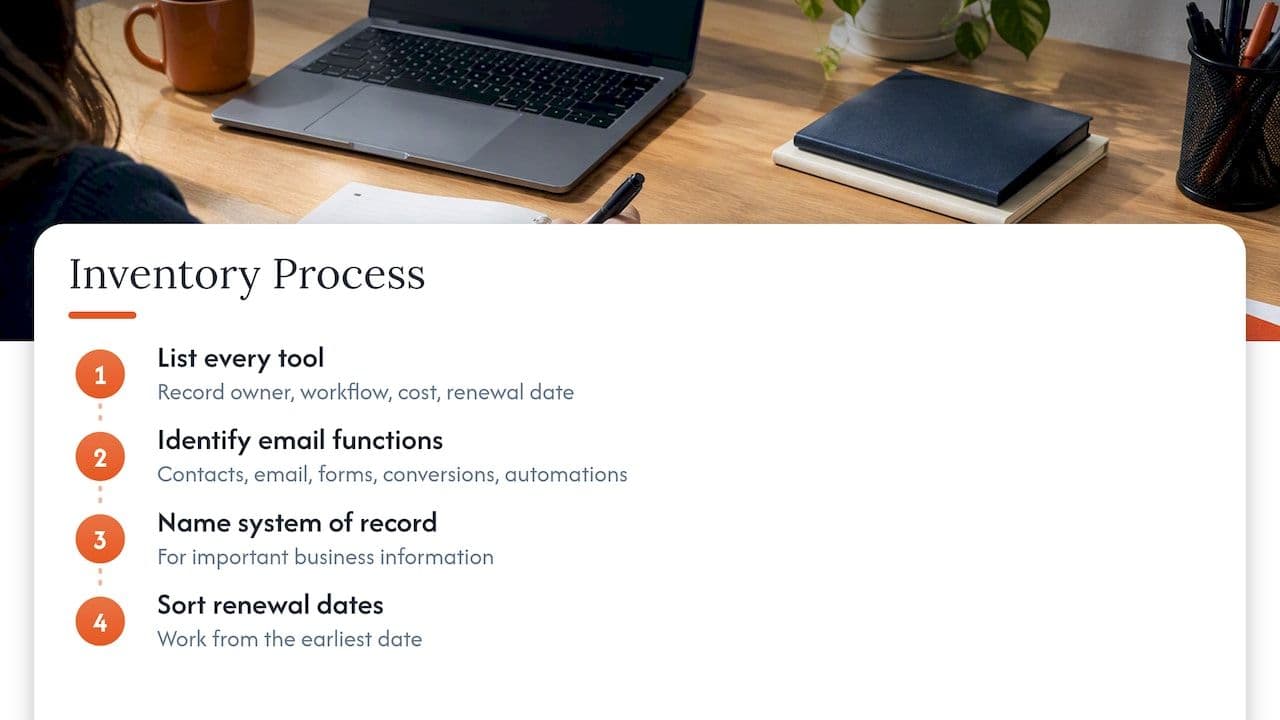
The renewal date column is the one that pays for itself. Most savings come from acting before an annual contract rolls over, so sort the register by that column and work from the earliest date.
Where to find tools your team has forgotten
Memory is a poor audit tool. A B2B SaaS audit checklist points out that finance records, procurement logs, single sign-on connected-app lists, browser-extension reviews and API logs from your CRM or marketing platform can reveal shadow tools that nobody mentions in a meeting. The practical order is:
- Pull twelve months of card and invoice data and search for anything that looks like email, forms, CRM, messaging or automation.
- Export the connected-app list from your identity provider and mark anything that can send on your behalf.
- Ask each team lead what they send, from where, and to whom, and compare their answers to steps one and two.
- Check the DNS record (covered next) to see what is genuinely authorised to send as your domain.
Using public DNS as a first inventory
Your DNS records are a surprisingly honest witness. An email stack lookup guide explains that MX records can reveal the mailbox provider and any gateway, while SPF includes and DKIM selectors can point to marketing, CRM and transactional senders. If your SPF record includes five or six third-party services and your team can name only three, you have found your first conversation.
The same guide is clear that this view is incomplete: a tool that sends from a different domain, uses account-specific DKIM selectors without an SPF include, or never sends as your domain may not show up at all. Treat DNS as a starting point to be cross-checked against invoices and your identity provider rather than as the full answer. If you want to understand what each of those records is doing, our explainer on SPF, DKIM and DMARC covers it in plain language.
Spotting overlap with a capability matrix
Once you have the register, the cleanest way to see duplication is a grid. A martech audit guide recommends listing tools as rows and capabilities as columns (sending, segmentation, A/B testing, reporting, APIs, forms and so on), then marking where more than one tool ticks the same box. Wherever a column has several ticks, that capability is a candidate for consolidation review.
A simplified example for a mid-sized online retailer might look like this:
| Capability | Mailbox suite | Marketing platform | Ecommerce platform | Transactional service |
|---|---|---|---|---|
| Sends order confirmations | No | Yes (rarely used) | Yes | Yes |
| Stores customer contacts | Yes | Yes | Yes | No |
| Segmentation | No | Yes | Basic | No |
| Handles unsubscribes | No | Yes | Yes | No |
| Reports opens and clicks | No | Yes | Basic | Yes |
In that illustration, order confirmations are producible by three tools and contacts are stored in three places, which is exactly the pattern worth investigating. The aim is not to delete two of the three, but to decide which one owns the job and what the others are still doing.
Overlap is not automatically waste
The same guide makes a point that is easy to lose in a cost-cutting mood: intentional redundancy can support reliability, and partial overlap calls for a judgement about whether the shared feature is important enough to justify a separate purchase. A backup sending route for critical transactional mail, for example, can be a reasonable expense if a missed password reset costs you customers.
The overlap that deserves less sympathy is duplicated data. The UK checklist mentioned earlier accepts that some overlap is fine but warns that duplicate records are costly, and recommends being explicit about which tool owns each piece of important information. When two systems each hold a version of the same subscriber, one of them will eventually email somebody who has opted out.
Look for features you already own
Sometimes the saving is not cancelling something but realising you are paying twice for a capability. A UK marketing stack audit notes that quick wins can hide in features already included in another platform, such as email, forms, landing pages or social scheduling. The same article advises checking feature depth, routing, segmentation, reporting, permissions and limits before replacing a specialist tool, which is sound advice: a bundled email module that looks equivalent on a pricing page may be missing the one control your team relies on.
If you run an online shop and are weighing which marketing features justify a paid tier, ecommerce email marketing strategies are a useful way to match features such as flows and segmentation to the revenue they are meant to drive.
Features that look optional but protect your inbox placement
This is where a cost-cutting exercise can go wrong. Some capabilities do not produce any visible output, which makes them look like candidates for the chop, yet they are the reason your mail arrives at all.
Authentication
The UK’s National Cyber Security Centre recommends DMARC, SPF and DKIM and notes that DMARC can stop phishers spoofing your domain and make genuine company emails more likely to reach inboxes. Its 10 Steps guidance similarly pairs these three standards with making domain spoofing harder. If a vendor offers authentication setup or DMARC reporting as part of a plan, that is rarely the line to question. It is far more useful to check that every sender in your inventory is properly aligned.
Authentication is necessary rather than sufficient, though. A perfectly authenticated domain can still land in spam if list quality, sending behaviour or overlapping lifecycle triggers are poor, which is why our piece on sending architecture and authentication treats them together.
Filtering, with tuning
The NCSC advises that inbound email should be filtered or blocked for spam, phishing and malware, preferably at server level, but warns that aggressive blocking can lose legitimate messages and needs tuning. So a security gateway is not something to cancel casually, nor something to leave on factory settings. If you pay for one, ask who last reviewed its rules and what it quarantined last month.
Consistency across senders
The B2B checklist cited earlier warns that when CRM, marketing automation, sales-engagement and transactional systems all send mail, inconsistent authentication, brand inconsistency and fragmented suppression lists create deliverability risk. A suppression list that lives in only one of four systems means a bounced or complained address can be emailed again from another. That is not a feature you are paying for unnecessarily, it is a gap, and consolidating or syncing suppression data is usually worth more than any subscription saving.
It also helps to keep mail types distinct, so our short guide to marketing versus transactional emails is worth reading before anyone proposes sending everything through one route to cut costs.
Compliance: what a downgrade must not touch
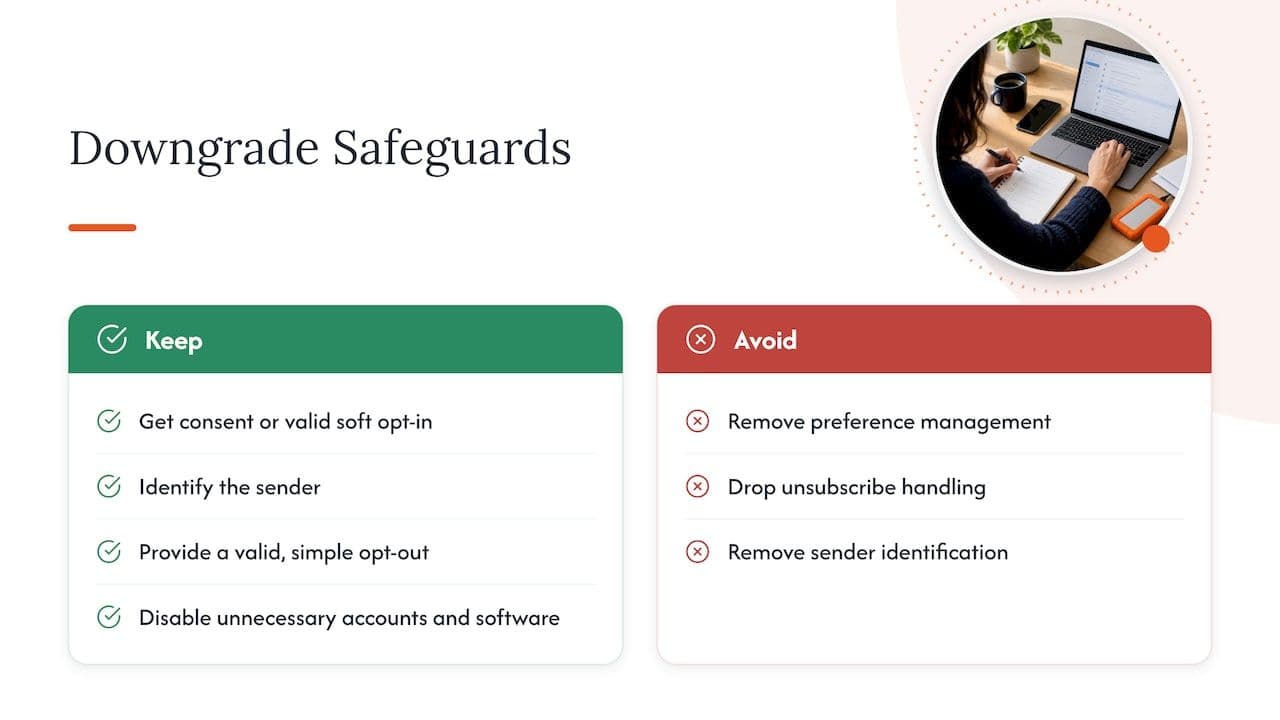
Any trimming exercise in the UK has to leave your legal obligations intact. The Information Commissioner’s Office explains that the Privacy and Electronic Communications Regulations generally require consent or a valid soft opt-in for unsolicited marketing email to individual subscribers, while corporate bodies can generally be emailed without consent. Sole traders and some partnerships are treated as individuals, which catches out many B2B senders. Every marketing email must identify the sender and carry a valid, simple opt-out.
The legislation itself is explicit: regulation 23 says direct-marketing email must not conceal the sender’s identity and must provide a valid address through which recipients can ask for further communications to stop. Moving to a cheaper platform does not move that responsibility with it. In short, if a downgrade removes preference management, unsubscribe handling or sender identification, it has stopped being a saving.
There is a security argument in the opposite direction too. The NCSC’s 10 Steps guidance recommends reducing attack surface by disabling unnecessary accounts, software and demo capabilities. Dormant mailboxes, forgotten trial accounts and unused integrations that can still send as your domain are both a cost and a risk, so removing them is one of the few cuts that improves your position on both counts.
Working out what a change really costs
A lower monthly price is not the same as a lower cost. One UK cost framework for email software suggests comparing whole-life cash and economic costs (implementation, internal work, operation, failure and exit) against incremental contribution, and pausing if any mandatory legal, privacy, accessibility, security or contract gate fails.
For a platform comparison, a UK platform comparison guide recommends totting up the complete twelve-month cost, covering contact and send volumes, feature tiers, users, integrations, support, migration, template rebuilding and internal administration, and using identical contact volumes, sending patterns, campaign types and growth assumptions for each option. Without that discipline you end up comparing a headline price on one platform with a realistic price on another.
A worked way to apply it:
- Take your current twelve-month spend per tool from the register.
- Estimate the hours your team spends administering each tool and give those hours a cost.
- For any proposed replacement, add migration, template rebuilding and a warm-up period if the sending infrastructure changes.
- Add a realistic allowance for lost revenue if inbox placement dips during the switch.
- Only proceed if the saving survives all four steps.
That fourth line is the one most spreadsheets leave out. A move between sending platforms changes your sending infrastructure, and reputation does not always travel with you. If you are weighing a move, our guide to comparing email service providers sets out what to check.
When a cheaper or free plan is enough
There are cases where less really is enough. The same hosting roundup observes that one privacy-focused provider’s free tier offers 1GB of storage, with paid plans adding storage, custom domains and addresses, and cautions that advanced security may exceed what some businesses need. A small internal team with modest storage and no bulk sending may be perfectly served by a basic mailbox plan.
The test is straightforward. A cheaper plan is a good fit when it keeps your own domain, supports authentication, has sending limits comfortably above your real volume, and does not carry any marketing or transactional mail that needs reputation management. The moment a plan is being asked to send customer-facing volume, you are no longer shopping for features but for sending infrastructure, and the questions change.
Where a specialist can save you time
Owners of overlapping stacks often tell us the hardest part is not finding duplicate subscriptions but knowing which ones are safe to retire without harming inbox placement. That is the point at which a second opinion pays for itself.
At Digistrat we start with a free health check and a 15-minute inbox check-up call to show you where to begin. From there, our Deliverability Review and Fix combines a detailed investigation with 45 days of implementation support, and your senior consultant works in your platforms with your team rather than handing over a report and leaving.
If you have one specific question, such as whether a particular sender can safely be retired or how to restructure your sending domains, a 90-minute advisory session costs £250 one-off. For teams that want continuous cover, Managed Deliverability provides daily monitoring, incident response, monthly inbox placement testing and one agreed improvement each month. If you want to see how your current setup is performing before you decide, our email deliverability audit is a good place to begin.
A practical order of work
Pulling it together, this is the sequence we would suggest for a team that wants to reduce spend without surprises:
- Build the register and sort it by renewal date.
- Cross-check against DNS, finance records and your identity provider to find forgotten senders.
- Draw the capability matrix and mark duplicated capabilities and duplicated contact stores.
- Decide the system of record for contacts and suppressions before touching any subscription.
- Remove clearly dormant accounts, seats and trial tools first, since they carry the least risk.
- Review any consolidation of sending platforms using twelve-month total cost, including migration and warm-up.
- Re-test authentication and inbox placement after each change, so you know which change caused any movement.
The last step is what keeps savings real. If you watch placement and sender reputation as you go (our guide to sender reputation explains what to track), any problem shows up within days rather than as a mysterious dip in revenue a quarter later.
FAQ
How do I know if I’m paying for email features I don’t use?
Start by listing every paid email-related tool with its owner, cost and renewal date, then check usage data inside each account for the features you are paying a higher tier for. Cross-check against your DNS records and finance records, because forgotten tools often turn up there first. Anything with no clear owner and no recent activity is a strong candidate for review.
Is it wasteful to have both a mailbox suite and a marketing platform?
Not usually, because they do different jobs: one serves people and the other serves campaigns. The waste appears when two tools both send the same type of message or both hold the same contacts. Decide which one owns each job and keep the other only if it has a distinct, justified purpose.
Can I safely cancel a tool that sends email on my behalf?
Only once you have confirmed what it sends, how often, and whether anything depends on it, such as password resets or order confirmations. Remove its entry from your SPF record and DKIM setup afterwards so that an unused sender cannot be abused. Check inbox placement for the affected mail types for a couple of weeks after the change.
Will a cheaper email platform hurt my deliverability?
It can, but not because it is cheaper. Risk comes from changed sending infrastructure, a cold IP or domain, lost suppression history and mismatched authentication. Plan the migration with a warm-up period and test placement before and after, and the price of the plan matters far less than how carefully the move is made.
Sources
- Cloud Email Services: Types, Security & Setup Guide
- Best email hosting services in 2026
- Software Stack Audit Checklist
- Marketing Automation Audit Checklist for B2B SaaS
- Email Stack Lookup
- Audit your martech stack and eliminate tool overlap
- How to Audit and Improve your Marketing Tech Stack
- NCSC: Phishing attacks, defending your organisation
- NCSC: 10 Steps to Cyber Security, architecture and configuration
- ICO: Electronic mail marketing
- PECR regulation 23
- Email software costs and budget guide
- Email Marketing Platforms Comparison UK