
If Microsoft 365 is blocking your outbound mail, it’s almost always one of four things: a restricted sender following a suspected compromise, a banned sending IP, routing through Microsoft’s high-risk delivery pool, or a recipient-side authentication failure. The fix starts with isolating the source and running a Message Trace.
Before you touch anything else, capture:
- The exact NDR code (550 5.1.8 signals a restricted sender; 550 5.7.606-649 signals a banned IP)
- Full message headers from a bounced message
- A Message Trace export scoped to the sending account and time window
- Current SPF, DKIM and DMARC status for the sending domain
Pro Tip: Do this within the first hour. The longer a restricted account keeps trying to send, the more it reinforces whatever pattern triggered the block in the first place.
Key Takeaways
Most Microsoft 365 outbound blocks trace back to a restricted sender, a banned IP, high-risk pool routing, or a failed SPF, DKIM or DMARC check, and each has a distinct fix.
| Point | Details |
|---|---|
| Identify the NDR code first | 550 5.1.8 means a restricted sender; 550 5.7.606-649 means a banned IP requiring delisting. |
| Secure before you unblock | Reset passwords and enable MFA before requesting delisting, or the block often returns within hours. |
| Check the high-risk pool | No NDR but collapsed open rates usually means routing through Microsoft’s low-reputation delivery pool. |
| Fix authentication properly | Keep SPF under 10 DNS lookups, publish DKIM selectors, and roll out DMARC from p=none upward. |
| Escalate when patterns recur | Digistrat runs deliverability audits that trace root cause, fix authentication, and monitor for recurrence. |
Table of Contents
- What does an office 365 blocking emails error actually mean?
- What should you do in the first hour of a block?
- How do you fix SPF, DKIM and DMARC failures?
- When does sending volume itself trigger a block?
- How long does it take to get unblocked?
- When should you bring in a deliverability consultant?
- Get a Digistrat deliverability audit for Office 365 blocks
- Sources
What does an office 365 blocking emails error actually mean?
Not every failure looks the same, and the NDR code you get back tells you which door to walk through first.
- 550 5.1.8 means Exchange Online has classified the sending account or connector as a “bad outbound sender.” This is the restricted entity status, usually triggered by exceeding outbound spam thresholds or by Microsoft flagging suspicious sign-in activity.
- 550 5.7.606-649 means your sending IP has landed on Microsoft’s banned list, and unblocking it requires a formal delist request rather than an internal fix.
- 450/451 or other 4xx codes are temporary throttles rather than blocks. These usually clear on their own once volume or rate drops.
- No NDR at all, but opens and clicks have flatlined, often means mail is leaving the tenant but routing through the high-risk delivery pool, where receiving servers quietly discard it before it reaches an inbox.
Run Message Trace scoped to the sender and check the OutboundIpPoolName field in the results. In the Defender portal, the Restricted entities page shows whether an account or connector has been flagged, and alert policies will show a “User restricted from sending email” event if one has fired recently. Note that removing an entry from Restricted entities typically needs Security Administrator or Organization Management role membership, so check permissions before you assume you’re stuck.
Pro Tip: If Message Trace shows “Delivered” but your open rates have collapsed, don’t trust the status label alone. Cross-check OutboundIpPoolName against Microsoft’s documented high-risk delivery pool behaviour before assuming the problem is solved.
What should you do in the first hour of a block?
Stopping the bleeding matters more than finding the perfect fix in the first sixty minutes. Work through this in order:
- Pause the affected mailbox, connector, or automated sending job. Every additional send while an account is flagged adds to the reputation damage.
- Reset the password and enable MFA on the sending account, then check sign-in logs for anomalies. A restricted entity flag frequently follows a compromised credential, not a marketing mistake.
- Remove any suspicious inbox forwarding rules. Attackers often add silent forwards to harvest replies before triggering a spam run.
- Divert any live bulk campaigns to a dedicated sending subdomain or a separate bulk-capable service while you investigate, rather than pushing more volume through the same flagged identity.
Don’t request delisting or unblocking before you’ve secured the account. Microsoft’s guidance on restricted entities is explicit that restrictions exist to protect tenant reputation, and an account that gets unblocked while still compromised or misconfigured tends to trip the same protection again within hours.
Pro Tip: Screenshot the Restricted entities entry and the alert policy trigger before you remediate anything. If you end up needing a delist request or a professional audit later, that evidence saves a full day of back-and-forth.
How do you fix SPF, DKIM and DMARC failures?
Authentication problems are the quiet cause behind a huge share of “Office 365 is blocking my emails” complaints that turn out to be recipient-side rejections rather than tenant restrictions. Microsoft’s own guidance on outbound spam protection notes that many of these failures trace back to infrastructure gaps rather than anything Microsoft has actively blocked.
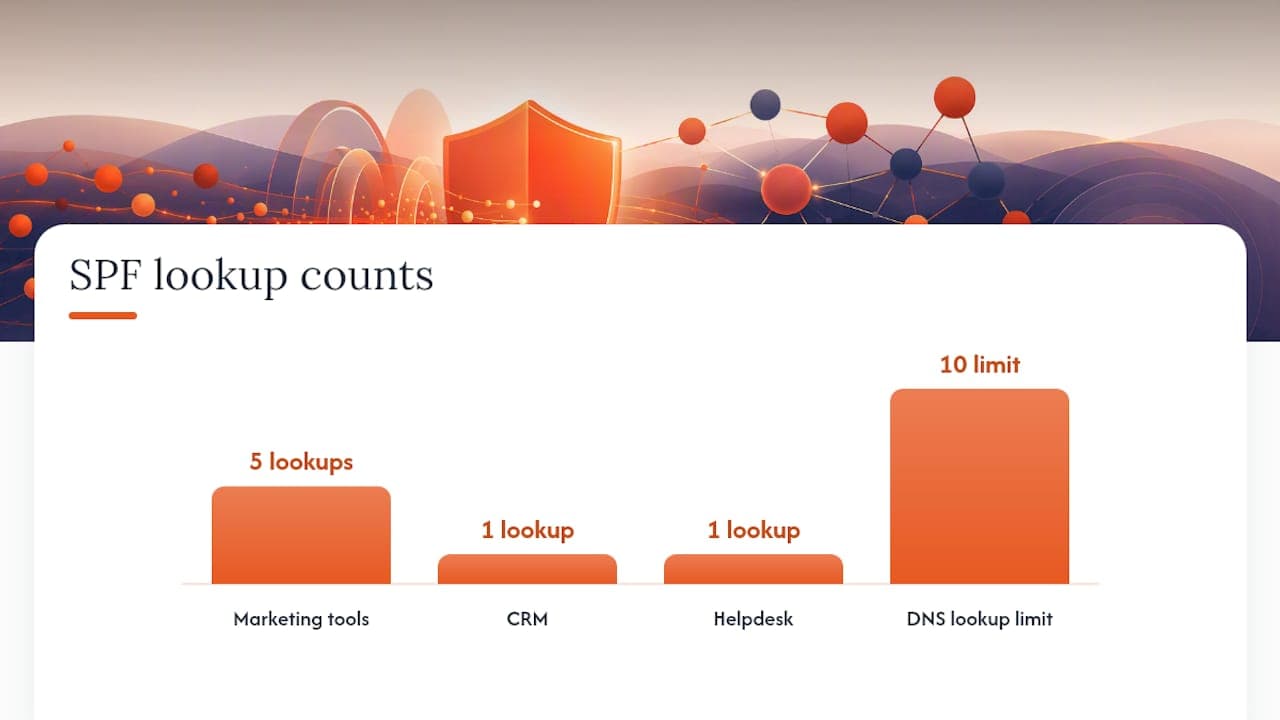
SPF breaks most often through DNS lookup limits. A domain that has accumulated includes from five marketing tools, a CRM, and a helpdesk platform can easily exceed the 10-lookup ceiling, which produces a permerror and silent rejection at the receiving end. Audit your record, remove unused includes, and where an estate is complex, flatten the record by converting includes into explicit ip4/ip6 ranges.
DKIM requires publishing two CNAME selectors and enabling signing for custom domains inside the Defender portal. Watch for intermediary systems, mailing list managers or forwarding services, that modify message bodies in transit, because that breaks the DKIM signature even when the record itself is correct.
DMARC should start at p=none while you validate every legitimate sending source through aggregate reports. Only move to quarantine or reject once you’ve confirmed every ESP, CRM and transactional platform is authenticating cleanly. For third-party tools that can’t sign with your domain, isolate them on a dedicated subdomain rather than risking your primary domain’s reputation.
| Mechanism | Common failure | Practical fix |
|---|---|---|
| SPF | Exceeds 10 DNS lookups, causing permerror | Remove unused includes; flatten to ip4/ip6 ranges |
| DKIM | Signature broken by body-modifying intermediary | Publish selector CNAMEs; audit mail flow for modification |
| DMARC | Legitimate senders fail before policy is enforced | Start at p=none; monitor aggregate reports before enforcing |
Check the Authentication-Results header on a rejected message and run it through Microsoft’s remote connectivity checker to confirm what the receiving server actually saw. A full SPF, DKIM and DMARC review is usually the fastest way to find which of the three is quietly failing.
When does sending volume itself trigger a block?
Exchange Online was built for business correspondence, not marketing volume, and its limits reflect that. Per-mailbox caps sit around 10,000 recipients per day, with SMTP submission capped near 30 messages a minute. A distribution list with 500 members counts as 500 recipients against that ceiling, not one, which catches teams out constantly.
If your programme regularly brushes against these limits, Exchange Online isn’t the right tool for the job. Consider:
- SMTP relay or Azure Communication Services for transactional and system-generated mail.
- A dedicated bulk-sending platform for marketing campaigns, kept entirely separate from your corporate domain’s day-to-day mail.
- Subdomain isolation, so a reputation problem on a marketing subdomain never touches your primary domain’s deliverability.
New sending IPs inherit whatever reputation your domain already carries, but they still need a gradual ramp. Start any new IP or platform at a fraction of target volume and increase over one to two weeks rather than firing a full list on day one. Misconfigured connectors are a frequent, avoidable cause of blocks too. A connector pointed at the wrong smart host, or one that strips headers, can break SPF and DKIM alignment even when your DNS records are perfect. Our breakdown of sending architecture and authentication covers connector pitfalls in more depth.
How long does it take to get unblocked?
For banned IPs (the 550 5.7.606-649 codes), Microsoft requires a formal delist request through its sender portal. You’ll need to confirm the root cause has been fixed before submitting, since a delist approved on an unresolved problem tends to result in re-blocking within days.
Timelines vary by cause. Restricted entity flags, once the account is secured and password reset, often clear within an hour. Banned IP delistings can extend up to 24 hours in more complex cases, particularly where Microsoft needs to verify the underlying issue has actually been resolved rather than just paused.
Build monitoring so you catch the next one before it becomes a crisis:
- Configure the “User restricted from sending email” alert policy so your team gets notified the moment it fires, not when a client complains.
- Set an internal threshold alert at 80% of your Tenant External Recipient Rate Limit, giving you headroom to react before you hit the ceiling.
- Review DMARC aggregate reports weekly and track complaint rates as an early-warning signal, since both tend to move before a hard block does.
- Run a scheduled Message Trace review rather than waiting for a bounce report to force the issue.
Pro Tip: Treat DMARC aggregate reports as your smoke detector, not your fire extinguisher. By the time you’re reading NDR codes, the reputation damage has usually already started.
When should you bring in a deliverability consultant?
Some blocks resolve with an hour of DNS work. Others don’t, and knowing the difference early saves weeks of lost revenue. Bring in outside help when you see:
- The same block recurring after you’ve fixed SPF, DKIM and DMARC and confirmed clean sending practices.
- Measurable revenue impact from stalled campaigns or transactional mail that isn’t reaching customers.
- Routing through the high-risk delivery pool that you can’t explain even after reviewing connectors and authentication.
- A multi-ESP estate where nobody internally has full visibility across every sending source.
A professional audit isn’t just about clearing today’s block. It maps every sending source across your domain, fixes the authentication gaps that caused it, and puts monitoring in place so the same NDR doesn’t reappear in three months once you’ve moved on to the next project.
Before any engagement, gather your NDRs, sample message headers, Message Trace exports and DMARC aggregate reports. That evidence lets a specialist diagnose the root cause in hours rather than days. Our guide on what a deliverability consultant actually checks sets out the full scope of that kind of engagement, and it’s worth reading before your first call.
Get a Digistrat deliverability audit for Office 365 blocks
Digistrat runs technical audits specifically for UK and European businesses whose Microsoft 365 outbound mail is being blocked, quarantined or silently routed away from the inbox. The goal is straightforward: restore delivery, stop the revenue leak, and put monitoring in place so the same NDR doesn’t come back next quarter.
Bring your NDR codes, a Message Trace export, sample message headers, and your typical campaign volumes to the first conversation. That’s usually enough for Digistrat to identify whether you’re dealing with a restricted entity, a banned IP, a high-risk pool routing issue, or an authentication gap, before any remediation work starts. If you’re already fairly confident where the fault lies but need it fixed properly and monitored going forward, book an email deliverability audit and get a clear, costed plan back within days.
Author perspective: deliverability is a revenue problem worth investing in
A blocked sender isn’t an IT inconvenience. It’s a stalled campaign, a missed invoice, a customer who never got their shipping confirmation. Digistrat treats every fix as a commercial question first, technical second, because that’s what clients are actually paying to solve. If your team lacks the bandwidth to chase this properly, a short health-check call is a reasonable place to start.
— James
