Gmail marks commercial email as spam when authentication fails, sender reputation is weak, or recipients show low engagement with what you send, and authentication is the one factor that behaves like a straightforward pass or fail gate rather than a slow-moving score. If you fix nothing else this week, get SPF, DKIM and DMARC properly aligned and register your sending domains in Google Postmaster Tools. Do that, and you should see your spam rate fall, your Postmaster reputation graph turn upward, and far fewer 5.7.x rejections within days.
Table of Contents
- Action-first checklist: the non-negotiable fixes for Gmail placement
- Technical fixes in depth: SPF, DKIM, DMARC, PTR, TLS and IP reputation
- Reputation and list hygiene: spam rates, bounce thresholds and verification practices
- Content, segmentation and engagement: what to change in campaigns
- Monitoring and measurement: Postmaster Tools, DMARC reports and SMTP signals
- Prioritised remediation plan with realistic timelines and team responsibilities
- How to create and manage custom Gmail spam filter rules and settings
- Overview of Gmail’s built-in spam filtering algorithms and signals
- How user feedback influences Gmail spam filtering
- Recognising and recovering misclassified legitimate emails from the spam folder
- The role of content formatting and avoiding common spam triggers
- Digistrat perspective: how we diagnose and fix Gmail spam-filter issues
- Email deliverability audit and remediation from Digistrat
- Sources
- FAQ
Action-first checklist: the non-negotiable fixes for Gmail placement
Before touching subject lines or send times, get the infrastructure right. Gmail reads authentication and header alignment before it ever considers whether your content looks legitimate, so a broken DMARC record undoes weeks of careful copywriting.
Here is the order that actually moves the needle, based on how Google’s own sender guidelines and Postmaster Tools describe the checks it applies:
- Authenticate every sending domain and make sure the visible From header aligns with your SPF and DKIM records, because misalignment is one of the most common reasons authentication technically passes but Gmail still distrusts the message.
- Add RFC 8058 one-click unsubscribe with a working List-Unsubscribe header for any bulk or marketing stream, alongside a visible unsubscribe link in the body copy.
- Register every sending domain in Google Postmaster Tools and start watching spam rate the same day, not after a problem appears.
- Verify your lists, suppress hard bounces immediately, and screen for spam-trap risk before your next send, not after a reputation drop.
- Confirm PTR records resolve correctly, TLS is enforced on the sending path, and check that any shared IP range you use isn’t already sitting on a blocklist.
Treat this as a punch list for engineering and marketing to work through together this week, not a long-term roadmap.
Technical fixes in depth: SPF, DKIM, DMARC, PTR, TLS and IP reputation
Authentication problems rarely announce themselves. A record can validate in a testing tool and still fail silently in production because of a forwarding rule, an old subdomain, or a marketing platform added six months ago and never documented.
- SPF: list every host permitted to send on your behalf, including third-party platforms, and keep the total DNS lookups within the 10-lookup limit, since exceeding it causes a permanent SPF failure regardless of how correct the record otherwise looks. Validate changes with an SPF testing tool before relying on them.
- DKIM: check which selectors are active, confirm key lengths meet current standards, and rotate keys periodically. Signatures need to survive mailing-list forwarding and content modification by intermediate servers, which is where DKIM most often breaks quietly.
- DMARC: start at
p=noneso you can collect aggregate reports without risking delivery, then graduate to quarantine and eventually reject once those reports show consistent alignment. Jumping straight to enforcement is the single most common cause of self-inflicted deliverability incidents. - PTR and TLS: reverse DNS lookups need to resolve cleanly for every sending IP, and SMTP transport should use encrypted TLS wherever the receiving server supports it. Both diagnostic order and the specific List-Unsubscribe requirement are covered in detail by Suped’s technical breakdown of Gmail failures that occur despite apparently correct configuration.
- Shared versus dedicated IPs: shared IP reputation is only as good as the worst sender on that range, so if you’re scaling volume or sending high-value transactional mail, a dedicated IP with a proper warmup schedule is worth the operational overhead.
Pro Tip: Check DKIM signature survival after forwarding through your own helpdesk or CRM. Many teams discover their authentication only fails when mail is relayed internally, not when it leaves the original sending server.
Read our detailed guide to SPF, DKIM and DMARC configuration if you want the underlying DNS syntax rather than the operational checklist.
Reputation and list hygiene: spam rates, bounce thresholds and verification practices
Gmail publishes numeric thresholds, which is unusually generous for a system that otherwise stays opaque about its ranking logic. Google’s guidance on bulk sender requirements sets the bar plainly: keep your reported spam rate under 0.10% and never let it breach 0.30% over a rolling 14-day window, because crossing that ceiling triggers aggressive filtering that is slow to reverse.
The thresholds that matter: spam complaints under 0.10% (never above 0.30%), hard bounces under 2%. Both are measured continuously, not as a one-off snapshot.
Bounce rate deserves the same discipline. Keep hard bounces low to maintain a good sending reputation, and suspend addresses that repeatedly fail rather than letting your platform retry them indefinitely.
- Run pre-send verification on any list segment that hasn’t been mailed in the last 90 days.
- Use re-engagement campaigns to identify dormant subscribers before they become a liability rather than after.
- Apply suppression rules automatically for hard bounces, spam-trap indicators, and repeated soft bounces from the same domain.
- Pause or throttle sending immediately if verification flags a spike in risk. A single spam-trap hit can take months to clear, so the cost of pausing for a day is trivial next to the cost of not pausing.
Read more on what your complaint rate is actually telling you about the health of your list beyond the raw percentage.
Content, segmentation and engagement: what to change in campaigns
Authentication and hygiene get you through the gate, but Gmail keeps watching what happens after the message lands. Recipients who open, reply, and drag mail out of Promotions are training the filter to trust you; recipients who ignore or delete unread are training it to doubt you.
- Segment toward recent engagers first, and expand to colder segments gradually rather than blasting your full list in one go.
- Keep your From name, sending domain, and any linked domains recognisably consistent with your brand, since a mismatch between what people expect and what they see is a common trigger for manual spam reports.
- Avoid deceptive subject lines, image-only HTML with no text equivalent, and URL shorteners; use direct HTTPS links that clearly resolve to your own domain.
- Set frequency expectations explicitly at signup, because unexpected volume is one of the most reliable causes of a spike in complaint rate.
None of this replaces authentication work. It sits on top of it, and it’s usually where recovery slows down if teams skip straight from “technically fixed” to “business as usual” without adjusting how campaigns actually behave.
Monitoring and measurement: Postmaster Tools, DMARC reports and SMTP signals
Recovery isn’t a feeling, it’s a set of numbers you should be checking daily during a remediation period and weekly afterwards.
- Register every domain in Google Postmaster Tools and read spam rate, domain reputation, IP reputation, and authentication pass rates from the same dashboard.
- Use DMARC aggregate reports to spot streams that are sending unsigned or misaligned mail you didn’t know existed, often a forgotten platform or a legacy system.
- Track SMTP response codes after every change: 4.7.x deferrals suggest a temporary reputation issue, while 5.7.x rejections point to a harder authentication or policy failure.
| Fix category | Typical time to see effect |
|---|---|
| Authentication alignment (SPF/DKIM/DMARC) | Hours to a few days |
| Spam-rate improvement in Postmaster Tools | One to two weeks |
| Full domain reputation recovery | Several weeks to a few months |
Our monitoring guide covers how to build a dashboard around these exact signals rather than checking each tool manually.
Prioritised remediation plan with realistic timelines and team responsibilities
Recovery works in layers, and trying to do everything simultaneously usually means nothing gets done properly.
- Immediate (hours to days): fix authentication alignment, implement the List-Unsubscribe header, and register in Postmaster Tools. This is engineering-led work with marketing sign-off.
- Short term (days to weeks): verify lists, suppress risk, and run a controlled warmup with targeted re-engagement sends to start rebuilding trust signals.
- Medium term (weeks to months): move DMARC from monitoring to enforcement, keep watching reputation weekly, and only consider BIMI once your DMARC posture is genuinely stable.
Pro Tip: Assign one named owner for DNS changes and one for list hygiene. Deliverability incidents most often stall when marketing assumes IT has made a DNS change that IT was never actually told to make.
How to create and manage custom Gmail spam filter rules and settings
Gmail gives individual users the ability to build personal filters, blocking senders, routing mail by keyword, or automatically archiving newsletters. That’s a genuinely useful feature for individuals managing their own inbox, but it has almost nothing to do with why your commercial mail is landing in the Spam folder across thousands of recipient accounts.
The distinction matters commercially. If a handful of recipients create personal filters against your domain, that’s a signal worth investigating, since it usually points to frequency or relevance problems rather than a technical fault. But the mass classification affecting your campaign metrics is driven by Gmail’s own automated filtering at the platform level, not by individual users configuring rules in their settings menu.
If you’re a sender trying to diagnose why open rates have dropped, don’t spend time investigating personal filter settings. Instead, look at the signals covered earlier in this article: authentication status, complaint rate, bounce rate, and engagement trends across your full sending domain. Those are the levers that determine whether Gmail’s own classification system treats your mail as wanted or unwanted, and they apply uniformly regardless of what any single recipient has configured in their own account.
Overview of Gmail’s built-in spam filtering algorithms and signals
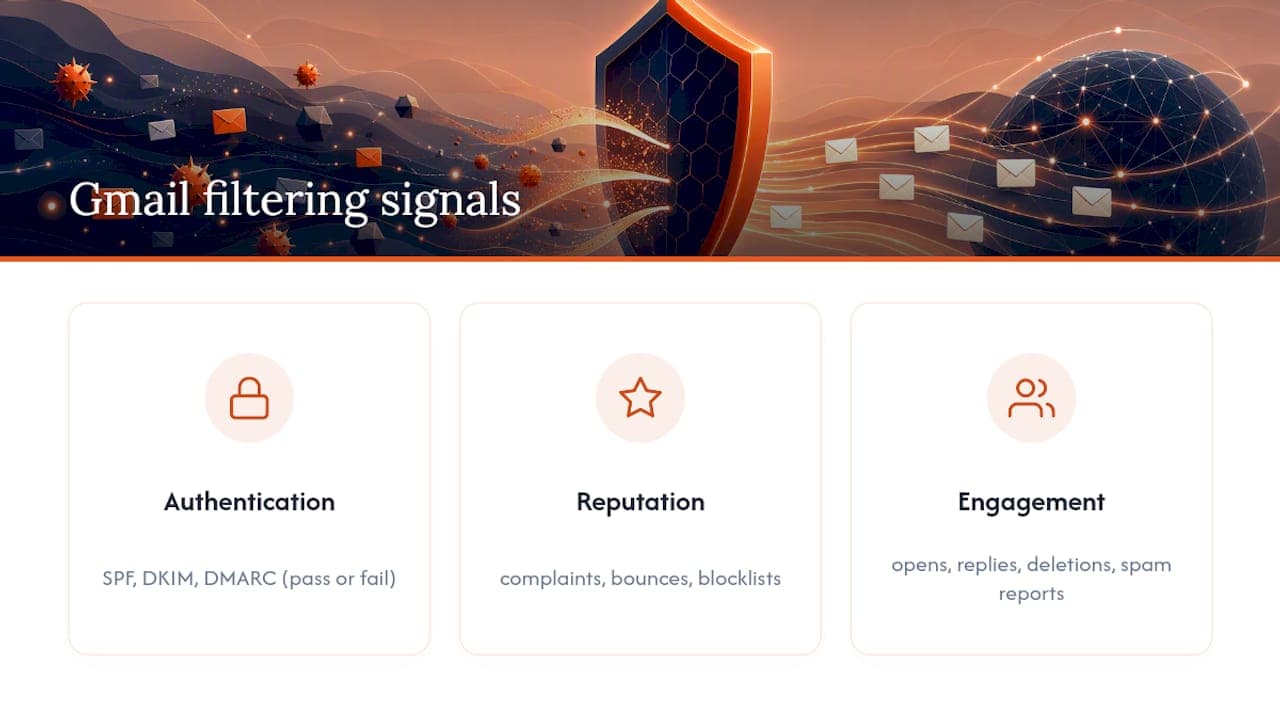
Gmail’s classification system evaluates three broad categories of signal: authentication, reputation, and engagement, and Palisade’s analysis of Gmail filtering treats authentication as the most commonly fixable cause precisely because it behaves as a clear pass or fail check rather than a gradual score.
Authentication confirms identity: does the message genuinely come from the domain it claims to represent, and do SPF, DKIM and DMARC agree with each other. Reputation is a rolling assessment of how your sending domain and IP have behaved historically, built from spam complaints, bounce patterns, and blocklist history. Engagement measures what real recipients do once mail arrives: opens, replies, deletions without reading, and manual spam reports all feed back into the model.
None of these signals work in isolation. A domain with perfect authentication but a history of high complaint rates will still struggle, and a well-reputed domain that suddenly sends deceptive or image-heavy content can see placement worsen within days. Gmail’s model rewards consistency over time far more than it rewards any single well-executed campaign, which is why deliverability recovery is measured in weeks rather than hours once reputation has actually been damaged.
How user feedback influences Gmail spam filtering
When a recipient marks your email as spam, that action carries real weight in Gmail’s model, and it accumulates across your sending domain rather than staying isolated to that one recipient’s inbox. A complaint rate that creeps toward the 0.30% ceiling described in Google’s bulk sender requirements will start affecting placement for recipients who have never interacted with your brand at all.
The reverse also holds. When recipients mark a message as “not spam,” reply to it, or move it out of the Spam folder into the inbox, that positive signal helps rebuild trust, though it works more slowly than damage accumulates. Gmail treats a manual “not spam” action as meaningful evidence, but it takes a sustained pattern of positive engagement, not a handful of corrections, to reverse an established negative trend.
This is precisely why re-engagement campaigns matter more than they might seem to on paper. A well-targeted email to genuinely interested subscribers, one that generates opens and replies rather than silence, does more to repair reputation than almost any technical fix on its own. It’s also why blasting your full list indiscriminately during a recovery period is one of the worst things you can do: a spike in complaints from disengaged recipients at exactly the moment you’re trying to rebuild trust will actively work against you.
Recognising and recovering misclassified legitimate emails from the spam folder
Legitimate transactional or marketing mail does end up in Spam even when a sender has done nothing obviously wrong, and the pattern is usually recognisable if you know what to look for. A sudden, unexplained drop in open rates across an otherwise healthy list, without any accompanying content or list change on your side, often points to a reputation shift rather than a fault with any individual message.
Ask affected recipients to check their Spam folder directly rather than assuming the message never arrived. If it’s there, ask them to mark it “not spam” and move it to the inbox, since that action feeds a genuine positive signal back into Gmail’s model for your domain. Encourage recipients to add your sending address to their contacts, which also strengthens the relationship signal Gmail associates with your domain over time.
From the sending side, cross-check the affected campaign against your authentication status in Postmaster Tools before assuming the content was the problem. A misconfigured DMARC record or an expired DKIM key can produce exactly this symptom, mail that looks fine to a human reader but fails a machine check invisibly. If authentication checks out clean, look at whether the specific campaign used a new sending domain, an unfamiliar link shortener, or a subject line pattern that diverges from your usual sends, since any of those can trigger a temporary classification shift even from an otherwise well-reputed domain.
The role of content formatting and avoiding common spam triggers
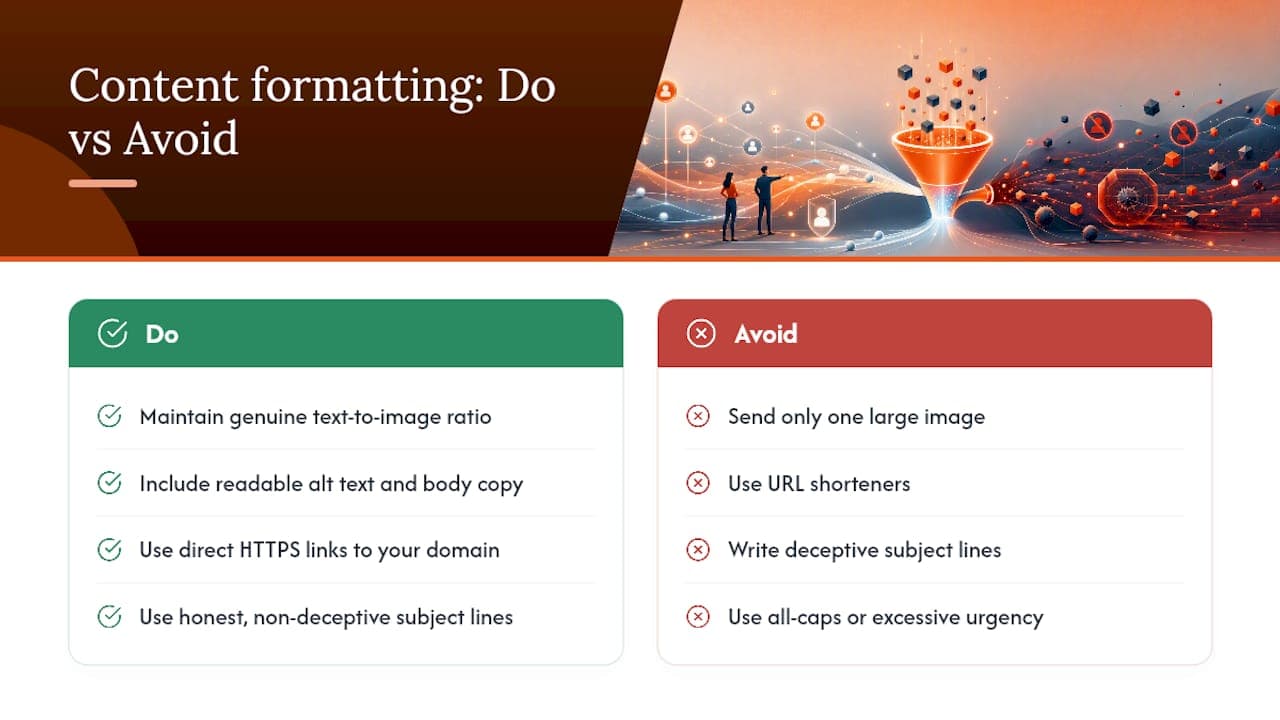
Formatting choices that seemed harmless in 2018 are now reliable spam signals, and Gmail’s filtering has become considerably more sensitive to structural red flags than to specific trigger words. An email that is entirely one large image with no text equivalent behind it reads as suspicious by default, partly because it’s a pattern historically used to evade keyword-based filtering.
Keep a genuine text-to-image ratio in every send, and make sure any image-heavy design still carries readable alt text and body copy underneath. Avoid URL shorteners in favour of direct HTTPS links that resolve transparently to your own domain, since obscured destinations are exactly the kind of pattern Gmail’s model has been trained to distrust. Deceptive subject lines, ones that promise something the body doesn’t deliver, generate complaints even from otherwise engaged recipients, and complaints damage reputation regardless of how the content was intended.
Excessive use of urgent language, all-capitals subject lines, and an unusually high ratio of links to text all correlate with lower engagement and higher complaint rates, even where none of them individually breaches a hard rule. The safest approach is the boring one: clear sender identity, a text-forward layout, honest subject lines, and links that go exactly where they claim to. Consistency across sends matters more than any single perfectly optimised campaign, because Gmail’s model is built to reward predictable, wanted behaviour over time.
Digistrat perspective: how we diagnose and fix Gmail spam-filter issues
We start every engagement by pulling Postmaster Tools and DMARC aggregate data before looking at a single email, because most teams have already guessed wrong about the cause and spent weeks fixing the wrong layer. Placement losses aren’t an abstract metric either; a five-point drop in inbox rate on a revenue email list translates directly into lost orders, and clients feel that faster than they feel a spam-rate graph.
Teams typically stall at the same point: DMARC sits at p=none indefinitely because nobody owns the decision to move to enforcement. That’s a governance problem more than a technical one, and it’s usually the fastest fix once someone actually takes ownership. Our case studies show what recovery timelines actually look like in practice, and we’d rather see your Postmaster and DMARC data before a first conversation than after.
Email deliverability audit and remediation from Digistrat
Digistrat is the practical alternative to guessing your way through Postmaster graphs alone: instead of piecing together SPF records, DMARC reports and bounce logs across separate tools, our audit gives you a single prioritised remediation plan built by specialists who read these signals daily. The Email Deliverability Audit covers full authentication review, reputation assessment, list hygiene checks and infrastructure diagnostics, and clients typically walk away with a clear, ranked list of fixes rather than a vague “improve deliverability” recommendation.
If you’d rather talk it through first, a chargeable 90-minute advisory session gets you direct access to a deliverability specialist. Bring your Postmaster Tools screenshots and DMARC aggregate reports if you have them, since starting from real data rather than assumptions cuts diagnosis time considerably. E-commerce and other high-volume senders facing revenue-critical placement issues can also look at our deliverability service built specifically for e-commerce and DTC brands. Whichever route fits your timeline, the next step is straightforward: book an email deliverability audit and get a specific, sequenced plan rather than another generic checklist.
Sources
- Gmail help: sender guidelines and Postmaster Tools
- Is Gmail filtering my emails? How to tell and fix it | Palisade
FAQ
Why does Gmail send my marketing emails to spam?
Gmail weighs authentication status, sender reputation and recipient engagement together, and a failure or weakness in any one of those areas can push otherwise legitimate mail into the Spam folder.
What is the Gmail spam-rate threshold I need to stay under?
Google’s guidance for bulk senders sets the target at under 0.10% and warns against ever breaching 0.30% over a rolling 14-day window measured in Postmaster Tools.
How quickly does fixing SPF, DKIM and DMARC improve Gmail placement?
Authentication fixes typically show measurable effect within hours to a few days, though full reputation recovery after a period of poor placement can take several weeks to months.
Does marking an email as “not spam” actually help my sender reputation?
Yes, a manual “not spam” action feeds a positive signal into Gmail’s model, but it takes a sustained pattern of positive engagement, not a single correction, to reverse an established negative trend.
Should I fix authentication myself or hire a specialist?
Straightforward SPF and DKIM updates are manageable in house, but Digistrat’s clients typically bring in specialist support when reputation has already been damaged, since diagnosing engagement and reputation issues alongside DNS-level problems needs experience reading Postmaster and DMARC data correctly.
