
Yahoo requires SPF or DKIM authentication from every sender and, for anyone sending in bulk, both SPF and DKIM plus a published DMARC record, a working one-click unsubscribe mechanism, and a complaint rate kept below 0.3%. Servers also need valid reverse DNS and must honour basic RFC formatting rules. These obligations have been enforced since 2024, and falling short of any one of them tends to mean spam placement or outright rejection rather than a gentle warning.
TL;DR:
- Bulk senders must implement both SPF and DKIM, publish a DMARC record with a p=none policy, and support one-click unsubscribe to meet Yahoo’s standards.
- Enrolling in Yahoo’s Complaint Feedback Loop and maintaining spam complaint rates below 0.3% are essential for protecting reputation and avoiding filtering.
- Proper DNS setup, including valid PTR records and adherence to RFC formatting, is crucial to prevent silent rejections and ensure inbox placement.
- DMARC alignment failures, especially due to return-path rewriting or DKIM configuration issues, are the leading cause of delivery problems and should be prioritized.
- Gradually warming up new IP addresses and monitoring engagement and complaints continuously are vital to establishing a positive sender reputation.
Digistrat
digistrat.co.uk
Strengthen Your Email Deliverability
Digistrat assesses sender reputation, infrastructure, and list quality to address spam placement and declining email engagement.
Table of Contents
- Requirements for all senders versus bulk senders
- Why DMARC alignment trips up more senders than anything else
- Setting up one-click unsubscribe correctly under RFC 8058
- Keeping your complaint rate under control with the Complaint Feedback Loop
- Server and DNS requirements that cause silent rejections
- A step-by-step audit and remediation checklist
- Diagnosing Yahoo-specific authentication errors
- Monitoring sender reputation with Yahoo over time
- How Yahoo filters mail beyond the complaint threshold
- Registering with Sender Hub and the 2024 enforcement timeline
- Warming up a new IP before Yahoo trusts it
- What actually drives your Yahoo sender reputation
- What we see fail most, and where to focus first
- How we help you meet Yahoo’s requirements without the guesswork
- FAQ
- Sources
Requirements for all senders versus bulk senders
Yahoo splits its rules into two tiers, and knowing which one applies to you is the first job. If you send low volumes of transactional or personal mail, the baseline is lighter. If you send marketing or bulk mail at any meaningful scale, the bar rises considerably, and Yahoo has been explicit about what it expects from each group.
For every sender, Yahoo expects:
- Valid SPF or DKIM authentication on outgoing mail, so the receiving server can confirm the message genuinely came from your domain.
- Compliance with standard RFC formatting for envelope and header construction, since malformed messages risk outright rejection.
- A properly configured reverse DNS record (PTR) on the sending IP address.
For bulk senders, Yahoo’s published guidance adds several further conditions:
- Both SPF and DKIM must be implemented together, not just one or the other.
- A DMARC record must be published, at minimum with a policy of p=none, and the From domain must align with either the SPF or DKIM result.
- One-click unsubscribe must be supported for marketing mail, and unsubscribe requests honoured within two days.
- Spam complaint rates must stay below 0.3%, monitored through Yahoo’s Complaint Feedback Loop.
Ignore any of these and the consequences are fairly immediate: messages get filtered to spam, some get rejected with 5xx errors at the RFC level, and persistent non-compliance tends to depress your sender reputation across the board, not just for the campaign that triggered it.
Why DMARC alignment trips up more senders than anything else
SPF checks whether the sending IP is authorised for the domain in the message’s envelope, but it has a hard limit of ten DNS lookups and breaks silently when emails are forwarded. DKIM instead signs the message with a private key, letting the receiving server verify the content hasn’t been tampered with using the matching public key published in DNS. Neither, on its own, confirms that the domain you see in the From field is the one actually responsible for sending the mail. That’s DMARC’s job: it checks that the domain authenticated by SPF or DKIM aligns with the visible From domain, and it’s this alignment check, not the underlying SPF or DKIM pass, that most senders get wrong.
The most frequent failure happens through ESPs. Many platforms rewrite the Return-Path to their own domain for bounce handling, which breaks SPF alignment even though SPF itself passes. If DKIM is signed using the ESP’s domain rather than yours, DMARC alignment fails there too, even with a perfectly valid DKIM signature. The fix is usually to configure the ESP to sign with a DKIM key for your own sending domain, or to use a dedicated subdomain that the ESP can authenticate on your behalf.
Other common issues include SPF records that exceed the ten-lookup ceiling through too many nested includes (flatten them, or consolidate third-party senders), and DKIM selectors that have been rotated or deleted without updating DNS.
- Check that your DKIM key length meets current recommendations: 1024 bits as a floor, 2048 bits where your infrastructure supports it.
- Request DMARC aggregate reports (rua) so you can see alignment failures as they happen rather than discovering them through a deliverability drop.
- Review which domain actually signs DKIM, not just whether DKIM is present.
Pro Tip: Pull a recent DMARC aggregate report and check the “Identifier Alignment” results before changing anything else: it tells you in minutes whether your failure is SPF, DKIM, or both.
Setting up one-click unsubscribe correctly under RFC 8058
Getting one-click unsubscribe right is less about intent and more about precise header construction. RFC 8058 sets out exactly what’s needed, and Yahoo enforces it to the letter for bulk and marketing mail.
- Add a List-Unsubscribe header containing an HTTPS URI (not a mailto link alone), pointing to an endpoint that performs the unsubscribe.
- Add the List-Unsubscribe-Post header with the exact value “List-Unsubscribe=One-Click”, which tells the receiving mailbox provider that a one-click POST is supported.
- Ensure both headers are included within your DKIM signature’s “h=” tag, because an unsigned unsubscribe header can be stripped or ignored by the receiver.
- Build the POST endpoint to unsubscribe the recipient immediately on receipt, using a token embedded in the URI rather than requiring login or additional confirmation.
- Keep a separate GET-accessible page that explains the unsubscribe action for anyone who clicks the link in a browser rather than through the automated mechanism.
- Test by sending a real campaign through your production path to a Yahoo mailbox, then inspect the raw headers to confirm List-Unsubscribe and List-Unsubscribe-Post survived the journey through your ESP, as Wisconsin’s technical guide on RFC 8058 implementation recommends.
Redirects and link-tracking layers are the usual culprits when headers go missing, so check the final delivered message rather than trusting what left your sending platform.
Keeping your complaint rate under control with the Complaint Feedback Loop
Yahoo calculates spam complaint rate against mail that actually reached the inbox, not total sends, which matters because a sender with poor inbox placement can look artificially healthy on a send-based calculation while quietly breaching the real threshold. The 0.3% ceiling is the figure Yahoo enforces, and it’s measured using data from its Complaint Feedback Loop.
0.3% is the maximum spam complaint rate Yahoo tolerates for bulk senders, calculated on messages delivered to the inbox rather than total volume sent, so Yahoo’s sender guidance makes CFL enrolment effectively mandatory for anyone sending at scale.
To enrol, you register your sending domains and DKIM selectors with Yahoo so that complaint reports (sent as Abuse Reporting Format messages) flow back to you whenever a recipient marks your mail as spam.
- Automate ARF ingestion so complaints convert into suppression entries without manual review.
- Set an internal alert well below 0.3%, since reactive fixes after breaching the threshold take time to show results.
- Review complaint spikes against specific campaigns or segments rather than treating the metric as a single rolling average.
Server and DNS requirements that cause silent rejections
A surprising number of deliverability problems trace back to infrastructure rather than content or authentication policy. Reverse DNS (PTR) records need to resolve meaningfully, ideally to a hostname that reflects your sending domain or ESP, because an IP with no PTR or a generic one is treated with suspicion by Yahoo’s filters.
- Confirm your sending IPs have a PTR record that resolves to a sensible hostname, and that the forward lookup matches, following best practice advice from Advanced Email Security for Businesses.
- Use TLS for both transport and submission wherever your infrastructure supports it, and consider ARC headers if your mail is commonly forwarded through intermediary systems.
- Check envelope and header formation against RFC 5321 and RFC 5322, since malformed envelopes or header syntax trigger 5xx rejections regardless of your authentication status.
These checks rarely get the attention authentication setup does, yet a single malformed header block can cause rejections that look, at first glance, like a reputation problem rather than a formatting one.
A step-by-step audit and remediation checklist
Work through these in order, because later steps depend on the earlier ones being solid.
- Confirm DKIM is signing correctly: check selector keys in DNS match what your sending platform uses, and that no old or revoked selectors are still referenced.
- Verify SPF, and flatten or consolidate any include statements pushing you towards or past the ten-lookup limit.
- Publish a DMARC record at p=none and start collecting rua reports before tightening policy further.
- Implement RFC 8058 headers for one-click unsubscribe and test delivery to a real Yahoo mailbox.
- Enrol in Yahoo’s Complaint Feedback Loop and build a process to convert ARF reports into suppressions automatically.
Use DNS lookup tools and a DKIM signature viewer to confirm each change took effect, and send test messages to a Yahoo webmail account at each stage rather than waiting until the end.
Pro Tip: If complaint rates climb sharply after a campaign, pause further sends to that segment immediately and gather headers, ARF samples and DNS records before escalating: that evidence saves significant diagnosis time later.
Diagnosing Yahoo-specific authentication errors
Authentication failures at Yahoo tend to surface as bounce messages or as a drop in inbox placement with no explicit bounce at all, which makes diagnosis harder than it should be. A 5xx rejection citing authentication usually points to a hard SPF or DKIM failure, often because a DNS record was changed, a selector was rotated without updating the sending platform, or a new sending IP hasn’t been added to your SPF include.
Soft failures, where mail is accepted but routed to spam, are more often a DMARC alignment problem than a flat authentication failure. If SPF and DKIM both technically pass but the From domain doesn’t align with either, DMARC fails quietly, and Yahoo’s filters treat the mail with more suspicion even though no explicit rejection occurs.
When troubleshooting, start by pulling the raw headers from a test message sent to a Yahoo mailbox, since this shows exactly what Yahoo saw, rather than what you believe you sent. Check the Authentication-Results header for the pass or fail status on each mechanism individually. A frequent cause of confusion is testing from a staging environment with different DNS records to production, which produces results that look fine in testing but fail in practice.
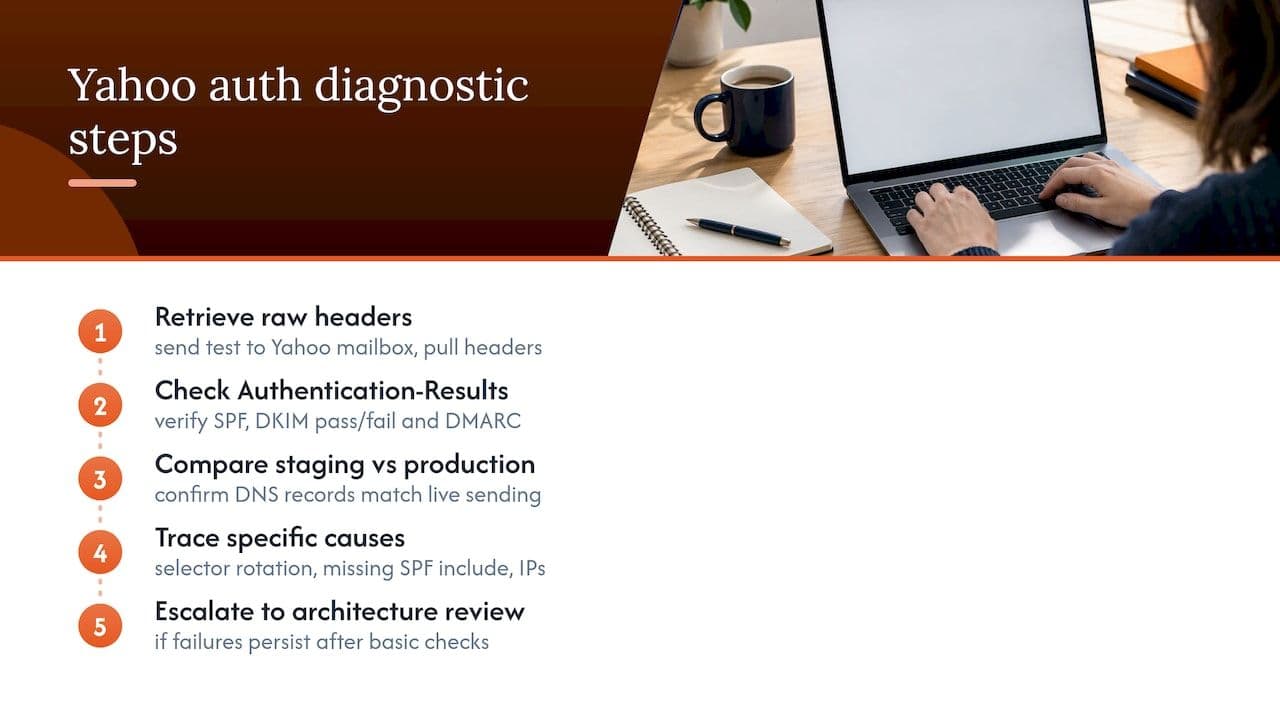
If DKIM signatures fail intermittently, check whether your ESP rotates keys automatically and whether your DNS has kept pace. If SPF fails only for some sending sources, check whether a third-party tool or subdomain was added to your sending stack without a corresponding SPF include. Persistent, unexplained failures that survive basic checks are usually a sign to review the full sending architecture rather than chase individual symptoms, since isolated fixes rarely resolve a structural alignment issue.
Monitoring sender reputation with Yahoo over time
Sender reputation at Yahoo isn’t a single score you can check in one place. It’s inferred continuously from a combination of authentication consistency, complaint rates, engagement, and sending patterns, which means monitoring needs to be ongoing rather than a one-off audit.
DMARC aggregate reports remain one of the most useful ongoing signals, since they show authentication results across your full sending volume rather than a single test message. Complaint Feedback Loop data is equally important, and reviewing it on a regular cadence, rather than only when deliverability visibly drops, lets you catch a developing problem before it crosses the 0.3% threshold.
Beyond those two Yahoo-specific tools, engagement metrics from your own sending platform (open rates, click rates, and how quickly recipients interact after delivery) act as an early indicator, since low engagement at Yahoo specifically, compared to other mailbox providers, often precedes a reputation or filtering issue rather than following it.
A sensible monitoring routine checks DMARC reports and CFL data weekly rather than monthly, tracks engagement by mailbox provider rather than as a single blended figure, and flags any sudden volume change, since a sharp increase in sending volume without a corresponding warm-up period is itself a reputation risk at Yahoo, independent of content or complaint rate. Treat a dip in open rates specific to Yahoo addresses as an early warning rather than noise, since it often surfaces before complaint rates move at all.
How Yahoo filters mail beyond the complaint threshold
Content filtering evaluates the substance of a message, including subject lines, link structures, and formatting patterns commonly associated with spam, independent of whether the sender is technically authenticated.
Throttling is another layer that catches senders out, particularly those scaling volume quickly. Yahoo adjusts how much mail it accepts from a given IP or domain based on recent sending history and reputation signals, so a sudden volume spike, even from an authenticated, low-complaint sender, can trigger temporary deferrals or rate limiting rather than outright rejection. This is often mistaken for a blocklisting issue when it’s actually a pacing response.
Engagement-based filtering also plays a role: Yahoo’s systems weigh how recipients interact with mail from a given sender, and a pattern of low opens, no clicks, or frequent deletions without opening can push subsequent messages towards spam placement even when every technical requirement is met. This is one reason list hygiene matters as much as authentication: a list full of disengaged or dormant addresses drags down the signals Yahoo uses for filtering decisions, regardless of complaint rate.
None of these filtering layers are published with exact thresholds, which makes them harder to audit directly than SPF or DMARC compliance. The practical response is to treat authentication, complaint rate, and engagement as three separate levers that all need attention, rather than assuming that passing the published technical requirements guarantees inbox placement.
Registering with Sender Hub and the 2024 enforcement timeline
Yahoo manages sender requirements and guidance through its Sender Hub, which is the reference point for current policy and the enrolment mechanism for the Complaint Feedback Loop. Registering here is a prerequisite for receiving ARF complaint reports, and without it bulk senders have no direct visibility into the metric Yahoo uses to judge their complaint rate.
The requirements covered throughout this guide, authentication, DMARC alignment, one-click unsubscribe, and the complaint rate ceiling, has been enforced since 2024, broadly in step with similar requirements introduced by other major mailbox providers around the same period. Senders who hadn’t previously needed DMARC or one-click unsubscribe found themselves needing to implement both relatively quickly, and the enforcement has not softened since.
Verification through Sender Hub isn’t a one-time formality. Domains and DKIM selectors need to be kept current there as your sending infrastructure changes, since an outdated registration means ARF reports may not route correctly, leaving you blind to complaint data even if your technical authentication remains sound. Teams migrating ESPs or adding new sending domains should treat Sender Hub registration as a step in that migration checklist, not an afterthought handled once a problem appears.
Warming up a new IP before Yahoo trusts it
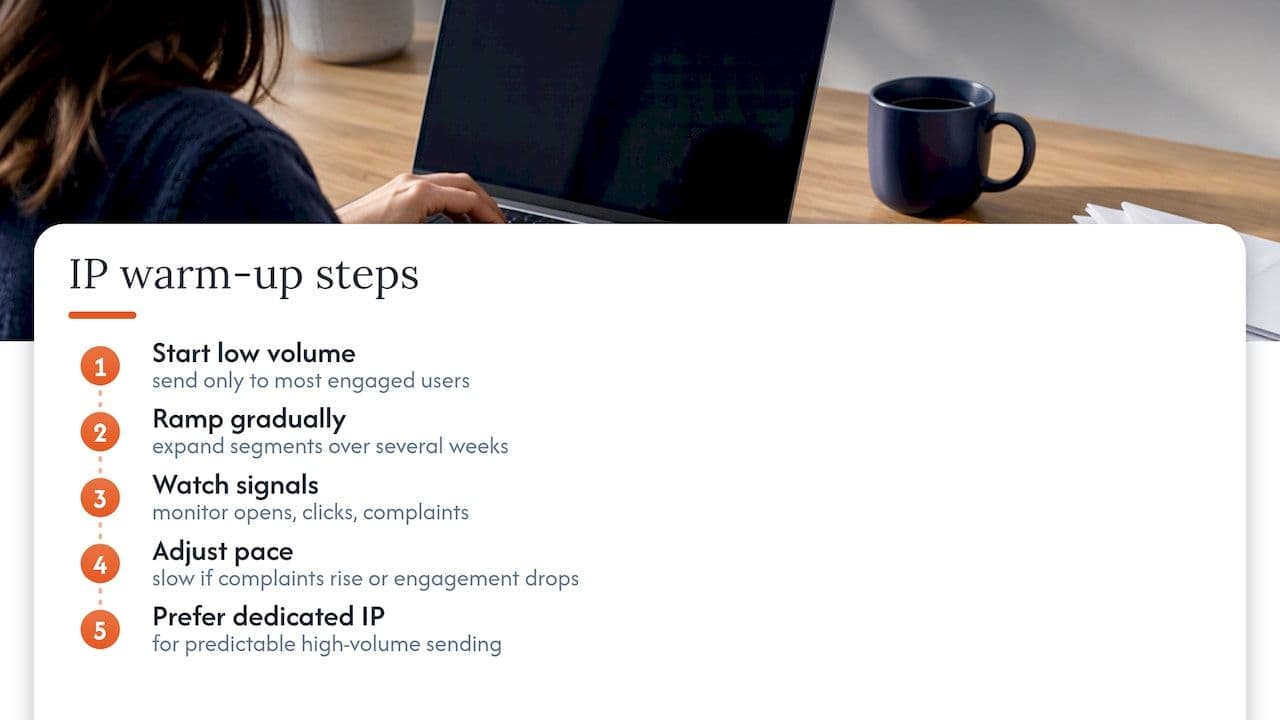
A new sending IP has no history with Yahoo’s filters, which means it starts with no reputation rather than a neutral one, and sending full volume from day one is one of the more reliable ways to trigger throttling or spam placement regardless of how clean your list is.
The general principle is to increase volume gradually, starting with your most engaged recipients, those who open and click reliably, and expanding to broader segments only as the IP builds a positive sending history. There’s no single published Yahoo-specific schedule, so most practitioners follow a cautious ramp over several weeks, watching engagement and complaint signals at each stage rather than following a fixed calendar regardless of results.
Sending your most engaged audience first matters more than the exact pace, since it gives Yahoo’s filters positive signals (opens, clicks, low complaints) early in the IP’s history, which carries more weight than volume alone. A spike in volume to a cold or purchased list on a new IP is one of the fastest ways to damage reputation before it has had a chance to establish.
Monitor DMARC reports and any available engagement data throughout the warm-up period, and slow the ramp if complaint rates rise or engagement drops, rather than pushing through on a fixed schedule. Shared IP pools, where your sending volume is blended with other senders, behave differently, since the reputation is partly inherited from other users of the pool, which is one reason dedicated IPs are generally preferred for predictable, high-volume senders once volume justifies the operational overhead.
What actually drives your Yahoo sender reputation
Reputation at Yahoo is built from several factors working together, and no single metric tells the full story on its own. Sending volume and consistency matter: a sender who sends predictable amounts on a steady schedule tends to fare better than one with erratic spikes and silent gaps, since unpredictable patterns resemble the behaviour Yahoo’s filters are designed to catch.
Engagement metrics, particularly open and click rates measured specifically against Yahoo-delivered mail rather than blended across all providers, carry significant weight. A sender with strong overall engagement but notably weaker numbers at Yahoo specifically likely has a provider-specific issue worth investigating, whether that’s content, timing, or a list segment skewed towards disengaged Yahoo addresses.
But complaint rate and engagement are connected: a disengaged list is more likely to generate complaints, since recipients who no longer want the mail but never unsubscribed are the most probable source of a spam click.
Taken together, these factors mean reputation management isn’t a single fix applied once. It’s closer to ongoing list hygiene, consistent sending patterns, and ongoing authentication monitoring, operating in parallel rather than treating each as a one-time technical task to tick off.
What we see fail most, and where to focus first
Across the deliverability reviews we carry out, the same three issues recur: ESP return-path rewriting that quietly breaks DMARC alignment, unsubscribe headers that exist but aren’t DKIM-signed, and complaint feedback data that nobody has wired into suppression. Fixing alignment first tends to deliver the biggest improvement for the least engineering effort, with CFL automation a close second.
How we help you meet Yahoo’s requirements without the guesswork
If working through alignment failures, DKIM selectors and ARF processing isn’t where your team wants to spend its time, that’s precisely the gap our deliverability work addresses. We carry out a Deliverability Review and Fix that identifies exactly where your SPF, DKIM and DMARC setup is failing Yahoo’s alignment checks, then implement the fix directly rather than handing you a report to action yourselves.
Our work for Yahoo-specific compliance typically covers:
- Authentication setup and DMARC alignment correction, including ESP return-path and selector issues.
- Complaint Feedback Loop enrolment and conversion of ARF reports into automated suppression.
- IP warm-up planning for new sending infrastructure or ESP migrations.
- Ongoing reputation monitoring through our Managed and Owned plans, so authentication drift gets caught before it affects inbox placement.
Before a session, it helps to have sample message headers, any recent ARF complaint data, and your current DNS records to hand, since that lets us diagnose the actual cause rather than the symptom. If you’d rather talk it through first, our advisory session is a one-off £250 booking built for exactly this kind of targeted troubleshooting. For a broader first look, you can book a free health check and we’ll tell you honestly where the priority sits.
FAQ
What are the IMAP and SMTP settings for Yahoo Mail?
Yahoo Mail uses imap.mail.yahoo.com and smtp.mail.yahoo.com for IMAP and SMTP respectively, both requiring SSL or TLS encryption. These settings apply to connecting a mail client to a personal Yahoo Mail account, rather than to the sender authentication requirements covered above, which apply regardless of how the mail is sent.
Why can’t I sort by sender in Yahoo Mail?
Yahoo Mail’s interface has historically offered limited native sorting options compared with some other webmail providers, and sorting by sender isn’t always available as a direct column header click in every view. Using the search or filter functions within Yahoo Mail is typically the more reliable way to group messages by a specific sender.
What is required for a Yahoo email account?
Creating a personal Yahoo email account only requires basic registration details through Yahoo’s sign-up page, which is separate from the sender authentication requirements (SPF, DKIM, DMARC, one-click unsubscribe) that apply to businesses or platforms sending bulk mail to Yahoo addresses. Those sender requirements apply to the organisation sending mail, not to individual account holders.
Why isn’t my Yahoo SMTP server working?
A non-functioning Yahoo SMTP connection for a personal account is usually down to incorrect port or encryption settings, an expired app password, or two-step verification requiring an app-specific password rather than the regular account password. For bulk senders experiencing delivery failures rather than connection errors, the cause is more often an authentication or alignment failure than a server configuration issue.
What is Yahoo’s maximum allowed spam complaint rate?
Yahoo requires bulk senders to keep their spam complaint rate below 0.3%, measured on mail delivered to the inbox rather than total volume sent. Enrolling in Yahoo’s Complaint Feedback Loop is the practical way to monitor this figure directly.
Sources
- Sender Best Practices | Sender Hub
- RFC 8058
- How to set up one-click unsubscribe for Gmail and Yahoo (RFC 8058) | KB.WISC
