The sp tag sets the DMARC policy applied to existing subdomains that have no _dmarc record of their own, and it accepts three values: none, quarantine or reject. If you omit it, every subdomain simply inherits whatever the p tag specifies at the organisational domain. Our recommendation, especially where the apex is already enforcing p=reject, is straightforward: never leave sp permanently weaker than p unless you have a genuine, time-boxed reason to do so.
Table of Contents
- How the DMARC sp tag works: policy discovery and inheritance
- DMARC sp tag syntax and examples you can deploy today
- When to use sp: rollout strategies that do not break mail flow
- Fixing DMARC sp misconfigurations: symptoms and diagnostics
- A 90 day plan for DMARC sp tag governance
- Why subdomain policy deserves the same attention as the main domain
- Getting sp right without the guesswork: Digistrat’s DMARC services
- Sources
- FAQ
How the DMARC sp tag works: policy discovery and inheritance
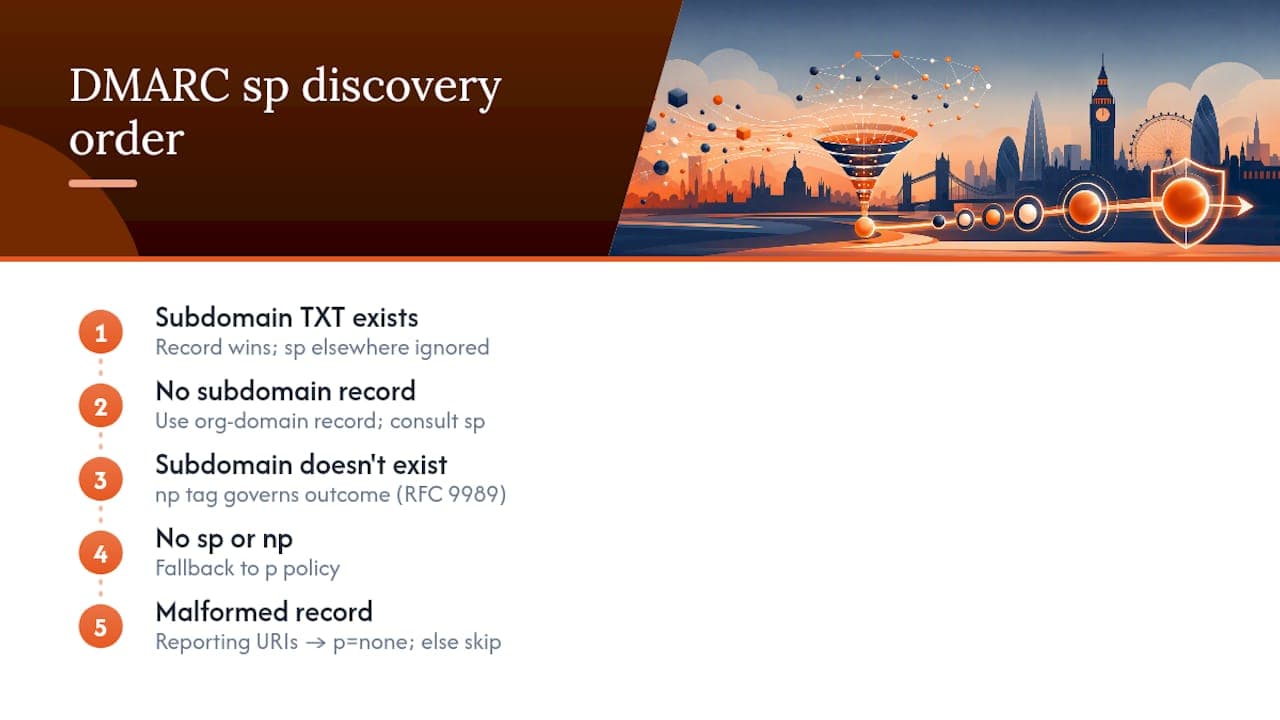
When a receiving mail server checks a message against DMARC, it does not simply read the record at the organisational domain and apply it everywhere. It follows a defined discovery order, and understanding this order is what separates administrators who configure DMARC correctly from those who leave gaps without realising it.
The receiver first looks for a _dmarc TXT record published directly at the sending subdomain. If one exists, it wins outright, and any sp value set elsewhere becomes irrelevant for that subdomain. Only when no subdomain-specific record exists does the receiver fall back to the organisational domain’s record and consult sp, provided the subdomain actually exists and sends mail. For subdomains that do not exist at all (a common exploitation route for phishing), a separate np tag governs the outcome, a mechanism RFC 9989 introduced to close a gap that older DMARC deployments left open. If neither sp nor np is present, everything falls back to p.
There is a quiet trap in all of this: administrators sometimes publish sp at a subdomain’s own record, expecting it to constrain further subdomains beneath it. It does not work that way. Per-subdomain precedence means a record at mail.example.com is read on its own terms; sp only has meaning when published at the organisational domain. RFC 9989 also specifies what happens with malformed records: if p is missing or invalid and sp or np is likewise invalid, receivers treat the policy as p=none when reporting URIs are present, and skip DMARC processing entirely if they are not.
DMARC sp tag syntax and examples you can deploy today
The sp tag sits inside the same DMARC TXT record as everything else, using identical syntax to p. There is no separate record type and no special formatting requirement beyond correct tag ordering and semicolon separation.
A few canonical examples cover most real deployments:
- Monitoring only:
v=DMARC1; p=none; sp=none; rua=mailto:dmarc@example.com. This is the safest starting point for any domain still gathering visibility, because nothing gets rejected or quarantined while you collect aggregate reports. - Full enforcement:
v=DMARC1; p=reject; sp=reject; rua=mailto:dmarc@example.com. Both the apex and every subdomain without its own record are protected identically, which is the end state most organisations should be working towards. - Split policy:
v=DMARC1; p=reject; sp=none; rua=mailto:dmarc@example.com. This protects the main domain while leaving subdomains open, and it is genuinely dangerous if left in place permanently. Practitioner guidance is consistent on this point: an attacker who cannot spoofexample.comdirectly will simply trypromo.example.comornews.example.cominstead.
Optional tags worth pairing with sp include pct (percentage of mail subjected to the policy, useful during phased rollout) and aspf/adkim (alignment mode, strict or relaxed). Include pct only during transition; drop it once you trust the policy fully.
When to use sp: rollout strategies that do not break mail flow
sp earns its place in three scenarios: a temporary safety net while you roll out enforcement on a troublesome subdomain, a permanent but deliberately different policy for a specific family of subdomains (perhaps a legacy marketing platform that can never reach full alignment), or as a fallback while np separately protects subdomains that do not exist. Omitting sp entirely and relying on inheritance from p is perfectly valid too, and often the simplest choice once your subdomains are all authenticated consistently.
A phased rollout looks like this in practice:
- Inventory every subdomain that sends mail, including anything run by marketing platforms, helpdesk tools or transactional email providers.
- Publish
p=none; sp=nonewith a reporting address and monitor aggregate reports for a period sufficient to collect meaningful data. - Fix SPF and DKIM alignment failures on any subdomain the reports flag.
- Move sp to quarantine once failures have dropped to a level you are comfortable with.
- Move sp to reject only when reporting confirms legitimate senders are consistently passing.
Pro Tip: Do not rush step four to step five in the same week. Quarantine gives you a buffer where misaligned mail lands in spam rather than bouncing outright, and that buffer is often what saves a marketing campaign from vanishing entirely.
Multi-team organisations should treat this as a governance exercise, not a one-off DNS change, particularly where different departments control different third-party senders.
Fixing DMARC sp misconfigurations: symptoms and diagnostics
Three problems show up again and again in practice. A subdomain gets spoofed despite the apex domain enforcing p=reject, because sp was left at none or omitted where inheritance quietly defaulted somewhere unexpected. Legitimate mail starts landing in spam after someone tightens sp to reject without first confirming alignment. Or an administrator sets sp expecting it to govern a subdomain, only to find it ignored because that subdomain publishes its own _dmarc record with different settings.
A short diagnostic checklist resolves most of these:
- Query
_dmarc.subdomain.example.comdirectly to see whether a per-subdomain record exists and is overriding sp. - Check for duplicate or conflicting TXT records at the same name, a surprisingly common cause of records being silently ignored.
- Confirm SPF and DKIM alignment for the exact sending subdomain, not just the organisational domain.
- Review aggregate rua reports for sources failing authentication, and cross-reference against your subdomain inventory.
- Verify DNS TTLs and allow propagation time before assuming a fix has not worked.
Fixes typically involve publishing dedicated records for active senders, correcting DKIM selectors, tidying malformed TXT syntax, and adding np=reject to guard subdomains that should never exist at all. Tools like Digistrat’s DMARC checker and standard DNS query utilities will confirm what is actually published, while aggregate report parsers show what receivers are seeing in practice, which is not always the same thing.
A 90 day plan for DMARC sp tag governance
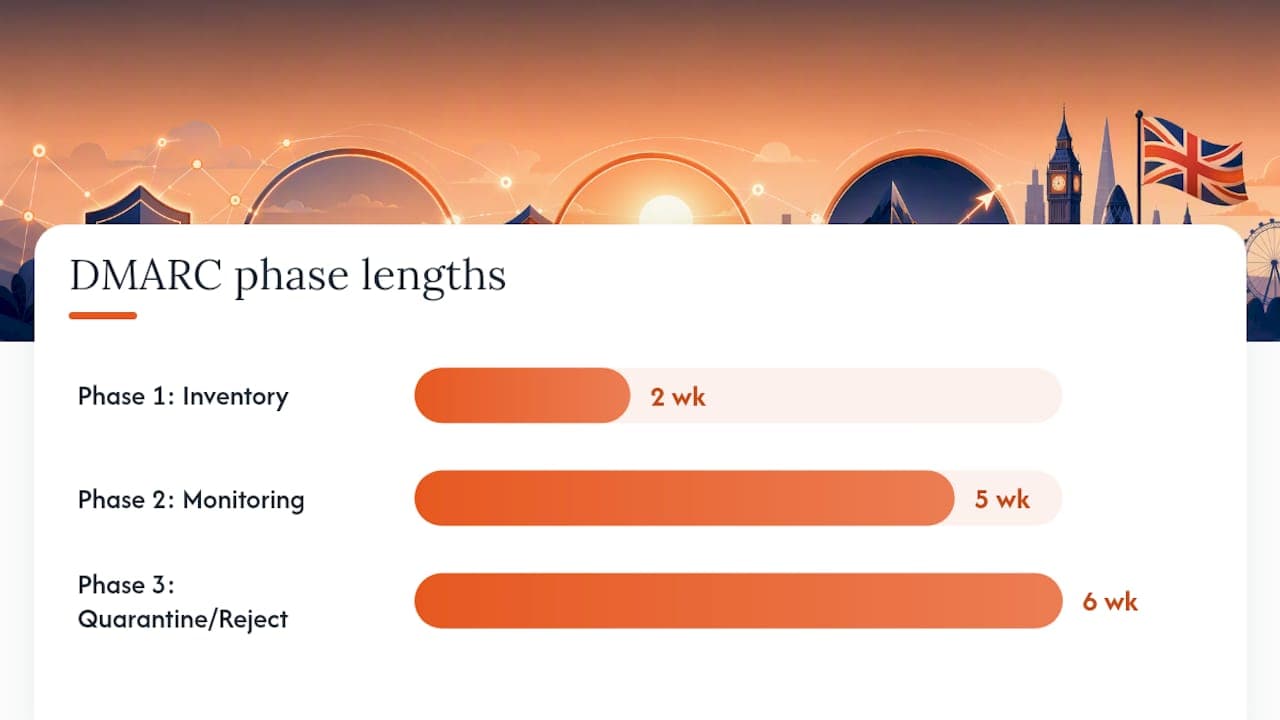
Digistrat’s engagements with UK and European senders tend to follow a consistent rhythm, because the same three phases apply whether the estate is five subdomains or fifty.
- Weeks 1 to 2: inventory every active subdomain, collect sending IP ranges and third-party senders, and confirm DKIM selectors are correctly published for each.
- Weeks 2 to 6: publish monitoring-only records, gather rua reports, and correct SPF or DKIM alignment for anything failing.
- Weeks 7 to 12: move selected subdomains to quarantine, validate that genuine send flow is unaffected, then progress to reject where the reporting data confirms it is safe.
Pro Tip: Keep a simple spreadsheet mapping each subdomain to its owner and its current sp status. Dormant subdomains are the ones that get forgotten, and forgotten subdomains are the ones attackers find first.
Our fuller 90 day DMARC implementation plan walks through each phase in more depth, including report triage and escalation thresholds.
Why subdomain policy deserves the same attention as the main domain
Strict subdomain policy matters because impersonation attempts almost always target the path of least resistance, and a protected apex with an open sp value is exactly that. I have seen organisations tighten p and celebrate the win, only to have a forgotten staging or marketing subdomain used for a convincing phishing run months later. Treat sp as ongoing operational hygiene, reviewed alongside every new platform onboarded, not a setting you configure once and forget.
Getting sp right without the guesswork: Digistrat’s DMARC services
Specialist consultancy services offer practical alternatives to piecing this together from forum threads and vendor help pages, particularly once your estate includes several third-party senders and subdomains you have not audited in years. Our email deliverability audit reviews DMARC, SPF and DKIM alignment across every domain and subdomain you own, then hands you a concrete remediation plan rather than a generic checklist.

Self-service works well for a single domain with tidy sending infrastructure. Where things get more complicated, multiple marketing platforms, agencies sending on your behalf, or a deadline for enforcement set by a partner or regulator, that is when a technical review earns its cost quickly. Once sp is set correctly, our reputation monitoring service keeps watching your aggregate reports so a new subdomain or a misconfigured sender does not undo the work. Book a technical audit or a 90 minute advisory session to get your subdomain policy reviewed properly.
Sources
The formal tag definitions and discovery rules sit in RFC 9989. Google Workspace’s support documentation sets out accepted sp values in vendor-facing terms. For a fuller UK-focused rollout, see Digistrat’s SPF, DKIM and DMARC explainer and 90 day implementation plan.
FAQ
What does the DMARC sp tag actually control?
It sets the DMARC policy applied to existing subdomains that publish no _dmarc record of their own, using the same none, quarantine or reject values as p.
What happens if I leave sp out of my DMARC record entirely?
Every subdomain without its own record simply inherits the p value set at the organisational domain, so omitting sp is valid when you want uniform enforcement everywhere.
Is sp=none safe if my apex domain uses p=reject?
Only temporarily, during a controlled rollout; left permanently, it protects your main domain while leaving subdomains open to spoofing, which is one of the most common DMARC misconfigurations administrators encounter.
How is sp different from the np tag?
sp governs subdomains that exist and send mail, while np, introduced through RFC 9989, specifically governs subdomains that do not exist, closing a route attackers previously used to impersonate unused subdomains.
How can I check whether my sp tag is configured correctly?
Query _dmarc at the subdomain directly to rule out a conflicting per-subdomain record, review your aggregate rua reports for alignment failures, or use a service like Digistrat’s DMARC checker to validate the full record at once.
