Set up a branded sending domain in Klaviyo and publish the exact CNAME or NS records, plus the TXT verification record, precisely as Klaviyo displays them. Once verified, check that DKIM actually signs your messages and that the signing domain aligns with your visible From address, then publish a DMARC record starting at p=none so you can watch what happens before enforcing anything stricter.
TL;DR:
Table of Contents
- What are SPF, DKIM and DMARC, and why do Klaviyo senders need them?
- What is a Klaviyo branded sending domain, and which send type do you choose?
- How do you generate and publish the DNS records Klaviyo needs?
- How do SPF, DKIM and DMARC actually work together in Klaviyo?
- How do you verify Klaviyo authentication using headers and DNS checkers?
- Why is my Klaviyo domain not verifying, and how do you fix it?
- When should you move Klaviyo’s DMARC policy from none to enforcement?
- Where consultancy earns its cost when self-managing Klaviyo authentication
- Book a deliverability audit or advisory session with Digistrat
- Sources
What are SPF, DKIM and DMARC, and why do Klaviyo senders need them?
Every one of these three protocols answers a different question about your email, and Klaviyo needs all three working together before your messages get treated as trustworthy by Gmail, Outlook or Yahoo.
SPF (Sender Policy Framework) tells a receiving server which mail servers are allowed to send on behalf of your domain. DKIM (DomainKeys Identified Mail) attaches a cryptographic signature to each message, proving it was not altered in transit and genuinely originated where it claims. DMARC (Domain-based Message Authentication, Reporting and Conformance) sits above both, checking that either SPF or DKIM not only passes but aligns with the domain shown in your From address, then tells receiving servers what to do if it doesn’t.
That alignment concept trips up a lot of technical teams who assume a “pass” on SPF or DKIM is the end of the story. It isn’t. A message can pass SPF technically while still failing DMARC because the domain that authorised the sending server doesn’t match the visible From domain closely enough.
This is where a branded sending domain earns its keep. Without one, your campaigns go out looking like they came “via klaviyomail.com” rather than your own brand, a signal that experienced spam filters and sceptical recipients both notice. Setting one up removes that indicator entirely and, more importantly, gives you a domain you actually control for DMARC alignment purposes.
Google’s own bulk-sender requirements apply to anyone sending 5,000 or more emails a day to Gmail addresses, and a branded sending domain sits at the centre of meeting them. If you’re anywhere near that volume, this isn’t optional housekeeping.
Why it matters in practice:
- Branded domains remove the “via” tag that signals a shared sending infrastructure
- DMARC alignment is only achievable when you own the domain being checked
- Google’s bulk-sender threshold makes branded domains effectively mandatory at scale
- Poor authentication increases the chance of landing in spam rather than the inbox
What is a Klaviyo branded sending domain, and which send type do you choose?
A branded sending domain replaces Klaviyo’s shared infrastructure with DNS records tied to your own domain, so every email you send is authenticated as coming from you rather than from a pooled Klaviyo address that thousands of other brands also use.

Klaviyo asks you to choose a send type when you set this up, and the choice matters more than most guides admit. You’ll typically see options for marketing, transactional, or service sends, each generating its own DKIM selector pattern (commonly prefixed km, kt or ks depending on the send category). Getting this wrong doesn’t break anything catastrophically, but it does mean your DKIM signatures won’t map cleanly to how you actually categorise traffic later when you’re troubleshooting.
The bigger decision is dynamic versus static routing:
- Dynamic routing (NS records) delegates a subdomain entirely to Klaviyo, which then manages the underlying records on your behalf. This is the lower-maintenance option and Klaviyo generally recommends it for most senders.
- Static routing (CNAME records) keeps the records under your direct control at the DNS level, which suits teams who need tighter oversight or who are running other services from the same subdomain and can’t hand over full delegation.
- Klaviyo’s own setup documentation confirms you’ll be given up to three CNAME records or four NS records, plus a single TXT record for domain ownership verification, depending on which route you pick.
If you’re not sure which to choose, dynamic (NS) is the sensible default unless you have a specific technical reason to keep manual control at the DNS layer.
How do you generate and publish the DNS records Klaviyo needs?
Klaviyo generates the records for you automatically once you start the branded domain setup inside the platform. Your job is to copy them across accurately, and that’s where most of the actual work, and most of the actual mistakes, happen.
- Open the branded domain screen in Klaviyo and select your send type before generating records, since changing this later means starting again.
- Copy each record exactly as displayed. You’ll typically be adding either NS or CNAME records for the mail delegation, plus one TXT record for verification.
- Log into your DNS host (Cloudflare, GoDaddy, 123-reg, Route 53 or similar) and decide whether the record belongs on the root domain or on a subdomain, since Klaviyo specifies this for each record and it’s not always the root.
- Paste values with no unintended edits. Do not add your domain name again at the end if the host has already appended it automatically, and watch for a missing or extra trailing full stop on fully qualified values, since DNS providers handle this inconsistently and it’s one of the most common causes of a “record not found” error.
- Disable any proxy setting. If your DNS host offers a CDN-style proxy toggle (Cloudflare’s orange cloud icon is the classic example), these records must be set to “DNS only” or unproxied, otherwise Klaviyo can’t see the actual value.
- Save, then return to Klaviyo and click Verify. Verification checks each record individually and tells you which, if any, haven’t propagated yet.
- Click Apply domain once every record verifies. This step is easy to miss, and Klaviyo will not switch your sending domain over automatically just because the records show as verified.
Propagation can take anywhere from a few minutes to up to 48 hours depending on your provider’s caching behaviour, so don’t panic if verification fails on the first attempt immediately after publishing.
Pro Tip: Check your records with an external DNS lookup tool before rechecking inside Klaviyo. If MXToolbox already shows the correct value, you know the problem is propagation timing rather than a typo, which saves you from needlessly re-editing a record that was actually correct all along.
How do SPF, DKIM and DMARC actually work together in Klaviyo?
DKIM is the protocol doing most of the heavy lifting for DMARC alignment when you send through Klaviyo, and that surprises a lot of technical teams who assumed SPF would be the anchor.
Here’s the mechanism. Klaviyo sends your campaigns through its own infrastructure, which means the return path (the technical sending server SPF actually checks) belongs to Klaviyo rather than to your domain. SPF can pass perfectly well at a technical level because Klaviyo’s servers are authorised to send, yet still fail DMARC alignment because the domain SPF validated against doesn’t match your visible From domain closely enough. Klaviyo’s own guidance on DKIM and SPF alignment confirms this is expected behaviour, not a fault.
DKIM avoids that problem because the signature itself is generated using a private key tied to your branded domain, and it travels with the message content rather than depending on which server physically sent it. Klaviyo’s CNAME or NS records point to the DKIM selectors it uses, so once your branded domain verifies and applies, DKIM signs outgoing mail with a domain that matches your From address, which is exactly what DMARC alignment requires.
Where SPF editing does become relevant is when you’re running mail from multiple services off the same domain or subdomain, in which case you’ll need to merge those into one combined record rather than publishing two separate ones. That’s because a domain can only have a single SPF record, and multiple v=spf1 entries will cause validation to fail entirely rather than being combined automatically.
Points worth holding onto:
- DKIM, not SPF, is usually the practical anchor for DMARC alignment in Klaviyo’s architecture
- SPF can technically pass while still failing alignment, because of how the return path works
- Multiple SPF records on one domain break validation. Merge them into a single record instead
- If you run other senders from the same domain, that merge needs to happen before you rely on SPF for anything
Google’s bulk-sender policy applies at 5,000 or more daily emails to Gmail addresses, and it’s specifically DMARC alignment, not just SPF or DKIM passing in isolation, that determines whether you’re compliant once you’re sending at that volume.
How do you verify Klaviyo authentication using headers and DNS checkers?
Dashboard “verified” status inside Klaviyo confirms your DNS records exist and resolve correctly. It does not confirm that a real, live message will pass DMARC alignment, and that distinction catches out more technical teams than any other step in this process.
The definitive check is a raw email header inspection. Send a live test campaign to an address you control, open the message, and view the source or raw headers rather than the rendered email. Look for the Authentication-Results field, which most major providers (Gmail and Outlook both do this) append automatically. You’re looking for three specific outcomes inside that field:
spf=passorspf=fail, alongside the domain it was checked againstdkim=passordkim=fail, alongside the selector and signing domain useddmarc=passordmarc=fail, which is the summary judgement that actually matters
Confirm the DKIM selector and signing domain shown in that header match your branded sending domain rather than a generic Klaviyo one. If they don’t, your branded domain setup hasn’t actually applied to that message, regardless of what the dashboard says.
For DNS-level confirmation independent of Klaviyo’s own interface, two tools cover almost everything you need:
| Tool | What it checks | Typical use case |
|---|---|---|
| MXToolbox | TXT, CNAME, NS and SPF record lookups against live DNS | Confirming a record has actually propagated before rechecking in Klaviyo |
| EasyDMARC | DMARC record presence, syntax and policy status | Confirming your DMARC record is published and readable |
One quirk worth knowing before it worries you unnecessarily: EasyDMARC will often display a “Warning” status for a domain running p=none, even when the record is entirely correct. That’s expected. “Warning” at the p=none stage simply flags that you haven’t yet moved to an enforcement policy, not that anything is broken.
Why is my Klaviyo domain not verifying, and how do you fix it?
Most verification failures trace back to one of four causes, and working through them in order resolves the overwhelming majority without needing to escalate anywhere.
- Record not found. Double check you’ve added the record to the exact host or subdomain Klaviyo specified, not the root domain by default. Also check for a missing or extra trailing full stop on the value itself, since some DNS hosts require it on fully qualified names and others reject it outright.
- Records are being proxied. If your DNS host offers any kind of CDN proxy toggle, Cloudflare’s orange cloud being the most common example, switch it to “DNS only” for every record involved in the branded domain setup. A proxied record hides the actual value Klaviyo needs to see.
- Duplicate SPF records. If verification flags an SPF conflict, you almost certainly have two separate
v=spf1entries where you need one. Merge the includes from both into a single record rather than leaving two in place. - DNS provider rejects underscores or the @ symbol. A minority of hosts, often smaller or older registrar platforms, won’t accept the underscore prefix that DMARC and some verification records require. If that happens, contact the provider’s support team first, and if they can’t accommodate it, moving your DNS hosting to a provider that supports standard record syntax is usually less painful than fighting the interface indefinitely.
Pro Tip: Work through this list in the order given rather than jumping to the cause that seems most likely. Proxying issues masquerade as “record not found” errors constantly, and checking the simpler explanation first saves you from unpicking a DNS host’s proxy settings when the real problem was a missing full stop.
When should you move Klaviyo’s DMARC policy from none to enforcement?
Starting at p=none is the correct approach for every domain, not a cautious half measure. Klaviyo’s own guidance recommends this exact policy as the starting point, paired optionally with an rua tag so aggregate reports get sent somewhere you can actually read them.
Those reports tell you who is sending mail claiming to be your domain, and whether it’s aligning correctly, before you switch on any policy that would actually block or quarantine messages. Reading them regularly for a few weeks typically surfaces at least one legacy sender, a forgotten marketing tool or an old CRM integration, that you’d otherwise have broken by moving to enforcement too early.
A sensible progression looks like this:
- Weeks 1 to 4: publish
p=none, collect RUA reports, identify every legitimate sending source - Weeks 4 to 8: fix any unaligned but legitimate senders, confirm Klaviyo and any other authorised platforms show clean alignment
- Week 8 onward: move to
p=quarantineonce reports show consistently clean alignment, then reassess before consideringp=reject
Rushing this sequence is the single most common cause of legitimate marketing or transactional email disappearing entirely once enforcement kicks in.
Where consultancy earns its cost when self-managing Klaviyo authentication
Most of what’s covered above is genuinely achievable in-house, and Digistrat would rather see a technical team fix a trailing full stop themselves than pay someone to do it for them. The point where expert help starts paying for itself is usually further along: reading weeks of RUA aggregate data correctly, spotting an unauthorised sender hiding inside legitimate-looking traffic, or deciding with confidence exactly when a domain is ready to move from p=none to p=quarantine without breaking revenue-generating campaigns in the process.
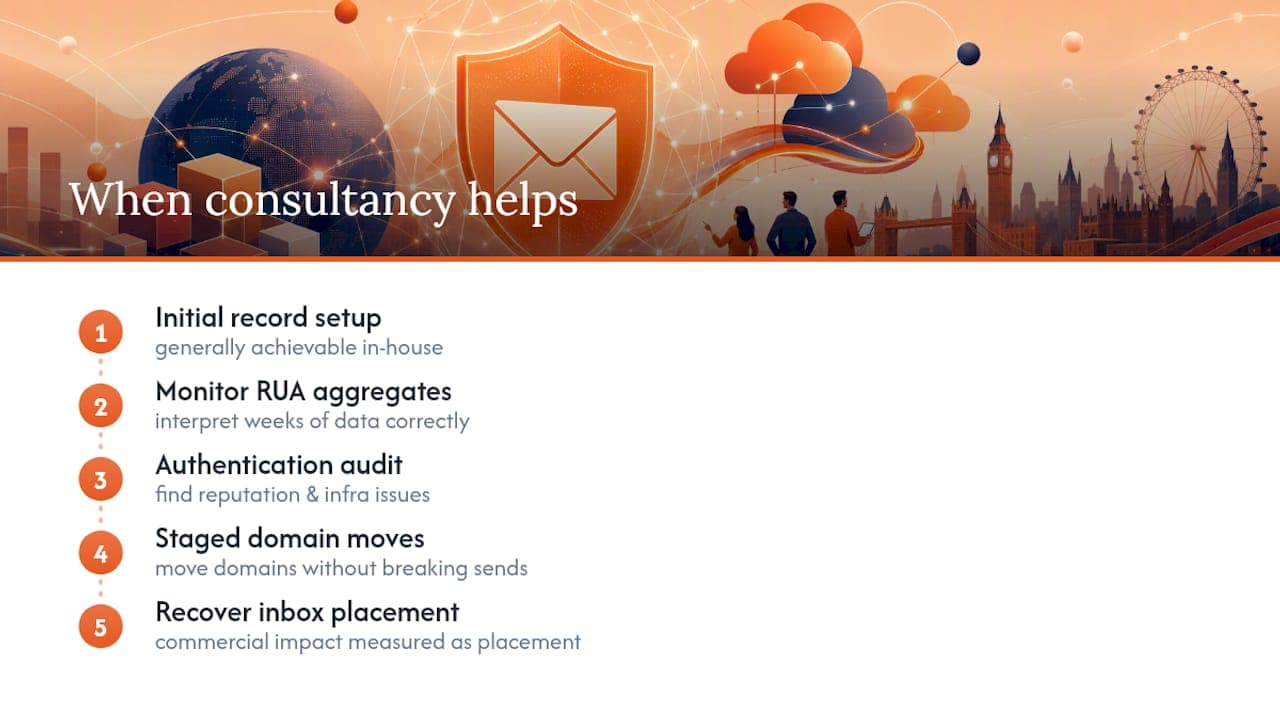
Digistrat runs a structured 90-day DMARC implementation plan for UK and European senders precisely because that staged judgement, not the initial record setup, is where authentication projects most often stall or go wrong. An authentication audit typically uncovers issues around sender reputation and infrastructure that dashboard checks never surface, and the commercial impact tends to be measured in inbox placement recovered rather than DNS records tidied.
If your team has the DNS access and the patience, do it yourselves. If a launch deadline or a revenue-critical send calendar means you can’t afford three months of trial and error, that’s when bringing in someone who has done this repeatedly saves considerably more time than it costs.
— James
Book a deliverability audit or advisory session with Digistrat
Digistrat exists for the moment DNS records verify correctly but your open rates still haven’t moved, which is usually the sign that authentication is only part of a bigger deliverability picture. Where the steps above get you a technically correct SPF, DKIM and DMARC setup, Digistrat’s email deliverability audit goes further, examining sender reputation, list quality and infrastructure together to find out why the inbox still isn’t seeing you the way it should.
For teams already running DMARC at p=none and wondering when it’s safe to enforce, Digistrat’s reputation monitoring service tracks that transition on an ongoing basis rather than leaving you to interpret aggregate reports alone every few weeks. E-commerce and DTC brands facing high email volume against Google’s bulk-sender threshold will find dedicated deliverability support built for that sending profile particularly relevant. If you’d rather talk through your specific setup before committing to a full audit, book a deliverability advisory session and bring your current DNS records with you.
